Circuits (User's Guide)
On the Circuits tab you connect each winding of the FEM model to its source and to lumped resistors, inductors and capacitors: a load, a resonant capacitor, or a tap shared by two windings.
This page shows how TRAFOLO builds the circuits, how to add an element, and how to read the voltage and current of every element after the run, with the Autotransformer template as the example. The video sets up the same circuit in an earlier version of the Circuits tab. Every column of the tab is described in Circuits (Interface Reference Manual).
How TRAFOLO builds the circuits
TRAFOLO makes one circuit per winding, Primary Circuit, Secondary Circuit and Secondary2 Circuit, and fills it from the ElMag tab: a Ground row (nodes 0 and 0), the winding (type FEM Coil) and, for a winding with Excitation Irms [A] or Urms [V], its source. The table of a secondary that is not ticked on ElMag (Secondary Winding, 2nd Secondary Winding) is greyed out.
| Circuit | FEM Coil | Source | Positive | Negative |
|---|---|---|---|---|
| Primary Circuit | Pri_Winding1 | Pri_Ph1 | 10 | 0 |
| Secondary Circuit | Sec_Winding1 | Sec_Ph1 | 110 | 0 |
| Secondary2 Circuit | Sec2_Winding1 | Sec2_Ph1 | 210 | 0 |
By default each winding sits directly across its own source, and the circuits share only the ground. In a three-phase model the phases use the nodes 10, 20 and 30 in the primary, 110, 120 and 130 in the secondary, 210, 220 and 230 in the secondary2.
An additional coil (ElMag › Additional Coils) appears as a FEM Coil row in the circuit of the winding chosen for it, with Positive and Negative 0. Set its two nodes to place it in the circuit, for example in series with the primary as in the Transformer with Inductor template (see the table of templates below).
How the node numbers work:
- Terminals with the same node number are connected. Node 0 is the ground and is in every circuit.
- The same number in two circuit tables joins those circuits, as at the tap of the autotransformer below.
- The numbers are labels only: any number not used yet makes a new node.
- Signs: the voltage of an element is V(Positive) − V(Negative), and its current is positive when it flows through the element from Positive to Negative. A source that delivers power therefore shows a negative current. Swapping Positive and Negative of a winding reverses its current in the FEM model (Setting terminals & Current Direction).
A secondary with Excitation Circuits has no source. Until you connect an element across it, the winding is open and carries no current.
What you can change in each row:
| Type | Positive | Negative | Value | Remove |
|---|---|---|---|---|
| Ground | no | no | no | no |
| FEM Coil | yes | yes | no | no (follows ElMag) |
| Source | yes | no, fixed at 0 | no, set on Waveform (unit V or A) | no (follows ElMag) |
| Resistor, Inductor, Capacitor | yes | yes | yes, in Ω, H or F | yes |
Example: autotransformer
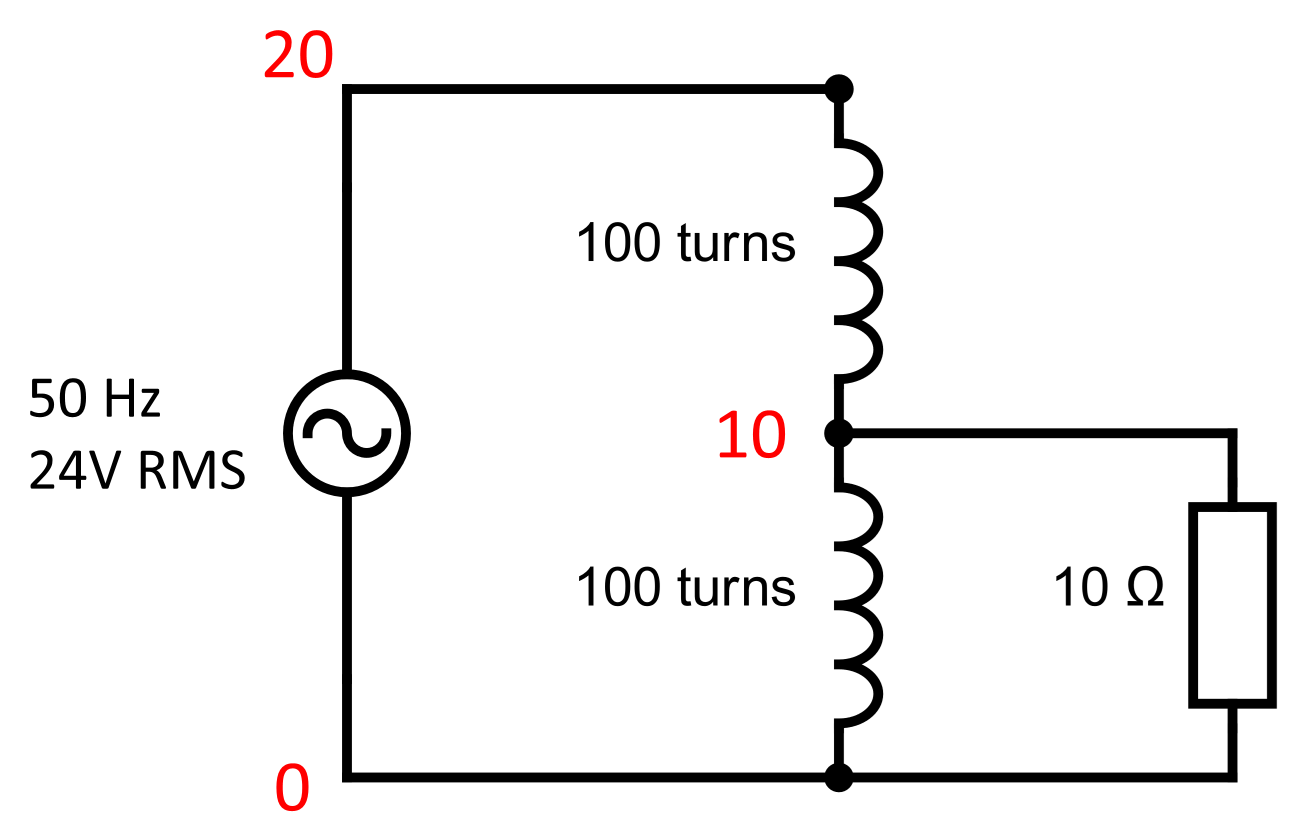
The Autotransformer template (Welcome screen › Examples) applies 24 V RMS at 50 Hz across a 200-turn winding tapped at turn 100, and loads the tap with 10 Ω. TRAFOLO models the series part (Group1coil, 100 turns from the input to the tap) as the primary winding and the common part (Group2coil, 100 turns from the tap to the ground) as the secondary winding, with Excitation Circuits. The nodes 20, 10 and 0 connect them.
| Circuit | Element | Positive | Negative | Role |
|---|---|---|---|---|
| Primary | Pri_Ph1, Source | 20 | 0 | 24 V RMS across the whole winding |
| Primary | Pri_Winding1, FEM Coil | 20 | 10 | Series part, input to tap |
| Secondary | Sec_Winding1, FEM Coil | 10 | 0 | Common part, tap to ground |
| Secondary | Sec_R1, Resistor 10 Ω | 10 | 0 | Load across the common part |
Node 10 is in both tables: it joins the two parts of the winding at the tap. The source sits between node 20 and the ground, so it drives the series part and the common part in series, the whole winding. The full set-up, from geometry to results: Autotransformer template.
Add a load or another element
- On ElMag, set the Excitation of each winding: Irms [A], Urms [V], or Circuits for a secondary without a source of its own. TRAFOLO fills the circuit tables.
- On Circuits, in the table of the winding the element belongs to, click New Element (1) and choose Inductor, Resistor or Capacitor. A row appears, named after the circuit and the type (2): Sec_R1, then Sec_R2 in the secondary; Pri_ in the primary, Sec2_ in the secondary2; L for an inductor, C for a capacitor.
- Set Positive and Negative (3) to the two nodes the element connects. For a load across a winding, use the two nodes of that winding: 10 and 0 for Sec_R1.
- Set Value (4): resistance in Ω, inductance in H, capacitance in F. The field accepts SI prefixes and exponents: 510n, 0.51u and 5.1e-7 all give 510 nF.
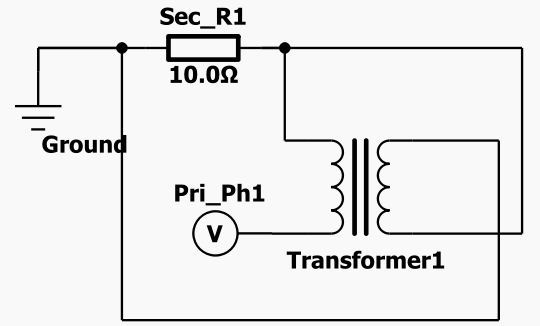
- Click Draw and Save at the bottom right of the tab. TRAFOLO saves the circuits and draws them next to the tables.
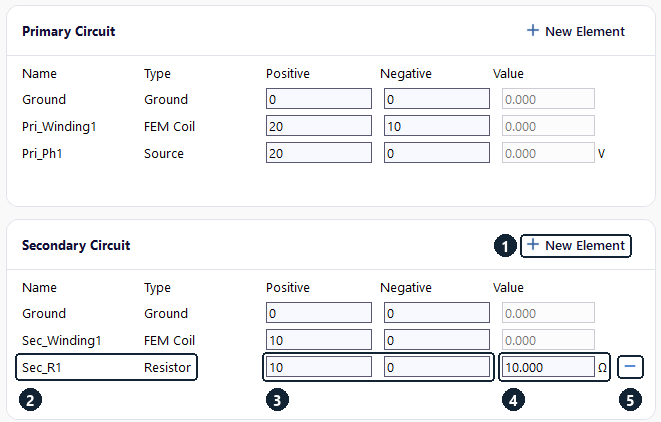
Value starts at 0 for a new element: a 0 Ω resistor shorts its two nodes. Set the value before you solve.
To delete a resistor, inductor or capacitor, click the remove icon (5) at the end of its row.
Check the drawing before you solve: a wrong node number shows as a missing or extra connection.
Circuits in the shipped templates
These templates (Welcome screen › Examples) contain working circuits to start from.
| Circuit | Elements and node numbers | Template |
|---|---|---|
| Tapped winding with a load | Pri_Winding1 20–10, Sec_Winding1 10–0, Sec_R1 10 Ω 10–0 | Autotransformer |
| Inductor as an additional coil in series with the primary, load on the secondary | Pri_Ph1 10–0, Additional_Coil1 5–10, Pri_Winding1 5–0; Sec_R1 10 Ω across Sec_Winding1 (nodes 100 and 0) | Transformer with Inductor, see LLC Coupled Transformer (with Inductor) |
| Series L–C–R load (resonant tank) on the secondary | Sec_Winding1 110–0, Sec_L1 5 µH 110–120, Sec_C1 510 nF 120–130, Sec_R1 0.817 Ω 130–0; f0 = 1/(2π√(LC)) ≈ 100 kHz | Planar Transformer, Transient run |
| Series compensation capacitors on both sides | Pri_Ph1 11–0, Pri_C1 126 nF 10–11, Pri_Winding1 10–0; Sec_Winding1 110–0, Sec_C1 134 nF 110–111, Sec_R1 5 Ω 111–0 | WPT3 for Automotive, Inductance run at 85 kHz |
| Delta primary, star-connected loads | Pri_Winding1 to 3 on 1–2, 2–3, 3–1, a source and a 1 GΩ resistor from each corner to ground; Sec_Winding1 to 3 from 11, 12, 13 to 0, loads 0.32 Ω from 11, 12, 13 to the star point 10 | Oil-Immersed Three-Phase Transformer |
Read the circuit results
TRAFOLO solves the voltage and current of every circuit element together with the field: complex amplitudes at each frequency in Harmonic and Inductance runs, time series in Transient runs. Two views of the Results tab show them: Component Values and Graphs.
Component Values
Results › Component Values lists, at the frequency or sweep point chosen in Value under Sweep (6), each winding with its coil groups and their solids (7), and the source of each winding (8).
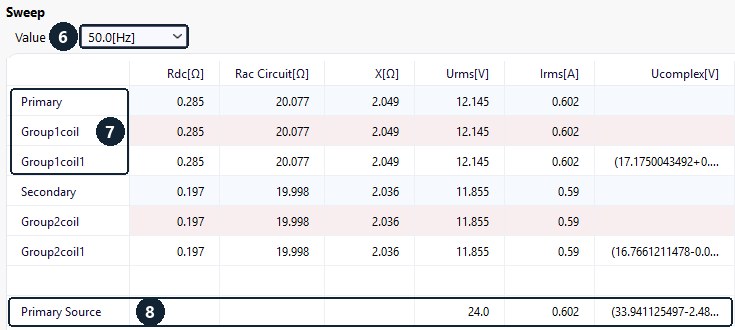
| Column | Meaning |
|---|---|
| Rdc[Ω] | DC resistance |
| Rac Circuit[Ω] | Re(U/I) at the terminals of the winding, coil group or solid, shown without sign |
| X[Ω] | Im(U/I), the reactance at the terminals. A negative (capacitive) X leaves the cell empty. |
| Urms[V], Irms[A] | RMS voltage and current: |
| Ucomplex[V], Icomplex[A] | Complex peak amplitude (real + imaginary part), for solids and sources only |
With a load connected, Rac Circuit and X describe the impedance seen at the winding terminals and include the load: 20.077 Ω for the series part of the autotransformer, whose Rdc is 0.285 Ω. Read the winding loss in the Losses box of Summary (Primary Loss [W], Secondary Loss [W]), not from Rac Circuit.
The Component Values box of Summary shows the source of each winding: Urms 24.0 V and Irms 0.602 A for the primary. This view shows the winding itself: 12.145 V across the series part.
Graphs
Results › Graphs plots the values the solver saved (circuit currents and voltages, losses, field energies) against frequency (Harmonic), time (Transient) or the sweep value (Inductance). Tick Visible (9) to add a quantity to the plot. Field Name (10) is the name the solver gives the value; Alias (11) is the readable name TRAFOLO shows on the plot axes and in the table under the plot.
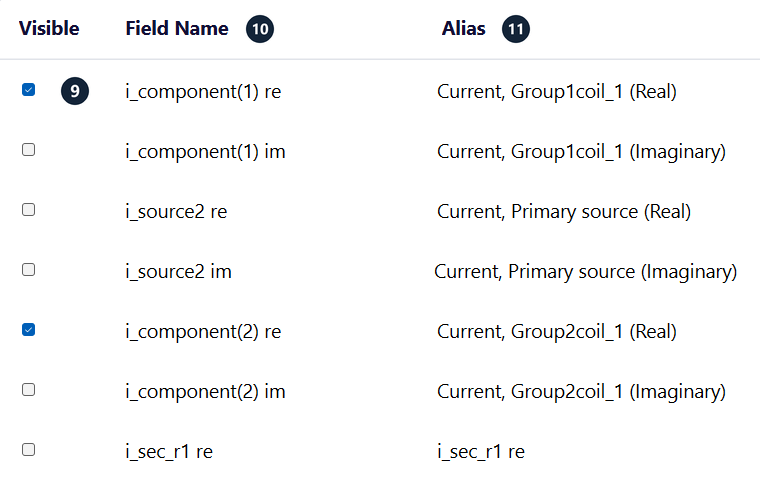
| Field Name | Alias | What it is |
|---|---|---|
| i_component(1) re, v_component(1) im | Current, Group1coil_1 (Real); Voltage, Group1coil_1 (Imaginary) | Current or voltage of one solid of a FEM coil. Each solid is one component, so a coil group of 10 solid turns gives 10 components. The alias names the solid as on the Assembly tab. |
| i_source2 re, v_source2 re | Current, Primary source (Real); Voltage, Primary source (Real) | Source of a winding: source2 primary, source5 secondary, source8 secondary2. Three-phase: source1 to 3, 4 to 6 and 7 to 9, with P1 to P3 in the alias. |
| i_sec_r1 re, v_sec_r1 im | Same as Field Name | Resistor, inductor or capacitor, by its name in lower case |
| joule loss, magnetic field energy | Joule loss, Magnetic field energy | Totals over the whole model |
re and im are the real and imaginary parts. In a Transient run the names carry no re or im and the values are plotted over time.
Each ticked quantity gets its own y axis in its own colour. The table under the plot (12) lists the values at each frequency, time step or sweep point, one column per ticked quantity.
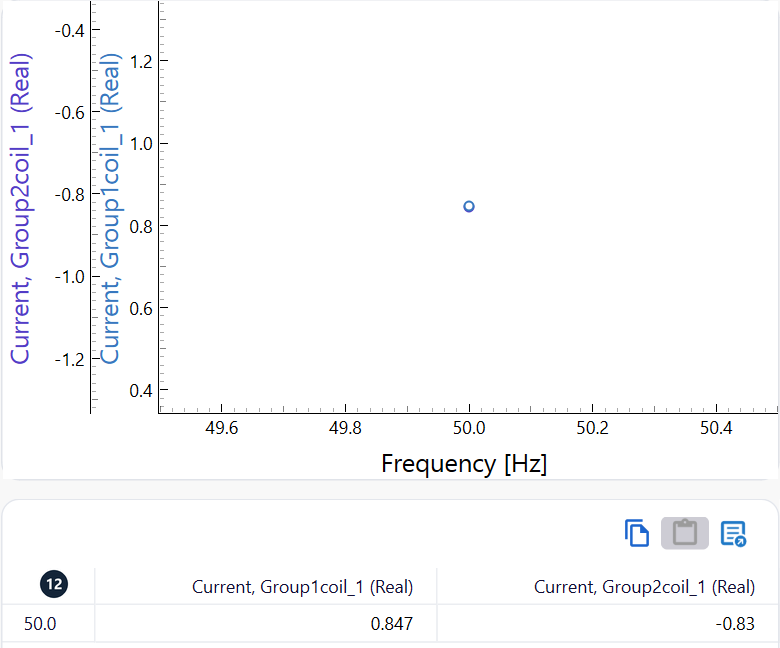
The y axes have different scales: compare the numbers in the table, not the heights of the curves.
Harmonic values in Graphs are peak amplitudes, not RMS: the 24 V RMS source shows v_source2 re = 33.941 V, which is 24 V × √2.
Check the autotransformer results
The circuit laws give a quick check of a run. Real parts of the peak values at 50 Hz from Graphs, with the RMS values from Component Values:
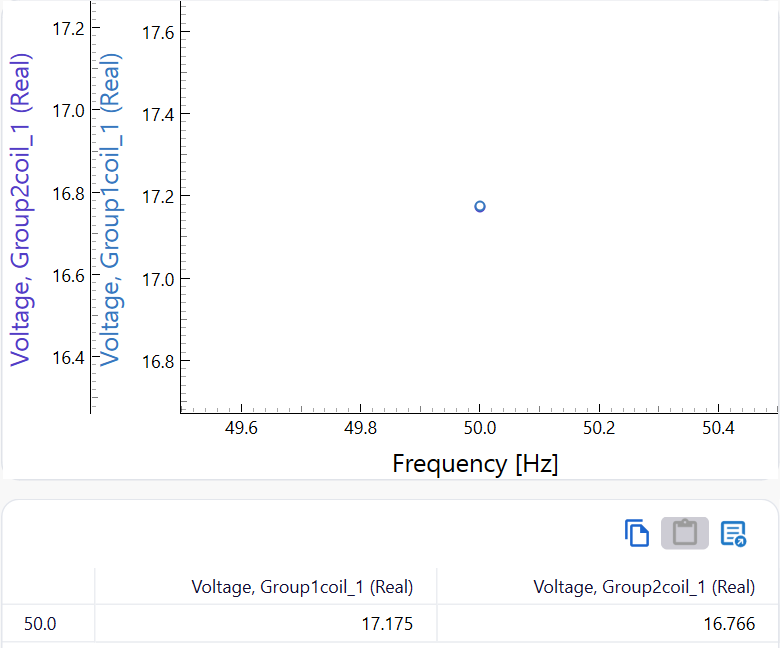
| Element | Current, real part | Voltage, real part | Irms, Urms |
|---|---|---|---|
| Series part, Group1coil_1 | 0.847 A | 17.175 V | 0.602 A, 12.145 V |
| Common part, Group2coil_1 | −0.830 A | 16.766 V | 0.590 A, 11.855 V |
| Load, sec_r1 | 1.677 A | 16.766 V | 1.186 A, 11.855 V (from the peak values) |
| Primary source | −0.847 A | 33.941 V | 0.602 A, 24.0 V |
- Currents at the tap, node 10: series part = common part + load, 0.847 A = −0.830 A + 1.677 A. The negative sign means the common part carries its current from the ground up to the tap, so each part of the winding carries about 0.6 A RMS while the load draws 1.19 A RMS.
- Voltages around the source: series part + common part = source, 17.175 V + 16.766 V = 33.941 V.
- The load and the common part share the nodes 10 and 0, so their voltages are equal: 16.766 V.
- The two parts take 12.145 V and 11.855 V RMS instead of 12 V each. The difference, 0.29 V, is the resistive drop: 0.602 A × 0.285 Ω + 0.590 A × 0.197 Ω = 0.29 V.
The imaginary parts follow the same sums.
Limits
Only linear resistors, inductors and capacitors are available: no switches, diodes or controlled sources. The circuit is solved together with the FEM model; it is not a circuit simulator such as SPICE.
Every source sits between its Positive node and the ground: a source cannot sit between two other nodes. Over-constrained circuits do not solve; for a delta connection, see Circuits, section Limits.
Related
- Circuits: every column of the tab, node numbers, the delta example
- ElMag: windings and their excitation; Waveform: source values
- Setting terminals & Current Direction
- Results: all views of the Results tab
- Without circuits: Inductance runs that apply the voltage to the winding terminals directly