Materials
On the Materials tab you take the materials of the model from the material library, add your own, and set a default material for each kind of component.
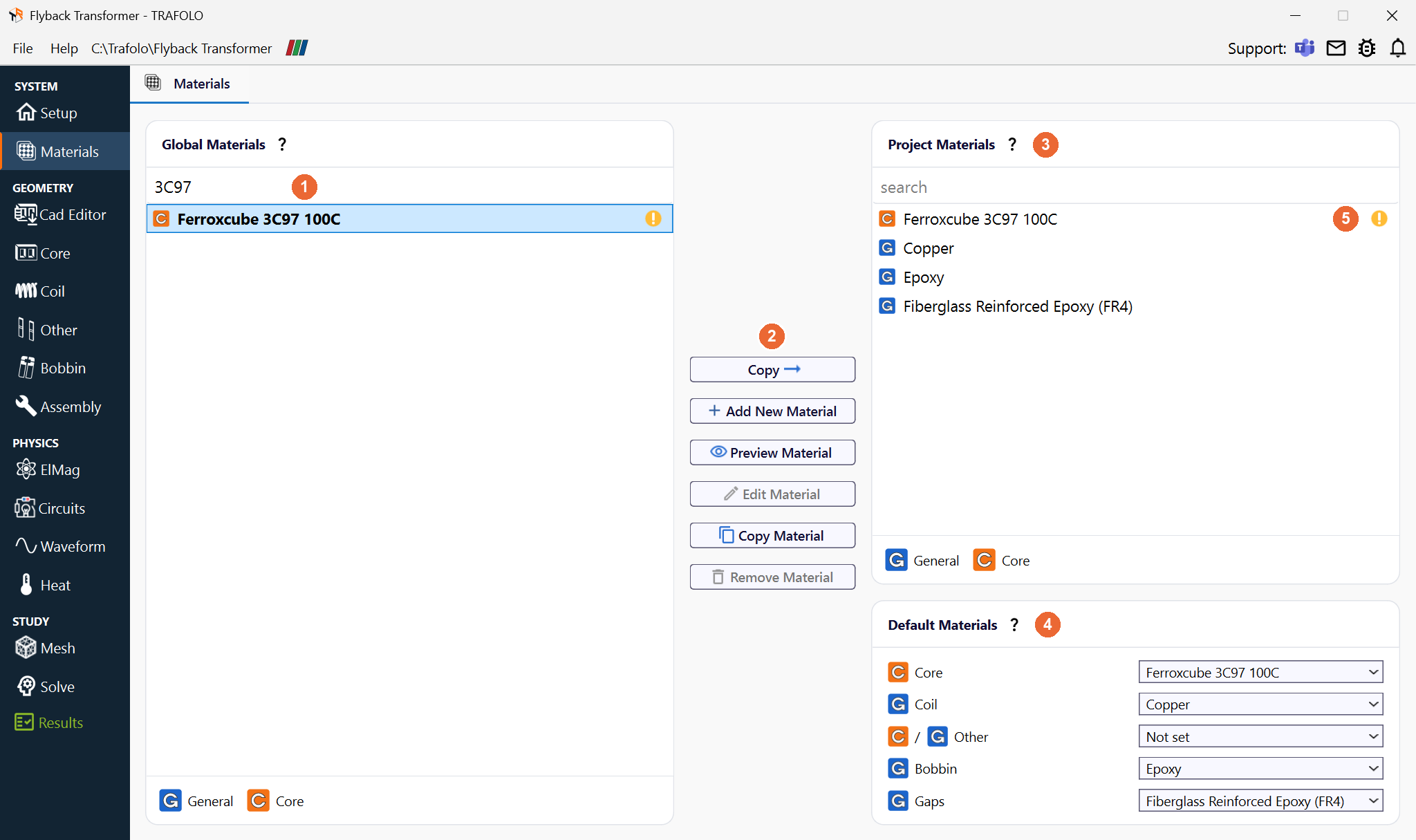
Material lists
| List | What it holds |
|---|---|
| Global Materials | The library: the materials that come with TRAFOLO, in bold (they cannot be edited or removed; Reference names their source, for example OpenMagnetics or a manufacturer datasheet), and the materials you saved yourself, in normal type. Your own materials are saved for your Windows user in %APPDATA%\Trafolo\materials; other users of the PC do not see them. |
| Project Materials (3) | The materials of this project, stored in the project folder. Only they appear in Default Materials and on the Assembly tab. |
| Default Materials (4) | The material that every new body of each component gets: Core, Coil, Other, Bobbin, Gaps. Each body gets its material on the Assembly tab; a default fills it in for every body of that kind, so you do not assign it body by body. You can leave a default Not set; then set the material of each of those bodies on the Assembly tab. Single bodies can be changed there at any time. |
Type in the search box above a list (1) to filter it by name, for example 3C97 in Global Materials. The letter before each name gives the material type: G General, C Core.
The marker below (5 in the picture) next to a material means that it lacks data some runs need; its tooltip says what: Missing B-H Table, Missing Steinmetz Coefficients, a missing core loss table, or missing heat transfer data (density, heat conductivity, heat capacity).

Buttons
| Button | What it does |
|---|---|
| Copy (2) | Copies the selected material to the other list. The arrow shows the direction: → with a global material selected (into the project), ← with a project material selected (into the global library, for other projects). Copy never moves a material: the original stays. When the name is taken, the copy gets a new name. |
| Add New Material | Opens an empty material form (below). |
| Preview Material | Shows the selected material without changing it. |
| Edit Material | Changes the selected material. Not available for the materials that come with TRAFOLO: copy one into the project and edit the copy. |
| Copy Material | Duplicates the selected material in the same list under a new name, for example to change a library material: edit the copy. The copy is also saved in your global library. |
| Remove Material | Removes the selected material. Not available for the materials that come with TRAFOLO. |
Material properties
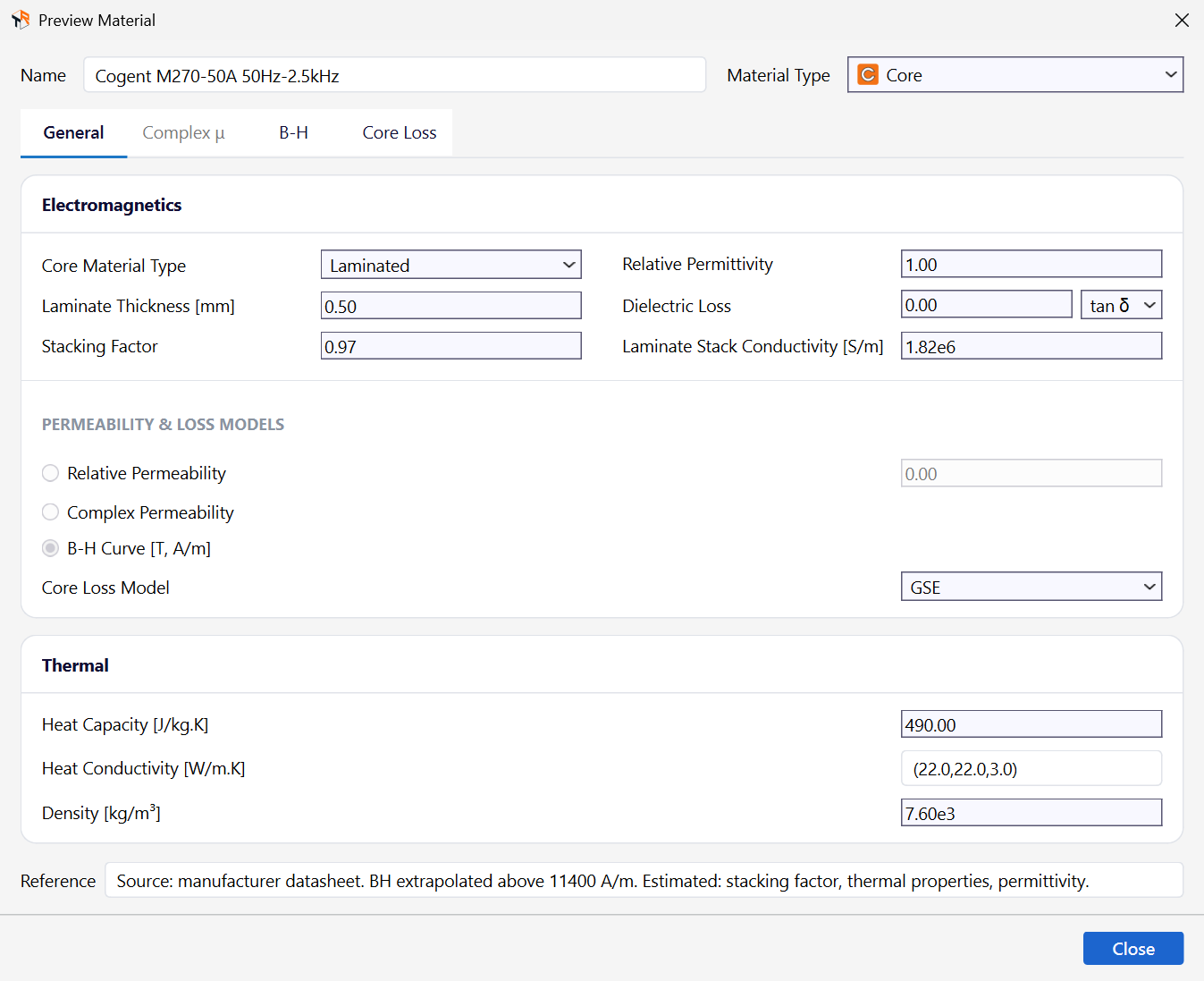
The material form has four tabs: General, Complex μ, B-H and Core Loss. Which of them are open depends on the material type and on the permeability model chosen on General.
General
| Setting | Values or unit | What it does |
|---|---|---|
| Name, Material Type | Core, General | Core for magnetic core materials; General for everything else: conductors, insulation, air, potting. |
| Core Material Type | Ferrite, Laminated, Powder, Composite, Magnet | Core materials only. Laminated adds the lamination fields below. |
| Laminate Thickness, Stacking Factor, Laminate Stack Conductivity | mm, –, S/m | Laminated cores only. The sheet thickness, the share of the stack that is steel, and the conductivity of the sheet material. TRAFOLO models the stack as one body and passes them to Elmer's laminate model, a low-frequency model (sheet thinner than the skin depth), in every run type; this conductivity does not depend on temperature. |
| Relative Permittivity | – | For the capacitance solve (Setup › Capacitance); matters for insulation and bobbin materials. |
| Dielectric Loss | tan δ or ε″ | Dielectric loss of insulation. Set it on the dielectric material, not on a conductor. |
| Electric Conductivity [S/m] @ 20°C, Temperature coefficient [K⁻¹] | S/m, K⁻¹ | For windings and solid cores. The conductivity follows σ(T) = σ20 / (1 + α·(T − 20 °C)), with σ20 the value at 20 °C and α the temperature coefficient (copper: 3.9 × 10⁻³ K⁻¹). A coil material must conduct: a coil with zero conductivity stops the run with a message. |
| Relative Permeability | – | A constant permeability. The other models are Complex Permeability (Complex μ tab) and B-H Curve [T, A/m] (B-H tab). |
| Core Loss Model | GSE, iGSE | Core materials with Relative Permeability or a B-H curve, for transient runs: the formula for the core loss from dB/dt. Harmonic and Inductance runs use the Steinmetz + Eddy law below. All core materials in one simulation must use the same model. |
| Heat Capacity [J/kg.K], Density [kg/m³] | J/(kg·K), kg/m³ | The thermal mass in transient heat transfer. Density also converts core loss data given per kilogram. |
| Heat Conductivity [W/m.K] | W/(m·K) | One value, or three values (x, y, z) for a material that conducts differently by direction, such as a laminated stack. It varies by more than three orders of magnitude between materials (copper about 400, epoxy about 0.2), so set it for the insulation too. |
| Reference | text | Where the data comes from. |
Eddy losses in the core. With an Electric Conductivity above zero, a solid (not laminated) core gets eddy-current losses in the bulk core from the field solution. Steinmetz-type core loss data come from measurements on small samples.
Ferrite and powder cores: keep the bulk conductivity. Their core loss data mostly hold the losses inside the grains; they contain the eddy loss of the bulk core only to a small extent, which the field solution adds.
Laminated cores: the laminate model takes the eddy currents in the sheets into account through Laminate Thickness and Laminate Stack Conductivity. On the Core Loss tab, the eddy term Kₑ·(f·B)² is part of the fit and of the core loss only when Kₑ is ticked.
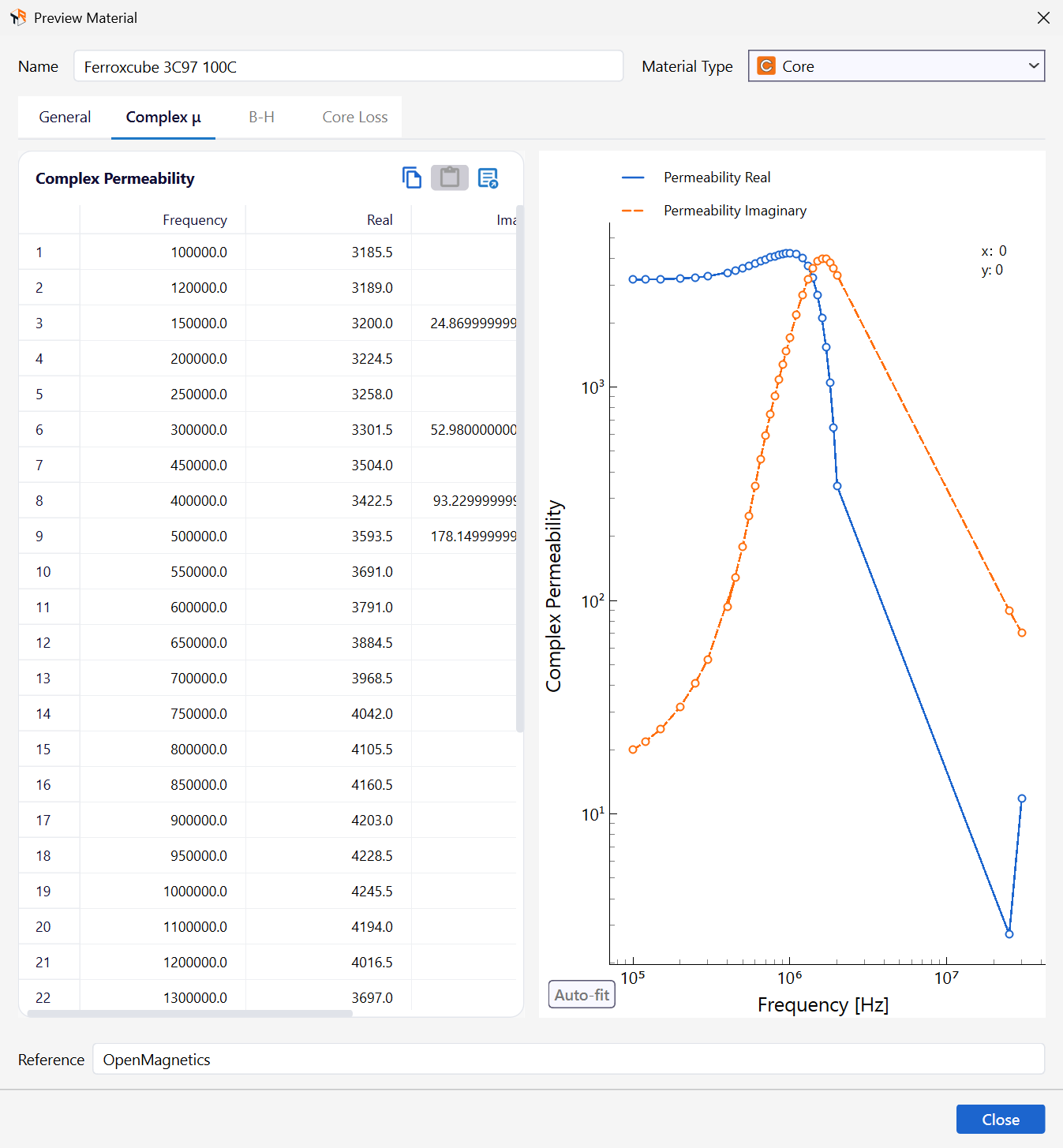
Complex μ
For a frequency-dependent permeability: one row per frequency with Frequency in Hz and the Real and Imaginary parts of the relative permeability. Paste the values from a spreadsheet or tab-separated text, with no empty cells. The plot shows both parts over frequency. Complex permeability is used in Harmonic and Inductance runs.
B-H
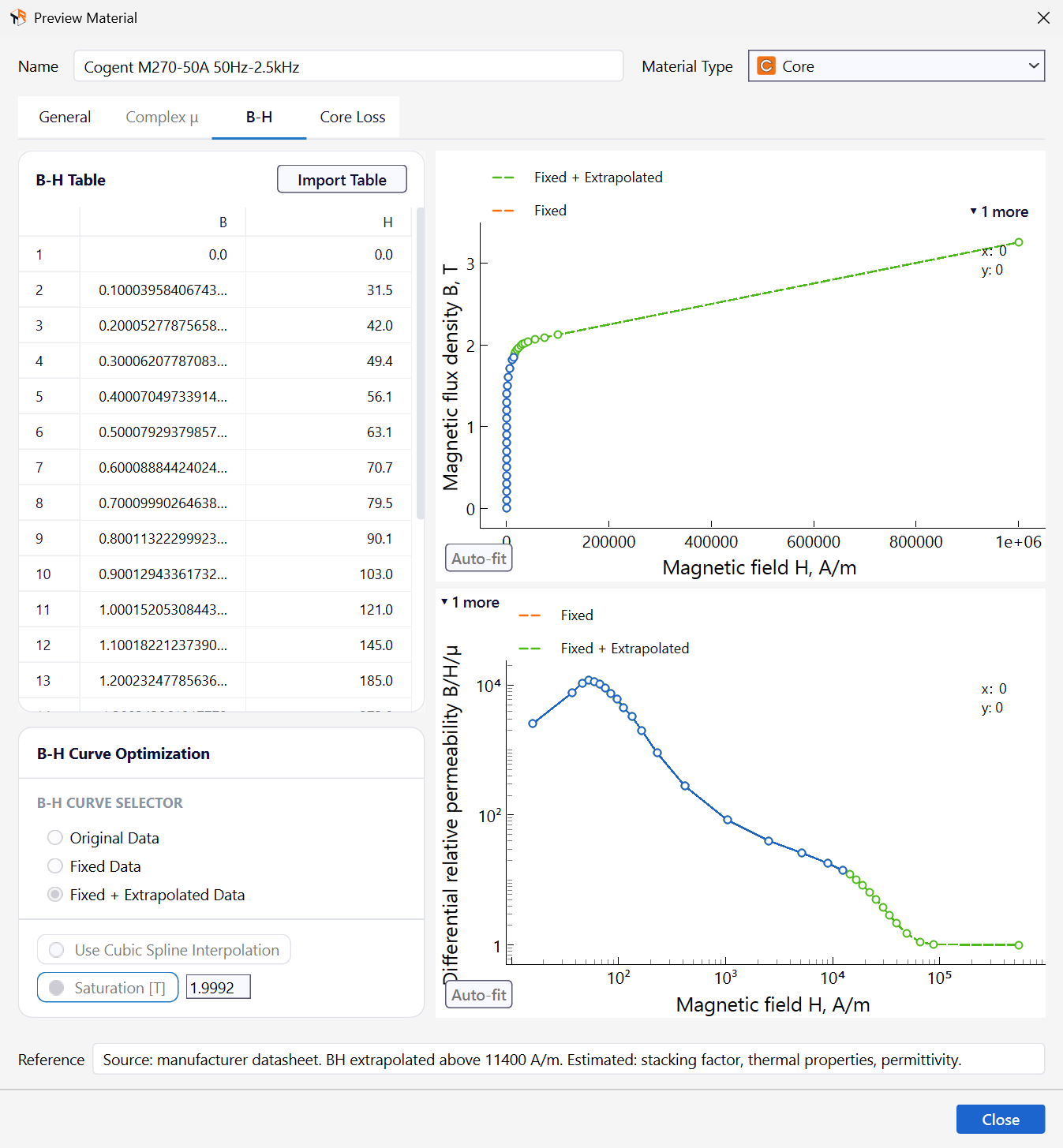
For a non-linear core: the B-H Table with B in T and H in A/m. Import Table reads a text file (CSV, txt) with two columns and any delimiter; TRAFOLO tells B-H from H-B by the values. The plots show B(H) and the differential relative permeability.
| Setting | What it does |
|---|---|
| B-H Curve Selector | Original Data as imported; Fixed Data with outlier points removed; Fixed + Extrapolated Data, also extended to saturation. The extrapolation assumes that the differential relative permeability goes to 1 at high field strength. |
| Use Cubic Spline Interpolation | Smooth (cubic) interpolation between the points instead of straight lines; can help the non-linear solver with sparse data. |
| Saturation [T] | The saturation flux density for the extrapolation: entered here, or estimated from the end of the curve when left empty. |
Example of a file for Import Table (TDK N87 data), one pair per line, B in T then H in A/m:
0,0
0.1,18.86
0.2,35.86
0.3,57.96
0.4,153.55
Core Loss
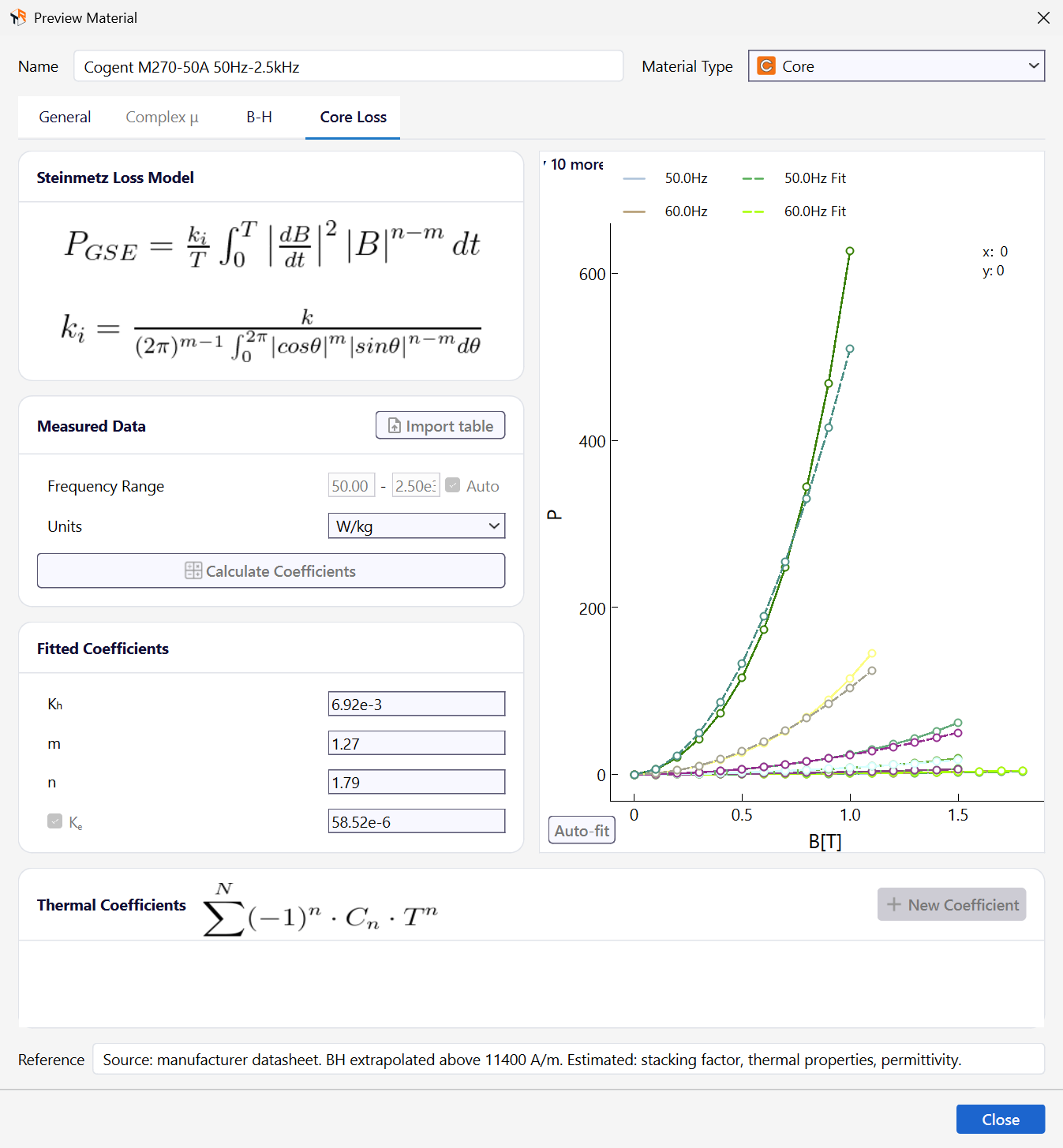
For Steinmetz-type core losses, evaluated after the field solution: from the flux density amplitude and frequency in harmonic runs, from dB/dt in transient runs.
| Setting | What it does |
|---|---|
| Import table, Units | Reads the loss table P(f, B) from a text file: f in Hz, B in T, P in W/kg, mW/cm3 or W/m3. TRAFOLO finds the frequency and flux density axes from the values. |
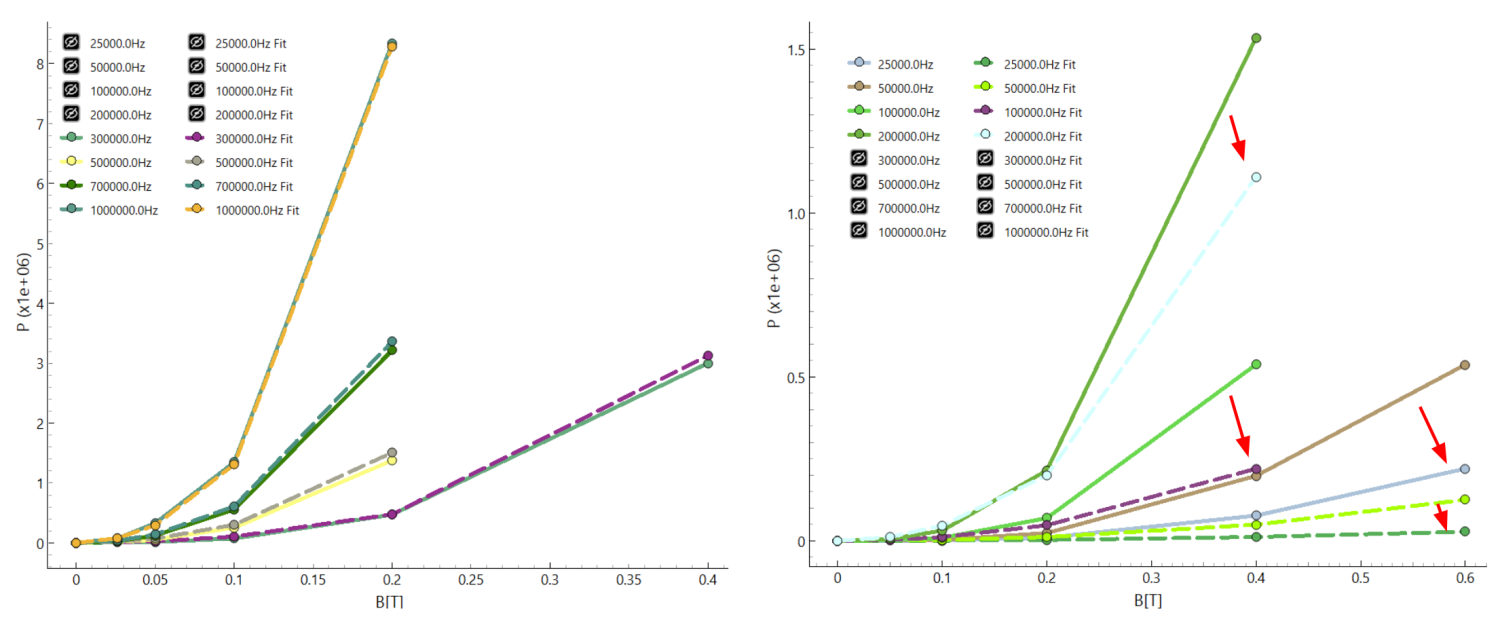
| Frequency Range, Auto | The frequencies used for the fit. A 4-coefficient fit over a wide range often misses at low frequency and high flux density; fit only the range your design runs in. |
| Calculate Coefficients | Fits P = Kh·fm·Bn + Ke·(f·B)² to the data. Kh, m (frequency exponent) and n (flux density exponent) describe the hysteresis part, Ke the eddy part (tick it to include it). Ferrites have n of about 2.5 to 3.5 (Ferroxcube 3C97 100C: m = 1.29, n = 3.55); steels lower (Cogent M270-50A: n = 1.79). |
| Thermal Coefficients, New Coefficient | Scale the core loss with the core temperature T (°C) by the factor C₀ − C₁·T + C₂·T² − … = Σ(−1)ⁿ·Cₙ·Tⁿ; New Coefficient adds a term, the first entry is the constant C₀. There is no reference temperature: fit the coefficients to the factor itself. Leave the list empty for losses that do not depend on temperature. |
Example of a file for Import table (TDK N97 data, losses in W/m³): the first row holds the frequencies in Hz after an empty cell, the first column the flux density in T, the other cells the losses. Leave a cell empty where no data exist.
,25000,50000,100000,200000
0.025,,,1340,5330
0.05,1050,2640,7160,26570
0.1,6520,15950,44520,150410
0.2,44140,111140,309320,953710
Related
- Core Properties and Models: the permeability and core loss models in detail
- Assembly: the material of each body
- Heat Transfer modeling: how the thermal properties are used