Heat
On the Heat tab you set the thermal boundary conditions of the outer faces and, when no electromagnetic simulation runs, the heat sources. Whether heat transfer runs, and whether it is Steady-state or Transient, is set on the Setup tab.
The heat model covers conduction in the solid bodies; the cooling of the outer faces is set by boundary conditions, and the air flow is not simulated. TRAFOLO solves electromagnetics and heat one after the other: the losses become the heat sources. With Temperature Iterations above 1 on the Setup tab, the temperatures go back to the electromagnetic solution for temperature-dependent materials. Background: Heat Transfer modeling.
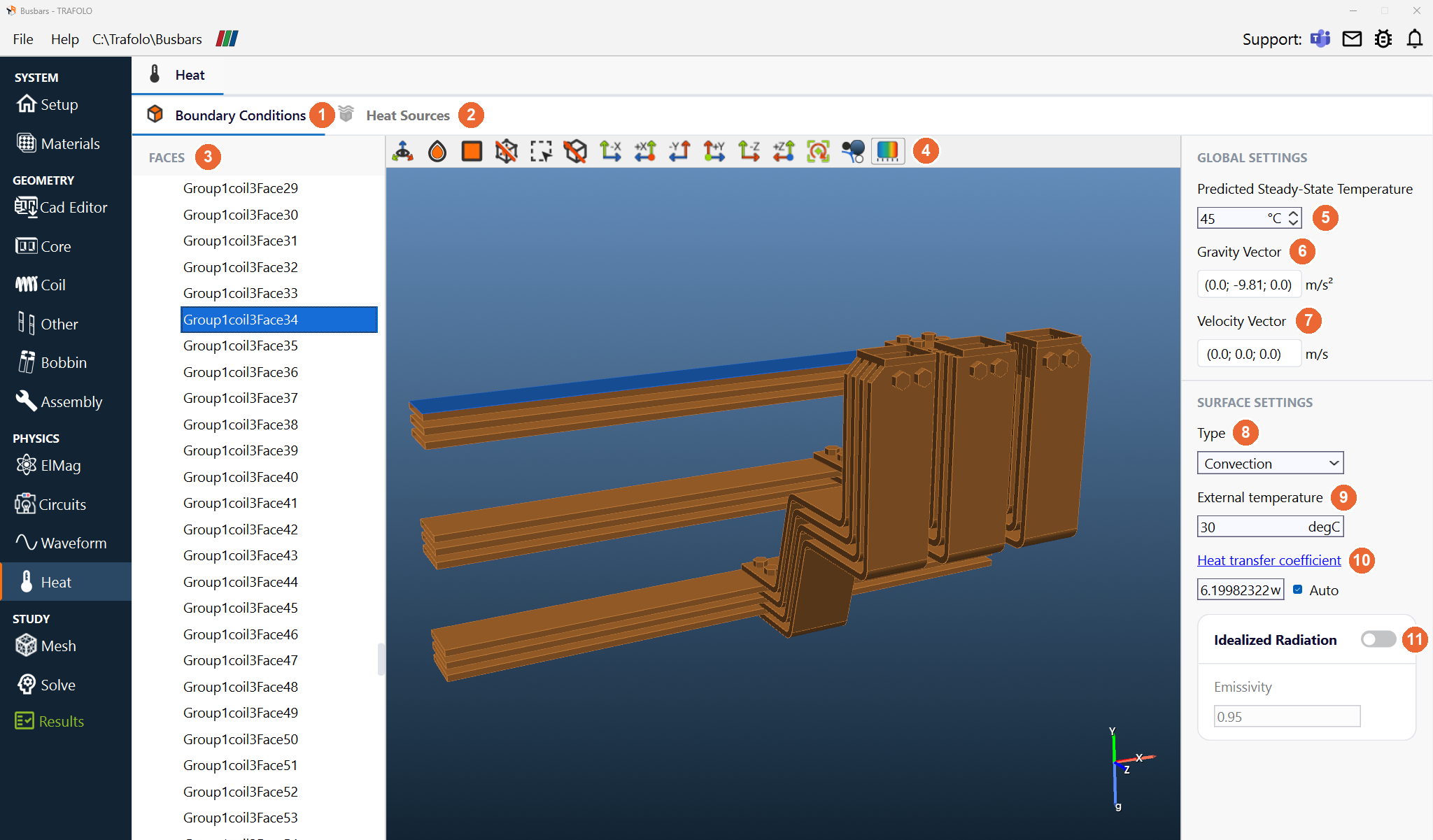
Global settings
| Setting | Unit | What it does |
|---|---|---|
| Predicted Steady-State Temperature (5) | °C | Steady-state heat transfer: the temperature used for temperature-dependent material properties in the electromagnetic simulation. Estimate it with a first run, or set Temperature Iterations above 1. |
| Initial Temperature | °C | Transient heat transfer: the temperature of all bodies at t = 0 s. |
| Timesteps | s | Transient heat transfer: the times at which the temperature is computed. Use short steps at the start and longer ones as the temperature settles; the generator spaces them evenly. |
| Gravity Vector (6), Velocity Vector (7) | m/s², m/s | Direction and size of gravity and of the flow around the component; the 3D view shows them as g and v on the axis triad. Auto uses them to estimate the heat transfer coefficient. |
Without heat transfer (Setup), the tab sets Steady-State Temperature instead: the fixed temperature of the temperature-dependent material properties, for example the copper conductivity.
Steady-state is enough for small components, which settle quickly. Large components can take hours to settle; use transient heat transfer to follow the temperature over time and compare it with measurements.
Boundary Conditions
On the Boundary Conditions tab (1), the FACES list (3) holds every outer face, grouped by body. Select a group or a face in the list or in the 3D view, then set its SURFACE SETTINGS. The Show Color Filter button (4) on the 3D toolbar opens a box above the 3D view that colours the faces by Type, Temperature, Heat Transfer Coefficient or Heat Flux to check the settings.
| Setting | Values | What it does |
|---|---|---|
| Type (8) | Convection, Fixed Temperature, Insulation, Heat Flux | Convection: heat removed to the surroundings through the heat transfer coefficient. Fixed Temperature: a constant face temperature. Insulation: no heat flow (adiabatic). Heat Flux: a given heat flow per area into or out of the face. |
| External temperature (9) | °C | The temperature of the surrounding air or liquid. |
| Heat transfer coefficient, Auto (10) | W/(m²·K) | Enter a value, or tick Auto to let TRAFOLO estimate it from the global vectors. Typical ranges: free convection in air 2.5–25, forced convection in air 10–500, forced convection in liquids 100–15 000. For still air, 5–10 is a usual start. |
| Idealized Radiation, Emissivity (11) | Idealized Radiation: Off (default), On. Emissivity ε: 0 to 1, 0.95 (default) | Adds grey-body radiation to the external temperature (formula below). Emissivity depends on the material and the surface: emissivity coefficients of common materials. |
With Idealized Radiation on, the face also exchanges heat by grey-body radiation, −k ∂T/∂n = σε(T⁴ − Text⁴), with σ = 5.67·10⁻⁸ W/(m²·K⁴) the Stefan–Boltzmann constant, ε the emissivity and T, Text absolute temperatures.
Heat Sources
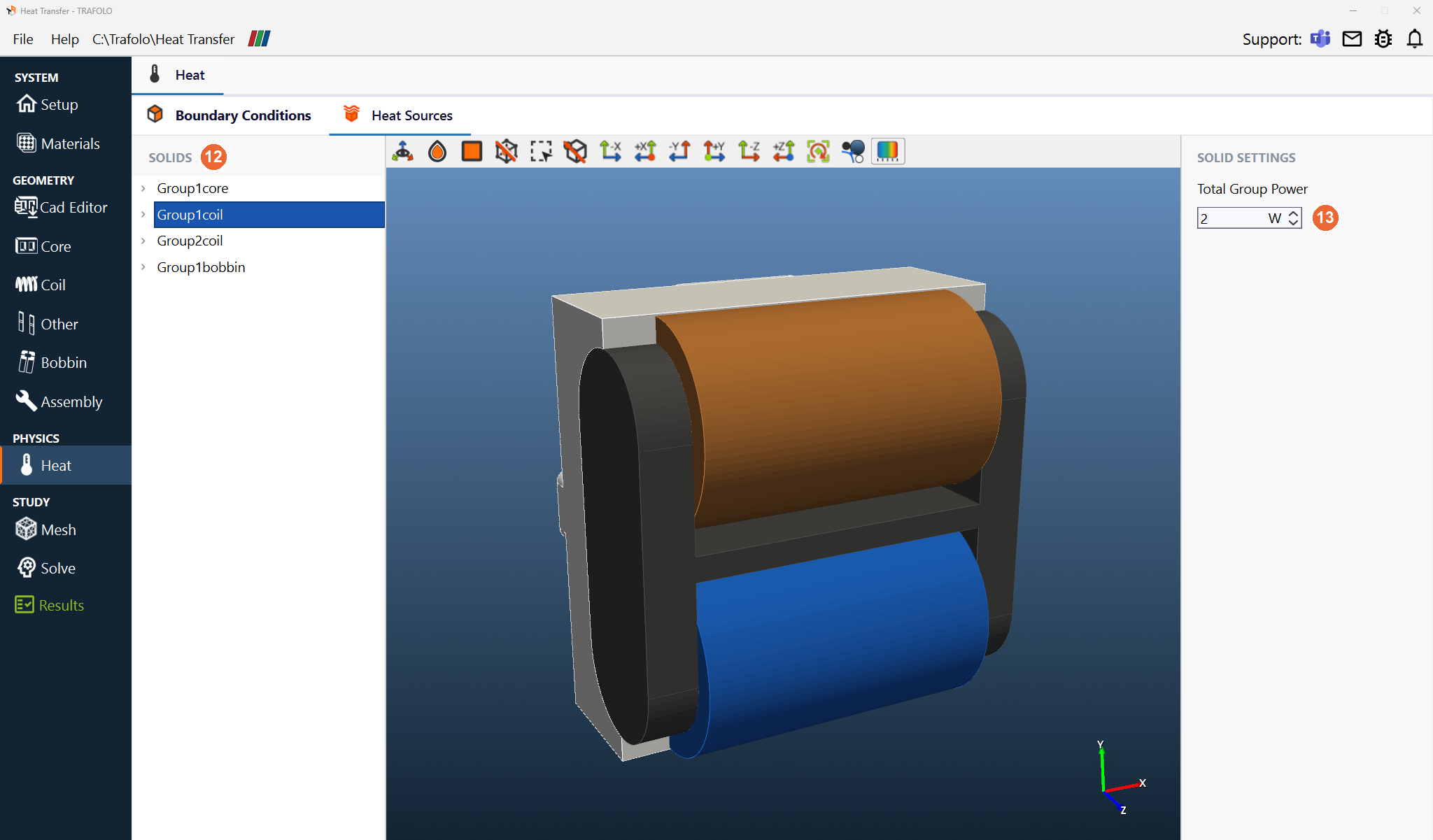
The Heat Sources tab (2) is available when no electromagnetic simulation runs (Off under Electromagnetics on the Setup tab). Select a group in the SOLIDS list (12) and enter its Total Group Power (13) in W: positive for a source, negative for a sink. The power is spread over the bodies of the group in proportion to their volume. Take the losses from your own data or from an earlier electromagnetic run.
Related
- Heat Transfer modeling: the heat model and the coupling with electromagnetics
- Bobbin: fill air pockets with an Air bobbin body so heat flows through them
- Results: Hotspot [°C] and temperatures