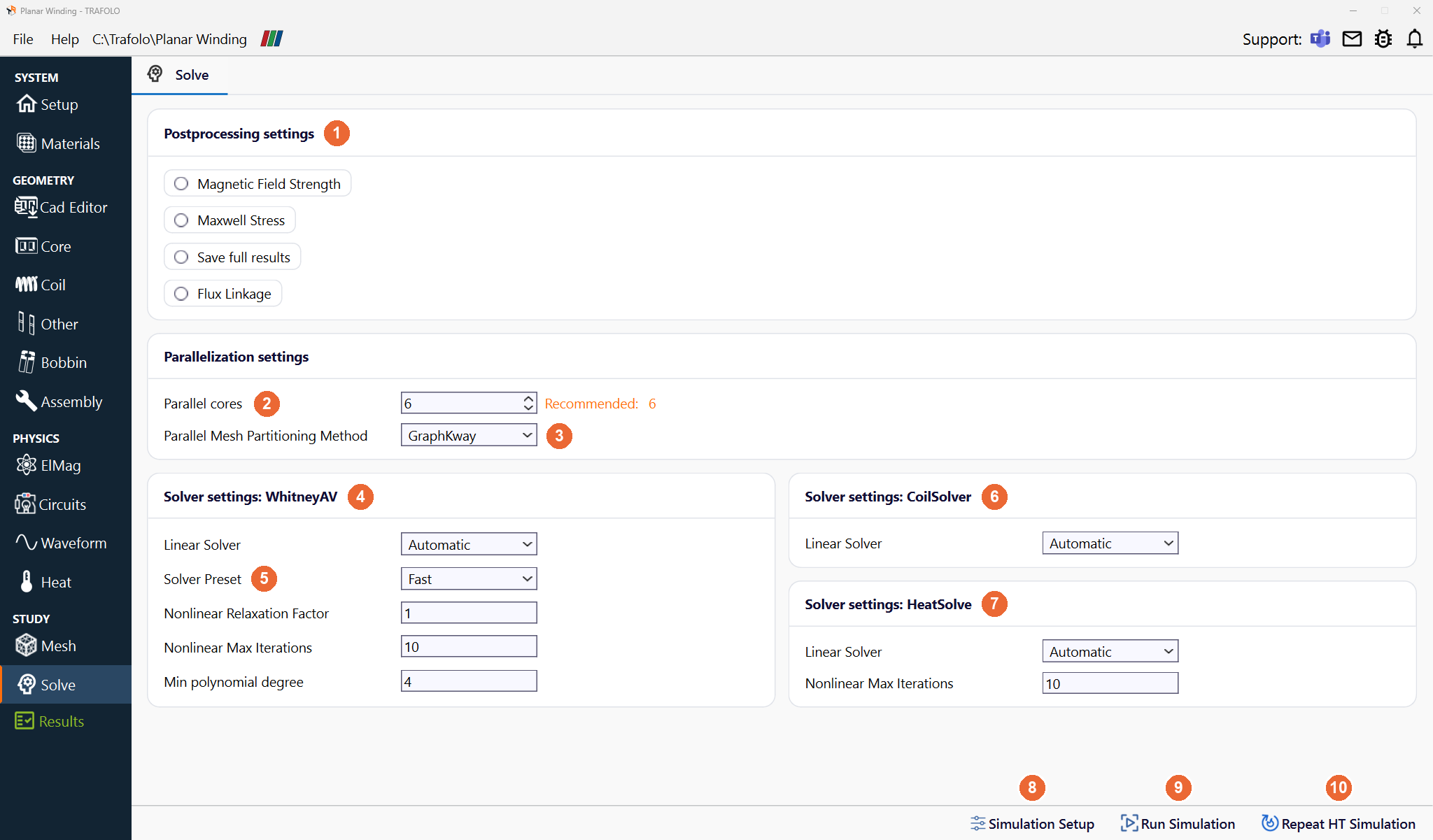
On the Solve tab you choose extra result fields, the number of cores and the solver settings, and run the simulation.
Solve tab of the Planar Winding template: 6 parallel cores as recommended, and the settings of the three solvers.
Running a simulation
Button
What it does
Simulation Setup (8)
Writes the solver input files (ElmerFEM sif files) from the model. Click it after every change to the model; it resets the results.
Run Simulation (9)
Runs the simulation. The status bar shows its state (Simulation started, Solved successfully); the console button at the bottom left shows the solver output.
Repeat HT Simulation (10)
Runs the heat transfer again on the last electromagnetic results, for example after a change on the Heat tab. It is disabled right after Simulation Setup; use Run Simulation then.
Postprocessing settings
Extra fields for the results (1), to view in ParaView with Open in ParaView on the Results tab.
Setting
What it adds
Magnetic Field Strength
The magnetic field strength H.
Maxwell Stress
The Maxwell stress tensor, integrated over the surface of each part into a force, written to results/results.csv in the project folder.
Save full results
All computed fields, also the intermediate ones; for debugging. The result files get about twice as large.
Flux Linkage
The flux linkage of the windings.
Parallelization settings
Setting
What it does
Parallel cores (2), Recommended
ElmerFEM runs in parallel (MPI). Set the number of physical performance (P) cores; efficiency (E) cores and hyper-threads slow the run down. Recommended estimates a good number from the model size: the speed does not grow linearly with the cores.
Parallel Mesh Partitioning Method (3)
MeshNodal, MeshDual, GraphRecursive, GraphKway. Change it only if a run converges badly; in rare cases a partitioning causes it.
Solver settings
One box per solver: WhitneyAV (4) for the electromagnetic field (Elmer WhitneyAVSolver and WhitneyAVHarmonicSolver), CoilSolver (6) for the coil currents before the field solver runs (CoilSolver, DirectionSolver and the wire direction solver), and HeatSolve (7) for heat transfer.
Setting
Solver
What it does
Linear Solver
all three
Automatic, Iterative or MUMPS (direct). Automatic picks per solver: for WhitneyAV the MUMPS direct solver in High Frequency Mode (Setup › Preset) and the iterative solver otherwise; for CoilSolver MUMPS for the wire direction solver only; for HeatSolve the iterative solver. MUMPS does not depend on iterative convergence and is much faster on high-frequency models, but needs much more memory. Transient runs always use the iterative solver.
Solver Preset (5)
WhitneyAV
Fast: run time before numerical stability. Normal: a balance. Slow: better convergence of strongly nonlinear cases (B-H curve), longer runs. Custom: set the values yourself.
Nonlinear Relaxation Factor
WhitneyAV
For nonlinear cases (B-H curve) the solver iterates in an outer loop around the linear system. Reduce the factor when the outer loop does not converge; the run can take several times longer.
Nonlinear Max Iterations
WhitneyAV, HeatSolve
The solver stops at this number of nonlinear iterations or at its convergence tolerance.
Min polynomial degree
WhitneyAV
A setting of the iterative linear solver: a higher degree can help convergence and costs more per iteration.