Licensing
Licensing model
New users get a 14-day trial license through the form on the Download Page.
To buy a license, write to info@trafolo.eu; the license key is sent to your email. Universities and research institutions can get an academic license by contacting us.
Activation
Online activation
Online activation is the simplest way: after each purchase the license is extended without any action from you. To activate:
- In TRAFOLO, click Help › Activate License.
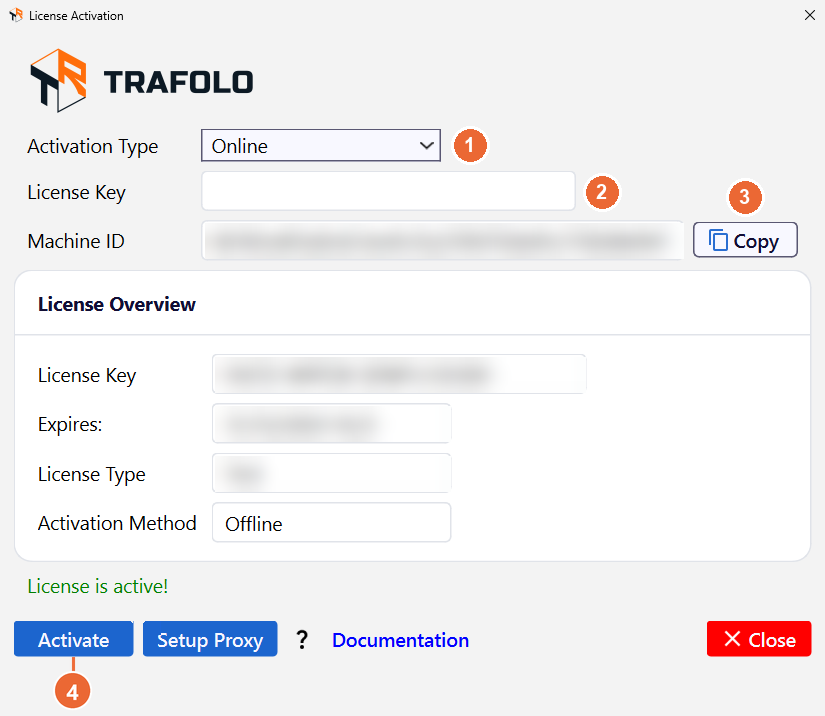
- Check that Activation Type (1) is Online.
- In License Key (2), paste the key from your email.
- Click Activate (4).
Offline activation
Use offline activation when the TRAFOLO PC has no internet access or a firewall blocks the licensing server:
- In TRAFOLO, click Help › Activate License.
- Set Activation Type (1) to Offline.
- Next to Machine ID, click Copy (3).
- On any PC with internet access, open the Offline Activation Form.
- Enter the license key from your email and the Machine ID, and submit the form.
- Save the file
ActivationFile*.skmthat the form gives you. - Copy
ActivationFile*.skmto the TRAFOLO PC. - In the License Activation window, click Activate (4) and, in the Select activation file window, select
ActivationFile*.skm. TRAFOLO activates the license.
Troubleshooting
If you lost your license key, please visit our Download page and fill in the form with your email address. If you are using an email that has been registered before, you will get a reminder email with your license key.