Circuits
On the Circuits tab you connect each winding to its source and to lumped elements: resistors, inductors and capacitors, for example a load resistor or the resonant capacitor of an LLC converter. There is one circuit per winding, Primary Circuit, Secondary Circuit and Secondary2 Circuit. TRAFOLO fills them in from the ElMag tab: the winding (FEM Coil), the ground and, for a winding driven by a current or a voltage, its source. An additional coil appears in the circuit of the winding it is connected to.
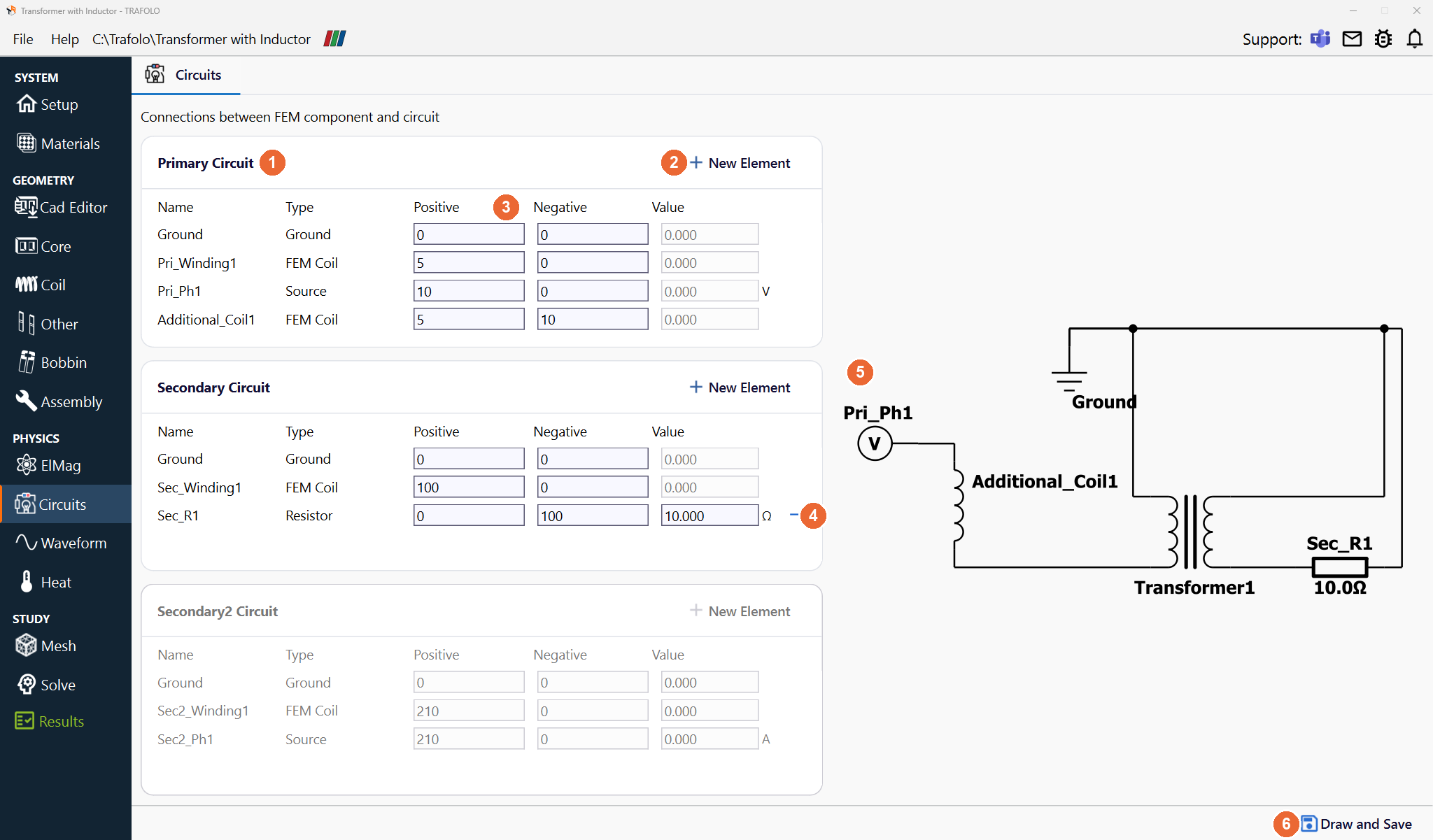
In the picture: the Primary Circuit table (1), + New Element (2), the node numbers in Positive and Negative (3), the remove icon (4), the drawn circuit (5) and Draw and Save (6).
Circuit tables
| Column | What it sets |
|---|---|
| Name | The element name, for example Pri_Winding1 for the primary winding, Pri_Ph1 for its source. |
| Type | Ground, FEM Coil (a winding of the model), Source, Resistor, Inductor, Capacitor. |
| Positive, Negative (3) | The node numbers of the two terminals of the element (see Node numbers). Swapping the two numbers of a winding reverses its current. |
| Value | Resistance in Ω, inductance in H, capacitance in F. The field is disabled for Ground, FEM Coil and Source: a source gets its value on the Waveform tab, with V for a voltage source and A for a current source. |
+ New Element (2) adds a row; the remove icon (4) deletes one. Draw and Save (6) draws the circuit (5) next to the tables and saves it. A circuit table is disabled while its winding is off on the ElMag tab.
Node numbers
Every element has a positive and a negative terminal, and each terminal gets a node number in Positive and Negative. Terminals with the same number are connected; terminals with different numbers are not. Node 0 is the ground. Any other number works, as long as each node has its own: the numbers are labels, not values or an order. The same number in two circuit tables connects the two circuits, as at the tap of the Autotransformer template.
Example, the primary circuit in the Circuits tab picture at the top (Transformer with Inductor template):
| Element | Positive | Negative | Connected to |
|---|---|---|---|
| Pri_Ph1 (Source) | 10 | 0 | Additional_Coil1 at node 10; ground at node 0 |
| Additional_Coil1 (FEM Coil) | 5 | 10 | Pri_Winding1 at node 5; Pri_Ph1 at node 10 |
| Pri_Winding1 (FEM Coil) | 5 | 0 | Additional_Coil1 at node 5; ground at node 0 |
The source, the additional coil and the primary winding form one series loop through the nodes 10, 5 and 0. In the secondary circuit, Sec_Winding1 (100, 0) and Sec_R1 (0, 100) share both nodes, so the 10 Ω load is connected across the winding.
Node 0 is in every circuit table. One shared node alone lets no current flow between two circuits; current flows between them only when they share a second node, as the tap node 10 of the Autotransformer template.
Limits
The circuit is solved together with the FEM model; it is not a SPICE simulator. Only linear elements are available (resistors, inductors, capacitors; no diodes or switches), and over-constrained circuits do not solve. In a delta connection, for example, add large resistors between the sources and the ground (1 kΩ in the example below) so that the solver finds a solution that conserves current.
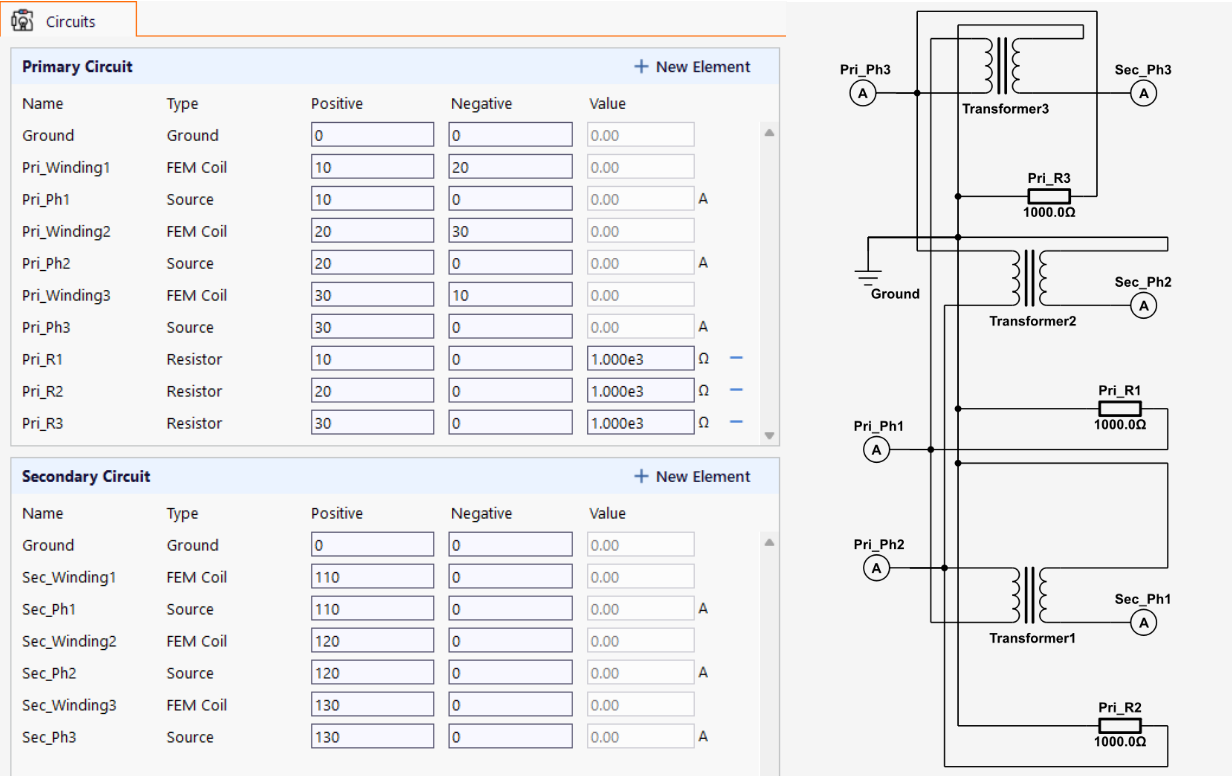
The node numbers in this example: the primary windings run from 10 to 20, 20 to 30 and 30 to 10, so they close a ring (delta); each source Pri_Ph1 to Pri_Ph3 and each 1 kΩ resistor Pri_R1 to Pri_R3 connects one corner (10, 20 or 30) to the ground. Each secondary winding runs from its own node (110, 120 or 130) to 0, the grounded neutral (star), with its source Sec_Ph1 to Sec_Ph3 between the same two nodes.
Related
- Circuits (User's Guide)s
- ElMag: windings and their excitation; Waveform: source values
- Setting terminals & Current Direction