Setup
On the Setup tab you choose the domain, the electromagnetic and the heat transfer simulation, and how they couple. These choices decide which tabs and settings the rest of the model offers.
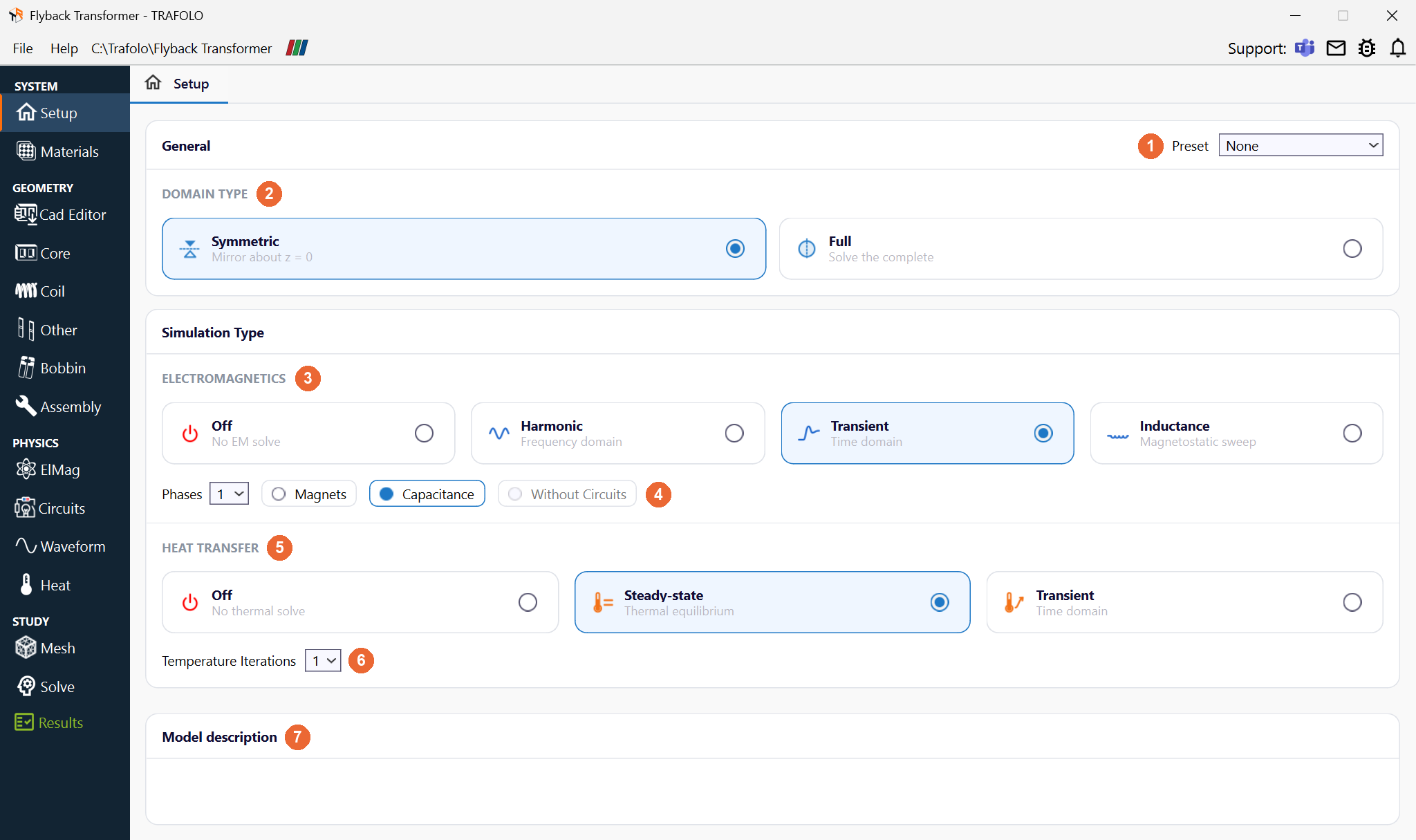
In the picture: Preset (1), Domain Type (2), Electromagnetics (3) with the options Phases, Magnets, Capacitance and Without Circuits (4), Heat Transfer (5), Temperature Iterations (6) and Model description (7).
General
| Setting | Values | What it does |
|---|---|---|
| Preset (1) | None (default), High Frequency Mode | High Frequency Mode is for RF inductors: it sets Inductance, Full, 1 phase, Without Circuits and no heat transfer, and locks these settings ("Some settings are locked by High Frequency Mode"). Every coil becomes massive wire with an impedance (surface) boundary instead of a meshed skin layer, and the Automatic linear solver on the Solve tab uses MUMPS. Back to None unlocks the settings; they keep their values. |
| Domain Type (2) | Symmetric (default), Full | Symmetric models half of the component and mirrors it about the xy plane (z = 0); Full solves the complete domain. See below. |
Symmetric or Full
Use Symmetric whenever the component allows it: the model is half the size and converges faster. Voltages, resistances, losses and inductances are reported for the full component. After assembly, every winding needs at least two terminals on the symmetry plane, and the magnetic flux must run parallel to that plane.
Why Symmetric is preferred: the half model has about half the elements, so each solver iteration takes about half the time; the smaller system also needs fewer iterations, and the solver converges better, most of all with windings whose turns are modelled one by one. Background: Mastering FEM, Part 1: keep your simulations simple (LinkedIn, section on symmetry). How TRAFOLO cuts the model at the symmetry plane: Assembly.
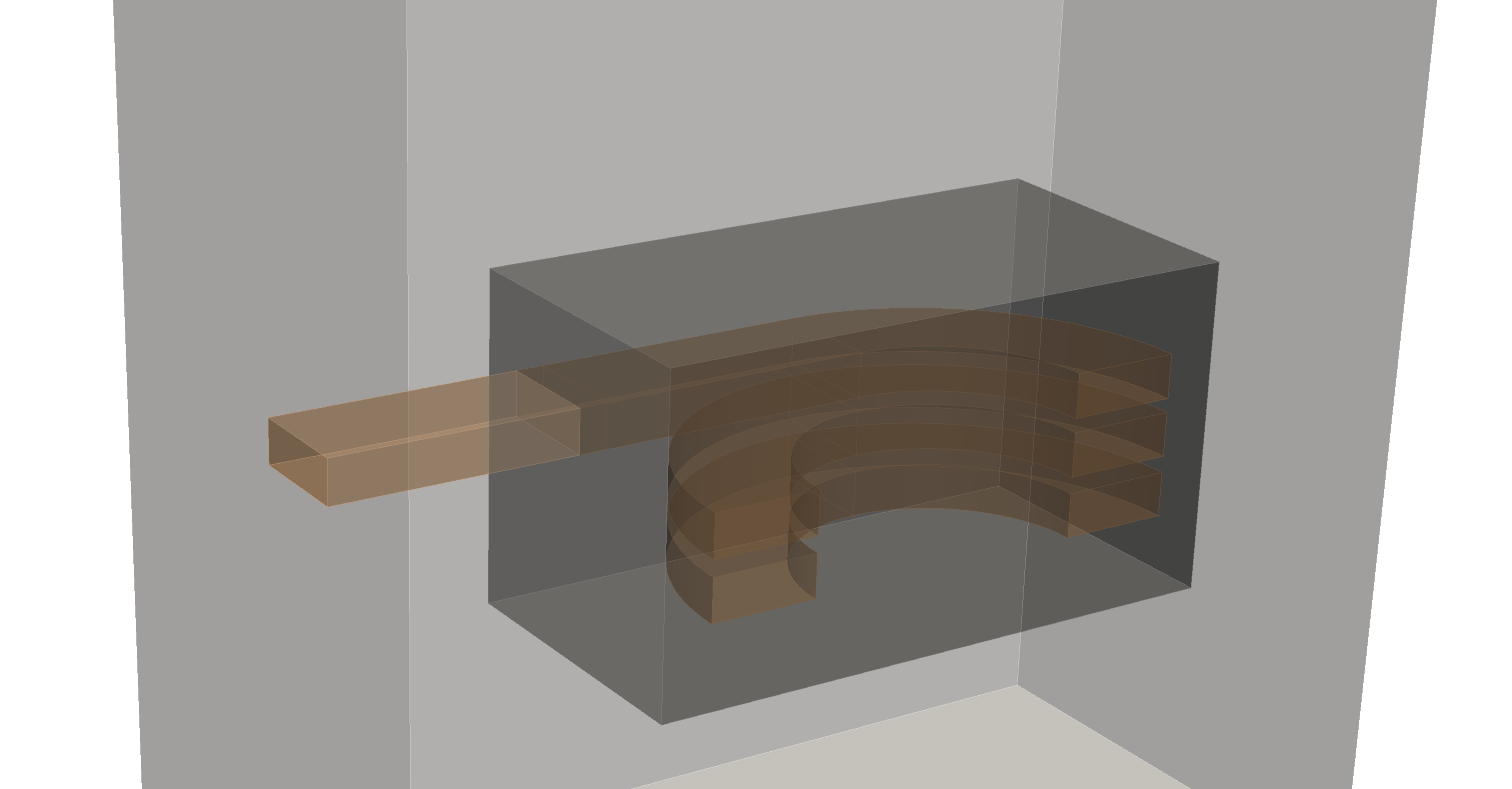
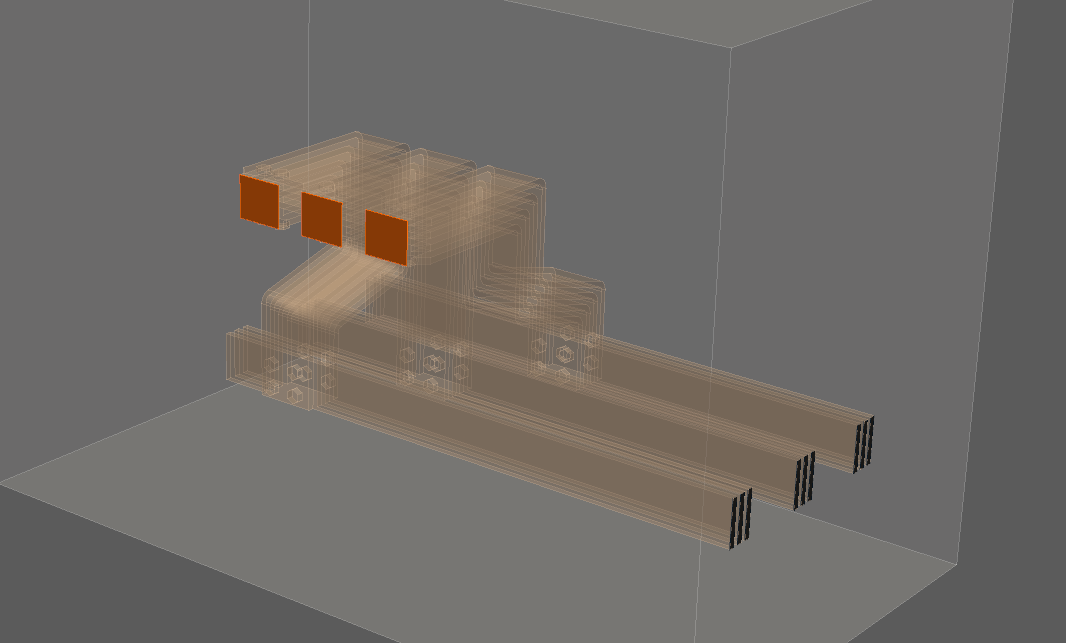
Use Full when the geometry has no such symmetry, for example busbars or a winding with leads on one side. Runs take longer, most with many solid (massive) turns. A winding without terminals at the domain boundary is possible only as a closed coil of stranded or litz wire (Closed coil on the Coil tab); solid and foil windings must be cut, with at least two terminals extended to the domain boundary.
Electromagnetics
| Type (3) | In the app | Use it for |
|---|---|---|
| Off | No EM solve | Heat transfer alone, with the losses entered as heat sources on the Heat tab. |
| Harmonic (default) | Frequency domain | Sinusoidal excitation, magnetostatics (0 Hz) and several independent harmonics. Losses are the sum over the harmonics, with the AC resistance computed per frequency. A transient waveform can be turned into harmonics with the DFT and Harmonize on the Waveform tab. |
| Transient | Time domain | Non-sinusoidal waveforms and non-linear cases, for example a saturating core, where a sinusoidal excitation gives a non-sinusoidal response. Core losses are computed at every time step with GSE (default) or iGSE, the Core Loss Model of the core material. |
| Inductance | Magnetostatic sweep | A sweep of harmonic solves over the excitation or the frequency: inductance, reactance, AC resistance, Q factor and losses per point, for an inductor or for magnetizing or leakage inductance of a transformer. See Inductance (frequency and excitation sweeps). |
Harmonic core losses. Core losses are non-linear, so adding them up over harmonics is an approximation, and a DC bias in the core is not captured. Use Transient when the core loss matters and the waveform is far from a sine.
Transient start. A transient run starts from zero magnetic flux, so it shows an inrush. Start the waveform where the magnetizing current is close to zero; with voltage excitation, that is near the voltage maximum. Background: Transient Waveforms & Simulations.
Time steps. The simulated time and the time step of a transient run are set on the Waveform tab; how many points per period a waveform needs is explained in Waveform, section Time steps.
Options
| Option (4) | Values | What it does |
|---|---|---|
| Phases | 1 (default), 3 | Number of phases of the sources; with 3, the sources are 120° apart. A 3-phase run cannot run at 0 Hz, and each coil group needs at least 3 bodies, one per phase. |
| Magnets | off (default), on | Permanent magnets, with Harmonic or Transient only. Core bodies whose material has the Core Material Type Magnet are magnetized with the material's coercivity; the direction of magnetization is set per core group on the Core tab, which shows it only with Magnets on. |
| Capacitance | off (default), on | Harmonic and Transient only. Adds an electrostatic solve for the capacitance matrix between the winding sections, the cores and other conductive parts; conductive parts that touch form one electrode, and windings are never merged with the core. The matrix is written to results/capacitance_matrix.csv and can be exported as a SPICE netlist (Results). An Inductance run with Full and Without Circuits also reports a capacitance of the winding, from its electric field energy. |
| Without Circuits | off (default), on | Applies the voltage directly to the winding terminals instead of through a circuit. Available with Inductance, Full and 1 phase. The excitation is then a voltage (Urms). It helps convergence for solid multi-turn windings imported from CAD at high frequencies, where the skin depth is much smaller than the conductor. For the connections, follow the Planar Inductor template: Coil group connection type Series and Connection Series. See Without circuits. |
Capacitance needs the dielectric. The result depends on the permittivity around the windings: fill the space between the conductors with a bobbin body and give its material a Relative Permittivity (Materials). Refine the mesh between the turns or windings, if needed on that bobbin body. Background: Parasitic Extraction.
Heat transfer
The heat model solves conduction in the solid bodies; the cooling of the outer faces is set by boundary conditions on the Heat tab (convection, with the coefficient entered or estimated by Auto, and radiation). The air flow is not simulated, which keeps thermal runs fast.
| Type (5) | In the app | Use it for |
|---|---|---|
| Off (default) | No thermal solve | Electromagnetics only. Temperature-dependent properties use the Steady-State Temperature set on the Heat tab. Inductance runs always have heat transfer off; with electromagnetics Off, heat transfer must be on. |
| Steady-state | Thermal equilibrium | The final temperature, when the losses balance the cooling. |
| Transient | Time domain | The temperature over time, for example to compare with a measurement that has not settled yet, or when the thermal mass matters. It solves many time steps and takes longer. |
| Setting | Values | What it does |
|---|---|---|
| Temperature Iterations (6) | 1 (default), 2, 3 | Steady-state heat transfer with electromagnetics on only. With 1, heat transfer runs once on the losses. With 2 or 3, the temperatures go back to the electromagnetic solve before the next pass, for temperature-dependent properties such as the copper conductivity. |
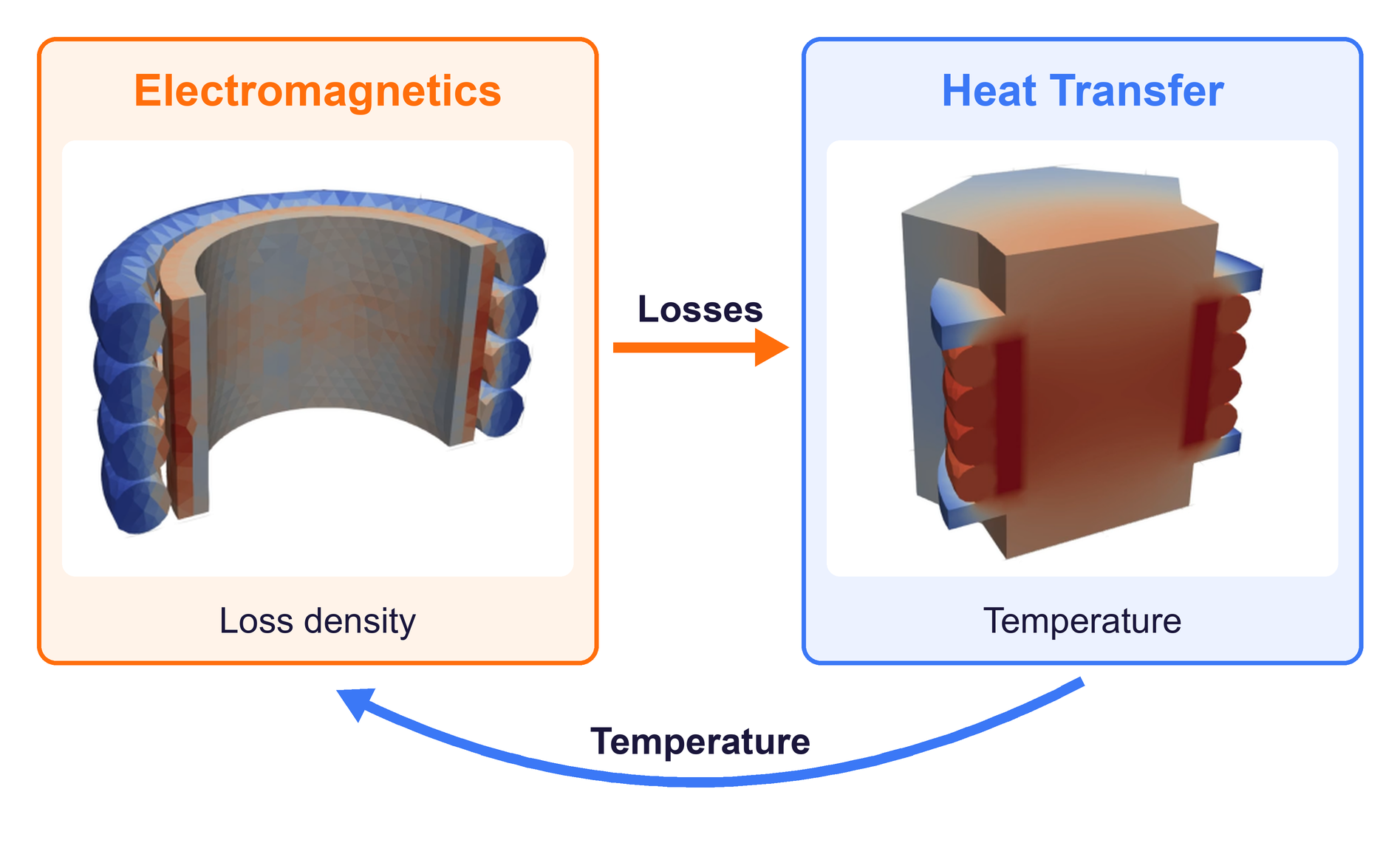
The diagram shows one run of the Flyback Transformer template:
- Electromagnetics (Harmonic or Transient) computes the loss density in W/m³ in every body: Joule and proximity loss in the windings; Steinmetz and eddy-current loss in the core, with GSE/iGSE or a complex permeability; eddy-current loss in other conductive parts. Harmonic runs sum the losses over the frequencies, transient runs average them over full periods. In the example, the winding loss density is 0.19 to 1.02 MW/m³.
- Losses: the loss density of each body becomes its heat source.
- Heat Transfer (Steady-state or Transient) solves heat conduction in the solid bodies, with the outer faces set on the Heat tab: convection, fixed temperature, insulation, heat flux or radiation. It gives the temperature field and the hotspot, 73 to 79 °C in the example. A transient heat run takes its time steps from the Heat tab.
- Temperature: with Temperature Iterations 2 or 3 (steady-state heat transfer only), the next electromagnetic run starts from this temperature field. The conductivity of windings, cores and conductive parts follows σ(T) = σ20 / (1 + α (T − 20 °C)), and the core loss is scaled by the thermal factor of the core material. The first run uses the temperature set on the Heat tab.
With electromagnetics Off nothing is transferred: you enter the heat sources under Heat Sources on the Heat tab.
Model description
Model description (7): free text for your notes on the model, saved with the project.
Related
- Heat Transfer modeling: the heat model and the coupling
- Transient Waveforms & Simulations: transient runs, inrush and Harmonize
- Inductance (frequency and excitation sweeps))