Autotransformer
A 24 V, 50 Hz step-down autotransformer on an E65 core of electrical steel, its 200-turn winding tapped at the middle and loaded with 10 Ω: how to connect a tapped winding in the circuits, the losses, and the current in each part of the winding.
- Component: E65/32/27 core of M270-50A electrical steel, no gap; one winding of 200 turns tapped at turn 100: series part 100 turns of 1.0 mm wire, common part 100 turns of 1.4 mm wire.
- Simulation: Harmonic at 50 Hz, 24 V RMS across the whole winding, 10 Ω load across the common part; half model (Symmetric).
- Winding model: Homogenization.
- You get: core and winding losses, the voltage and current of each part of the winding and of the load, and the DC resistance of each part.
- Files: none.
- In TRAFOLO: Welcome screen › Examples › Autotransformer is this model with its results.
- Run time: under 1 min on 8 CPU cores.
Video: the circuit of this autotransformer set up step by step, in an earlier version of the Circuits tab.
Model description
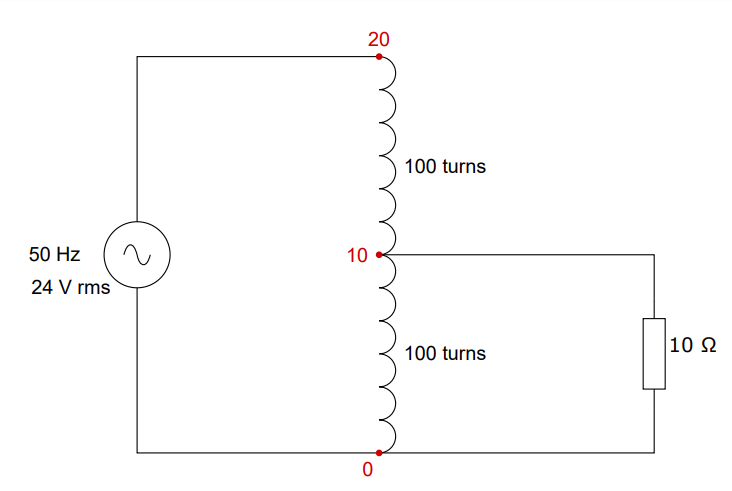
24 V RMS at 50 Hz is applied across all 200 turns; the 10 Ω load sits between the tap at turn 100 and the grounded end, so it gets about half the input voltage. TRAFOLO models the two parts of the winding as two coil groups: Group1coil, the series part between input and tap, in the primary circuit, and Group2coil, the common part between tap and ground, in the secondary circuit. A shared circuit node at the tap joins them.
| Core | Core material | Air gap |
|---|---|---|
| E65/32/27 shape | Cogent M270-50A, 0.5 mm laminations | none |
| Winding part | Coil group | Turns | Wire diameter | Circuit nodes |
|---|---|---|---|---|
| Series | Group1coil | 100 | 1.0 mm | 20 to 10 |
| Common | Group2coil | 100 | 1.4 mm | 10 to 0 |
Modelling instructions
Setup
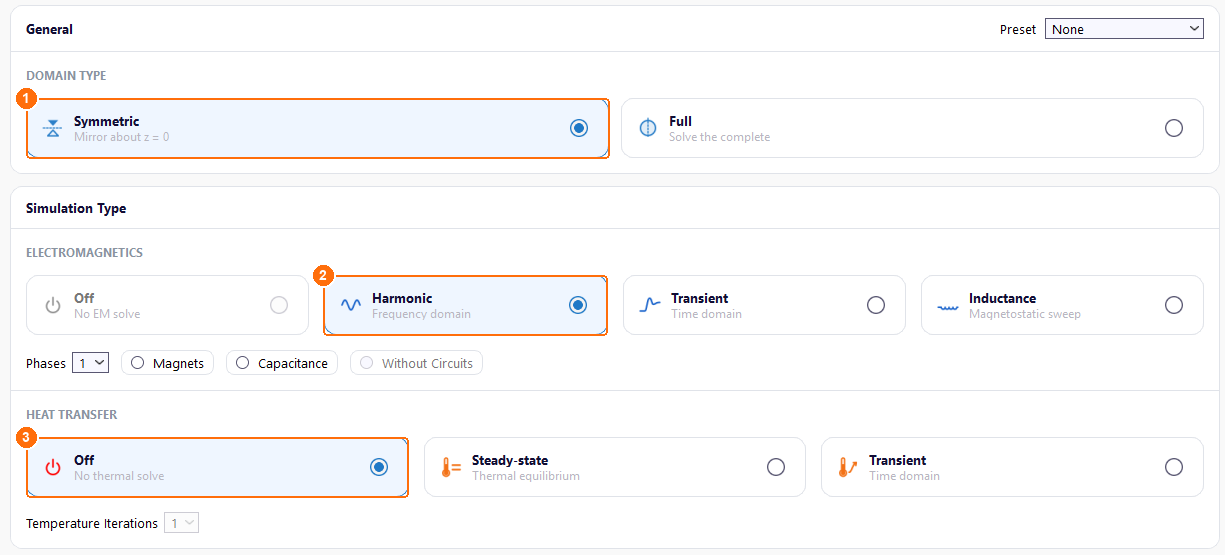
- Under DOMAIN TYPE, select Symmetric. TRAFOLO models the half above z = 0 and scales the results to the whole autotransformer.
- Under ELECTROMAGNETICS, select Harmonic: the supply is sinusoidal.
- Under HEAT TRANSFER, keep Off.
Materials
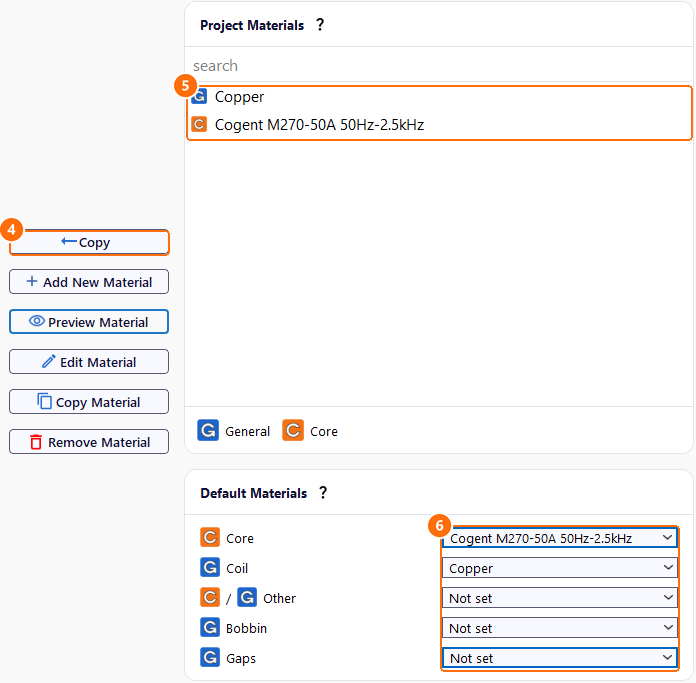
- Under Global Materials, select Cogent M270-50A 50Hz-2.5kHz and click Copy.
- Copy Copper the same way. Both appear under Project Materials.
- Under Default Materials, set the material of each component:
| Core | Coil | Other | Bobbin | Gaps |
|---|---|---|---|---|
| Cogent M270-50A 50Hz-2.5kHz | Copper | Not set | Not set | Not set |
Core
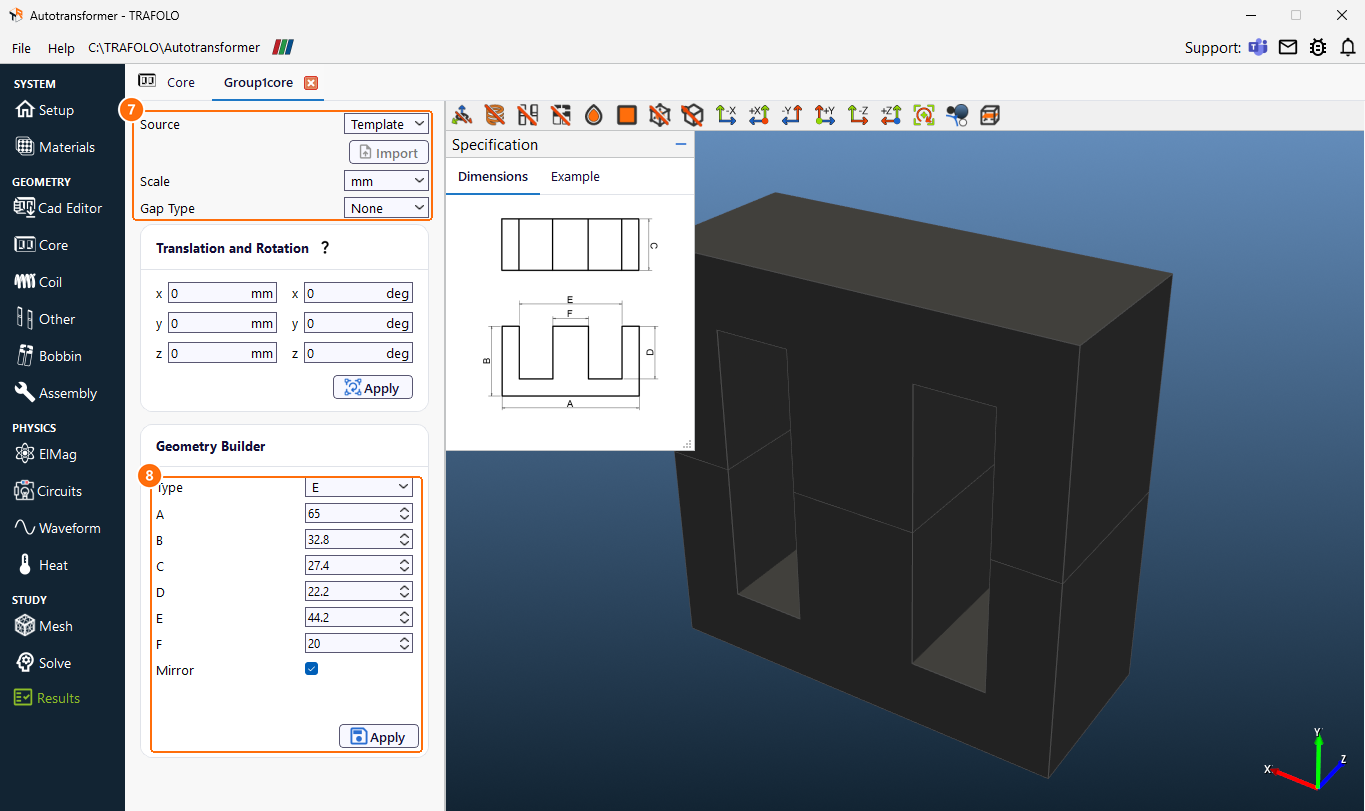
- On Core, click New Group. Group1core appears.
- Click Configure next to Group1core.
- Set Source to Template, Scale to mm and Gap Type to None.
- In Geometry Builder, set Type to E, enter the dimensions in mm, keep Mirror ticked and click Apply:
| A | B | C | D | E | F |
|---|---|---|---|---|---|
| 65 | 32.8 | 27.4 | 22.2 | 44.2 | 20 |
Coil
Each part of the tapped winding is one coil group.
- On Coil, click New Group. Group1coil, the series part, appears.
-
Click Configure next to Group1coil.
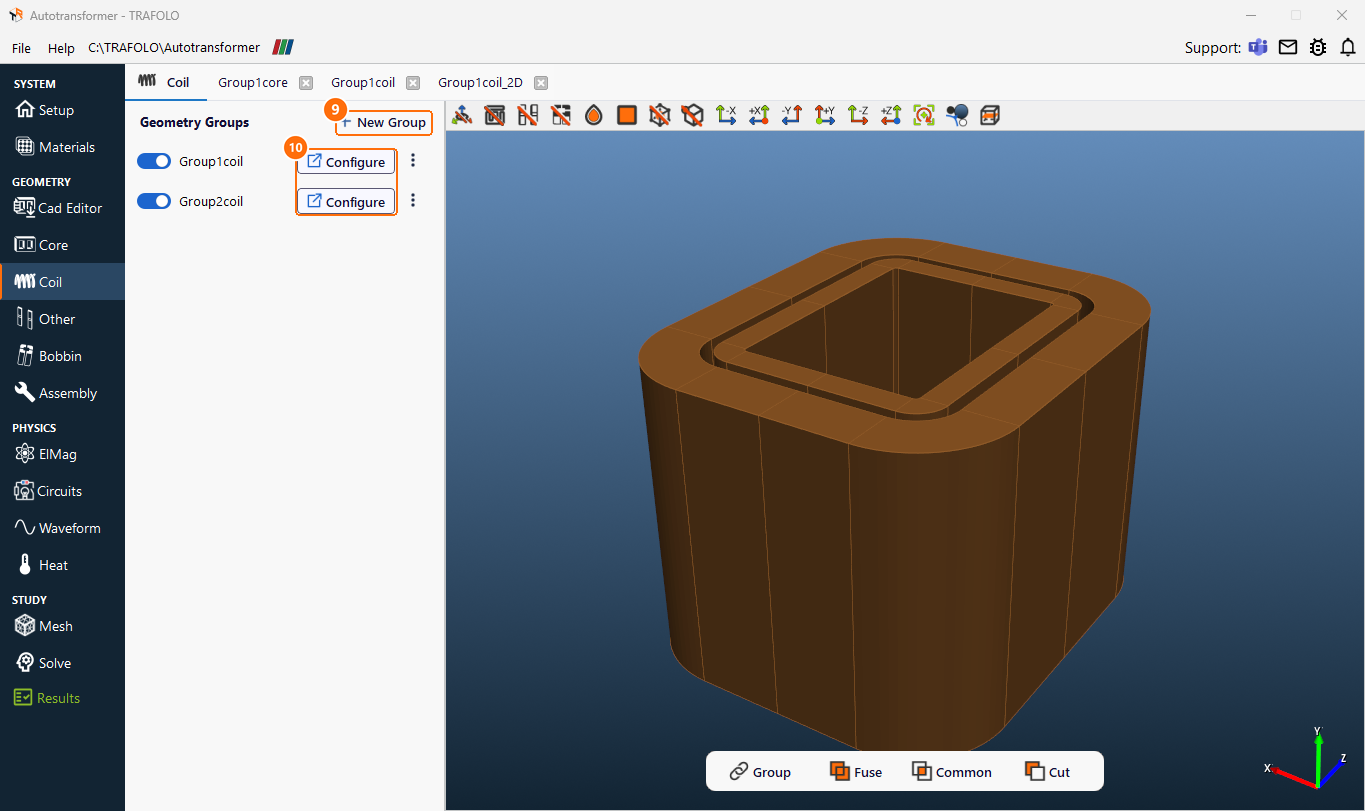
Coil tab: New Group (9), Configure (10); both parts of the winding in the 3D view. -
Set Source to Template, Scale to mm, Wire Type to Stranded & Litz and Turns per solid to 100: one solid body carries all 100 turns.
-
In Geometry Builder, set Type to Filled, enter the dimensions in mm and click Apply:
Coil group A B C R H Group1coil 27.4 20 3 0.5 35 Group2coil 27.4 20 6 5 35 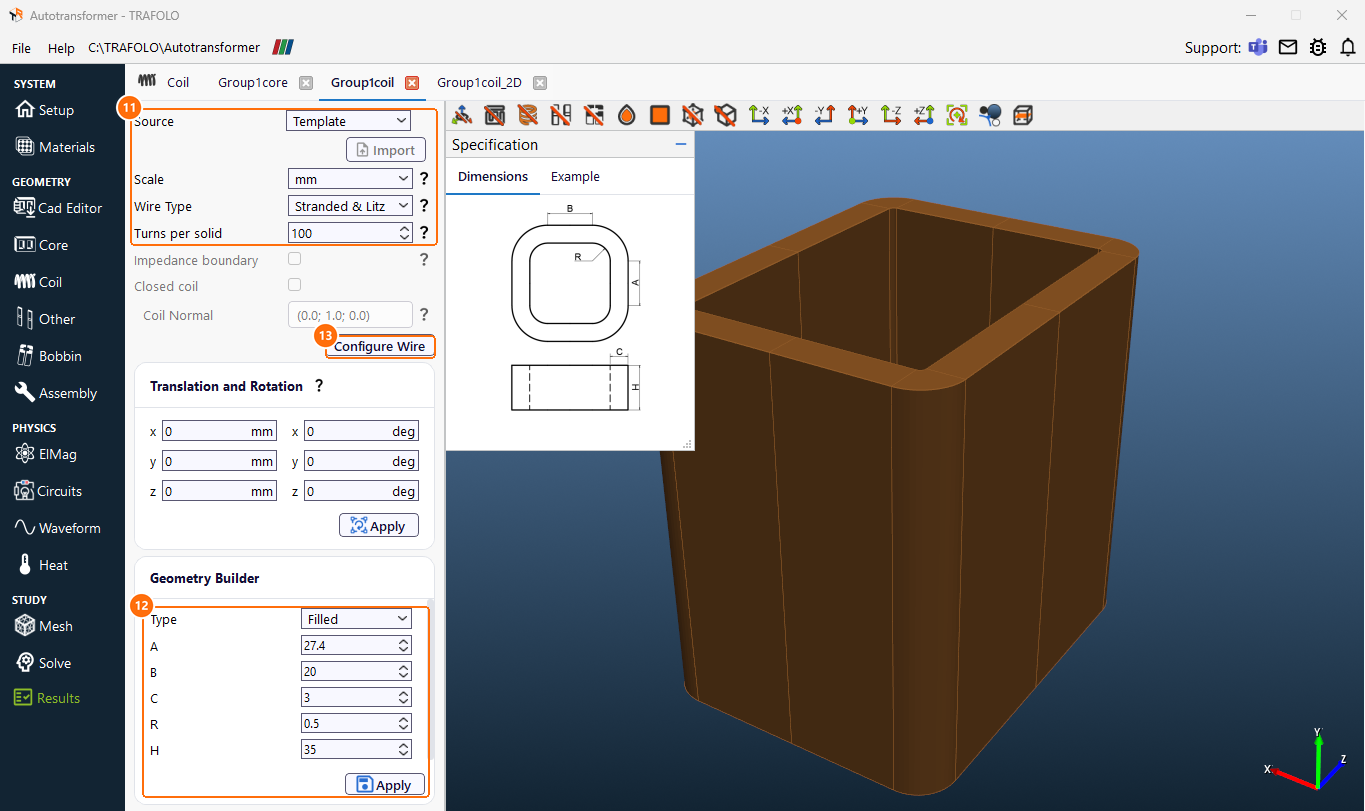
Group1coil: Source, Scale, Wire Type, Turns per solid (11); Filled dimensions and Apply (12); Configure Wire (13). -
Click Configure Wire. In the Group1coil_2D tab, select Homogenization and set Packing to Rectangular, Strand Thickness to 1.0 mm and Max Frequency to ≤ 100Hz.
-
Next to Fill Factor, click Calculate, keep Strand Type Round and Strand thickness 1.0, set N strands to 1 (each turn is one round wire) and click Accept. Fill Factor becomes 0.748. Then click Generate Mesh: TRAFOLO builds the 2D model of the wire; without it the run stops.
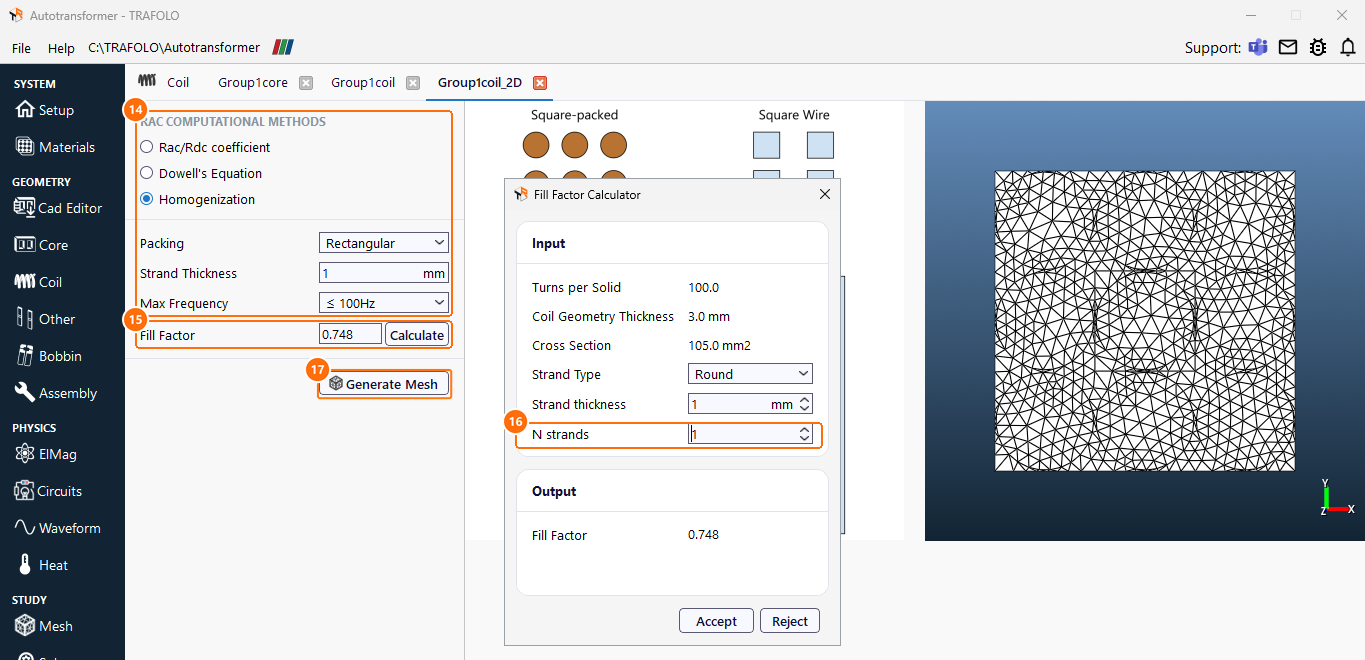
Group1coil_2D: Homogenization settings (14), Fill Factor and Calculate (15), N strands (16), Generate Mesh (17). -
Back on Coil, click New Group again and set up Group2coil, the common part, the same way with its dimensions from the table and Strand Thickness 1.4 mm. Fill Factor becomes 0.733; click Generate Mesh for it too.
At 50 Hz the skin depth in copper is about 9 mm, far more than the wire diameter, so the winding loss is the DC loss. Homogenization is used here so that one solid body can carry 100 turns.
Assembly
- On Assembly, click Assemble Geometry.
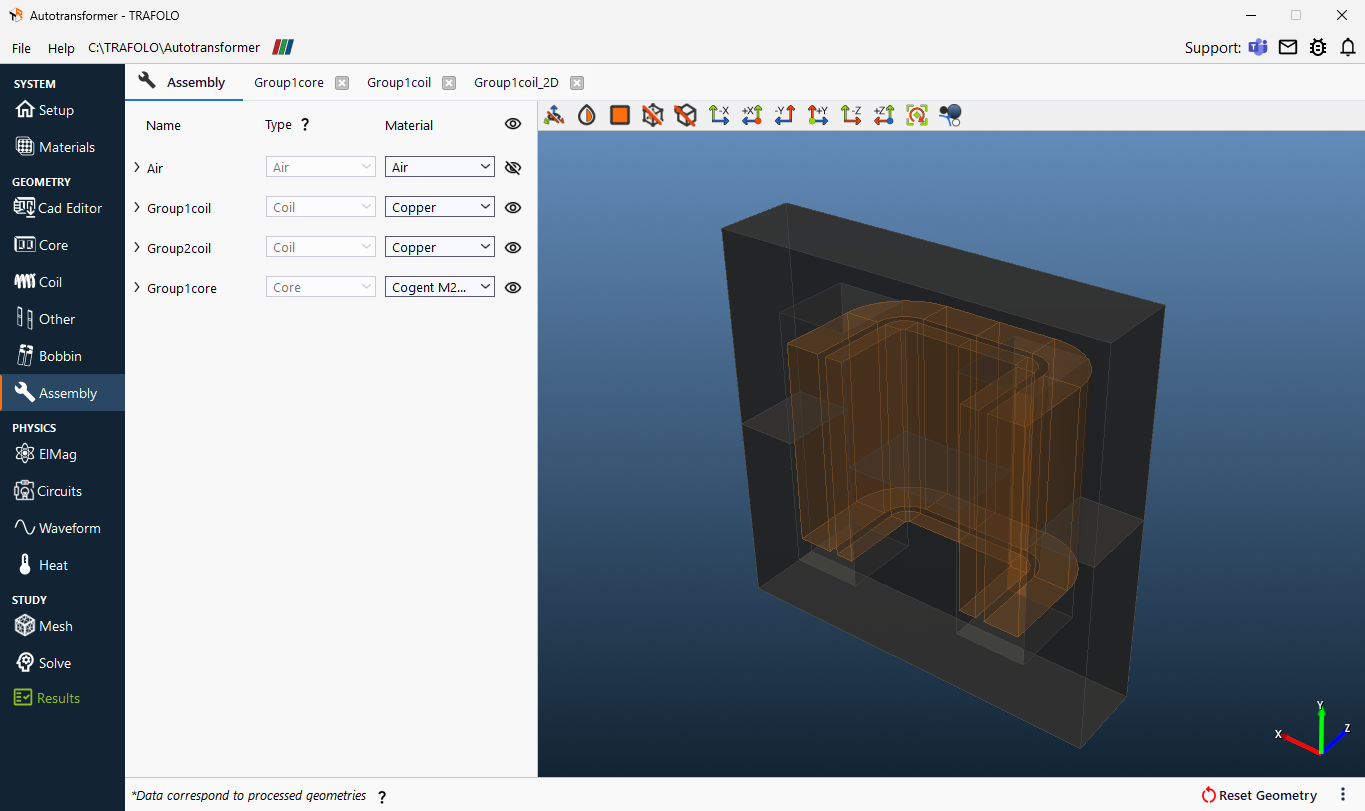
ElMag
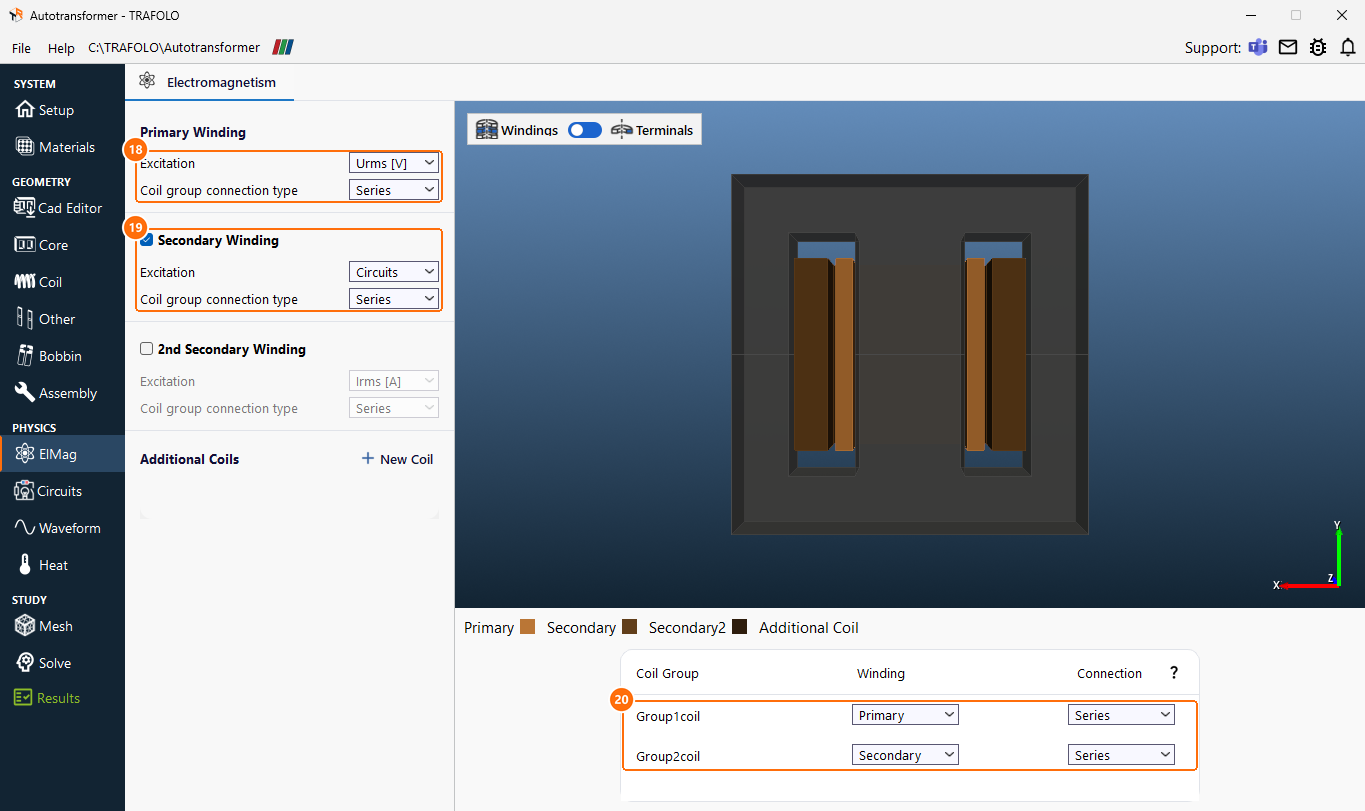
- Under Primary Winding, set Excitation to Urms [V] and Coil group connection type to Series.
- Tick Secondary Winding, set Excitation to Circuits and Coil group connection type to Series: the secondary has no source of its own.
- In the coil group table, set both groups:
| Coil Group | Winding | Connection |
|---|---|---|
| Group1coil | Primary | Series |
| Group2coil | Secondary | Series |
Circuits
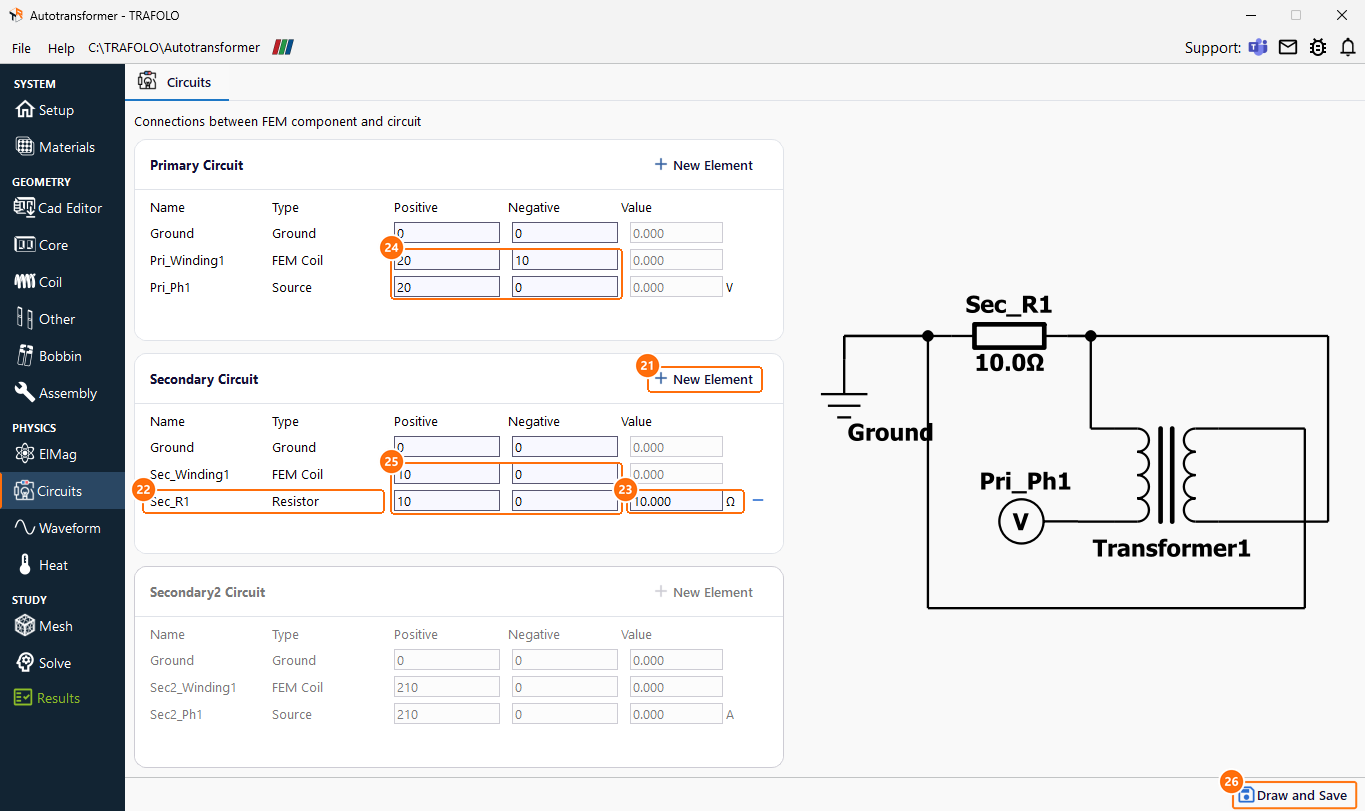
TRAFOLO builds one circuit per winding. Two changes make them an autotransformer: a load resistor, and node numbers that connect the two parts of the winding at the tap. Elements with the same node number are connected; node 0 is ground, common to both circuits.
- In the secondary circuit, click New Element, choose Resistor and set its value to 10 Ω.
-
Set the node numbers of each element as in the circuit diagram above:
Circuit Element Positive node Negative node Primary Pri_Ph1, the source 20 0 Primary Pri_Winding1, Group1coil 20 10 Secondary Sec_Winding1, Group2coil 10 0 Secondary Sec_R1, the load 10 0 -
Click Draw and Save.
Waveform
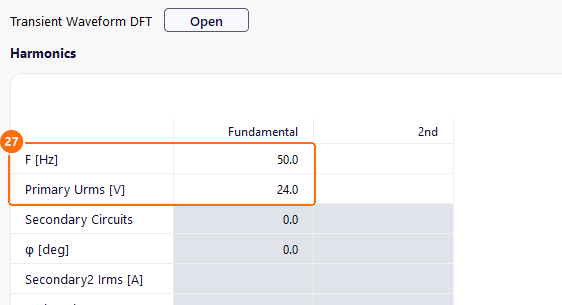
- In the Harmonics table, column Fundamental, set F [Hz] to 50 and Primary Urms [V] to 24.
Heat
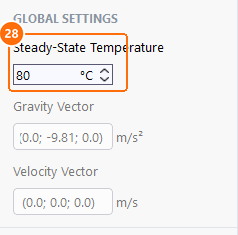
- Under GLOBAL SETTINGS, set Steady-State Temperature to 80 °C. It sets the copper conductivity.
Mesh
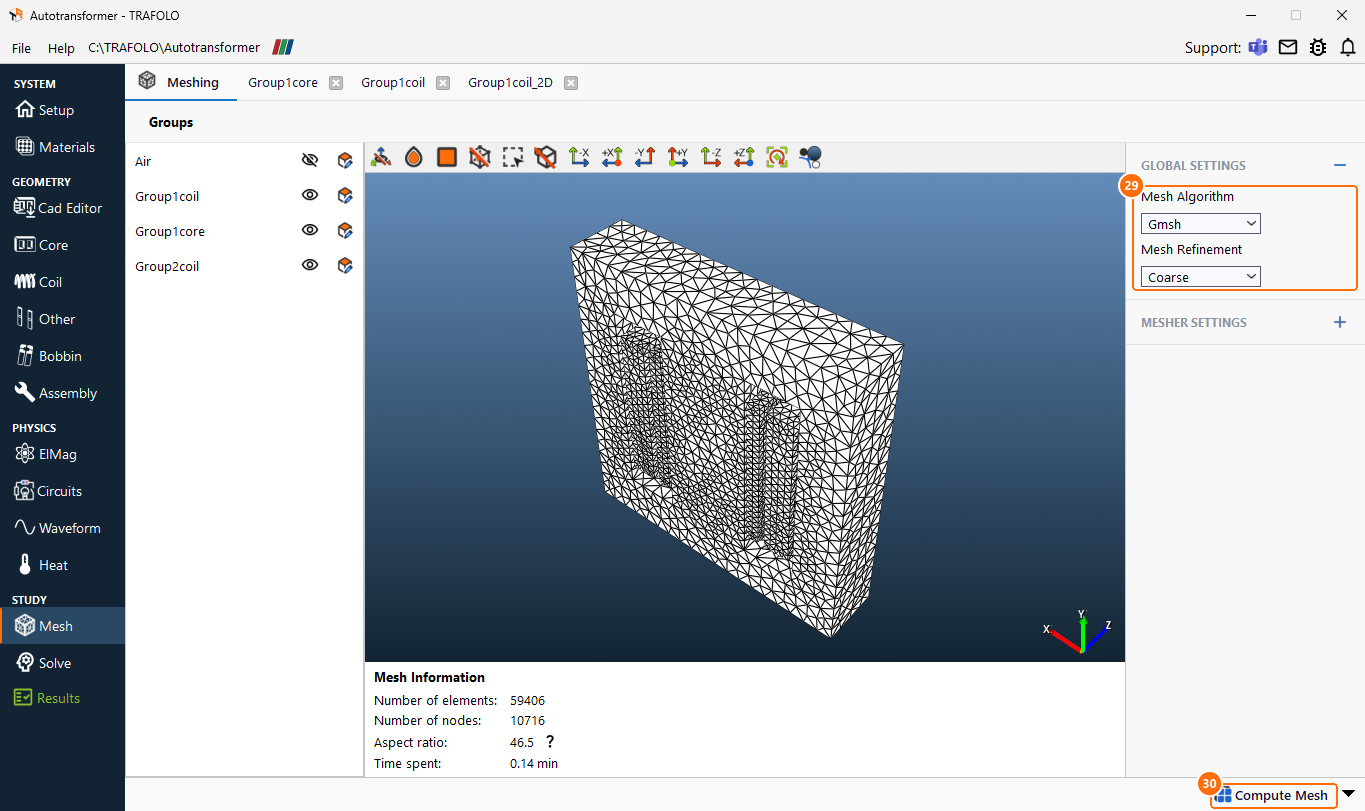
- Under GLOBAL SETTINGS, set Mesh Algorithm to Gmsh and Mesh Refinement to Coarse.
- Click Compute Mesh. The mesh has about 59,000 elements.
Solve
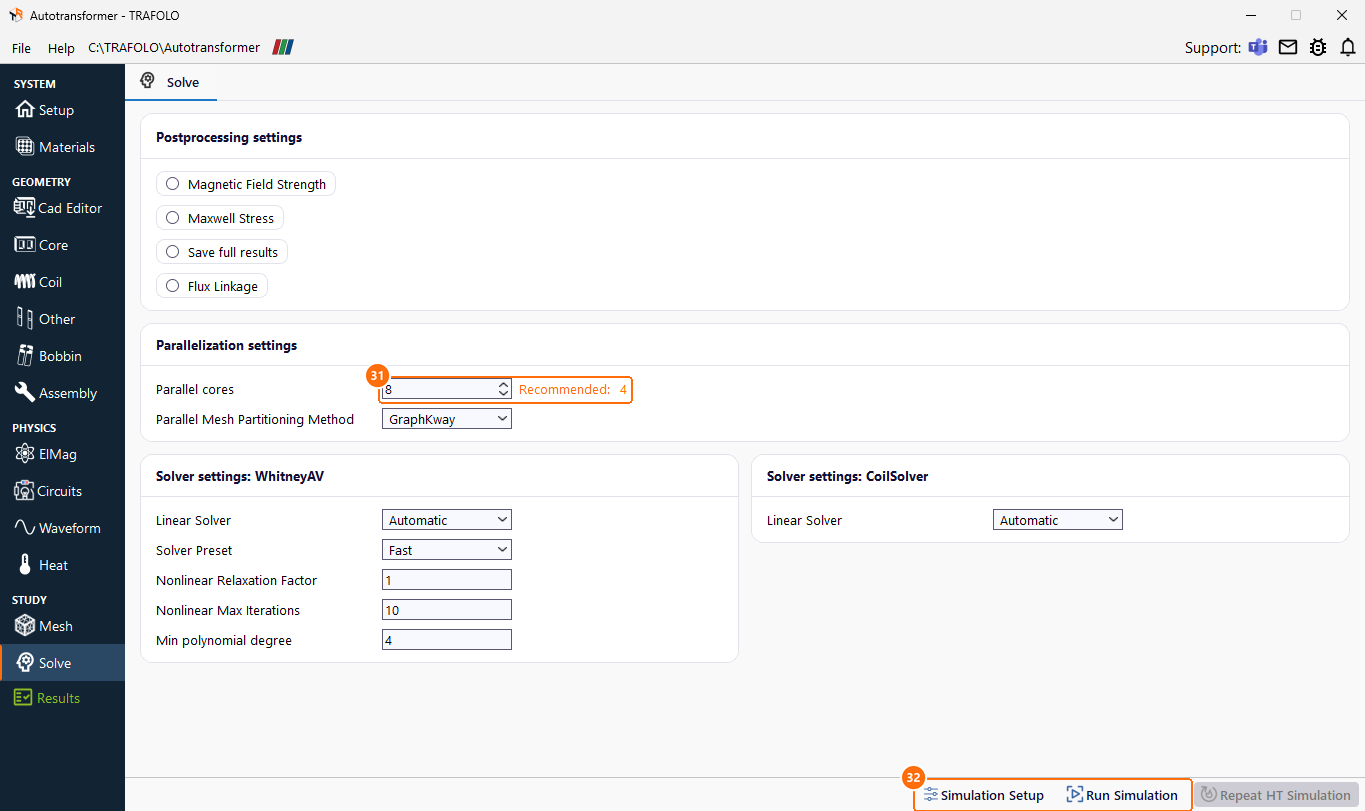
- Set Parallel cores to the number of performance cores of your CPU and keep Solver Preset Fast.
- Click Simulation Setup, then Run Simulation.
Results
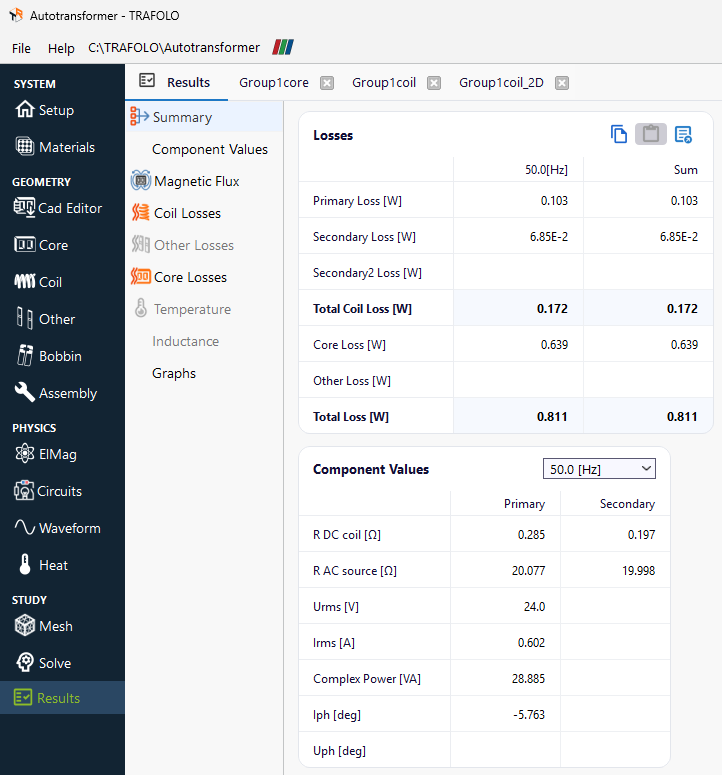
Losses at 24 V RMS and 50 Hz (Results › Summary):
| Series part | Common part | Windings | Core | Total |
|---|---|---|---|---|
| 0.103 W | 0.069 W | 0.172 W | 0.639 W | 0.811 W |
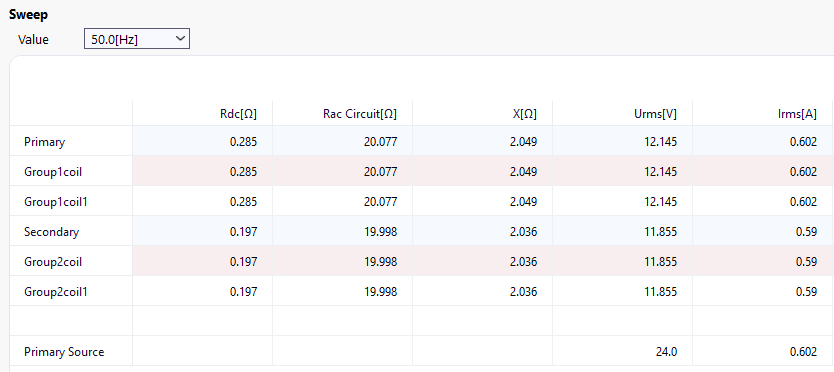
Voltages and currents (Results › Component Values; the load current is the load voltage over 10 Ω):
| Voltage (V RMS) | Current (A RMS) | |
|---|---|---|
| Source | 24.0 | 0.602 |
| Series part, Group1coil | 12.145 | 0.602 |
| Common part, Group2coil | 11.855 | 0.590 |
| Load, 10 Ω | 11.855 | 1.186 |
Currents in the two parts
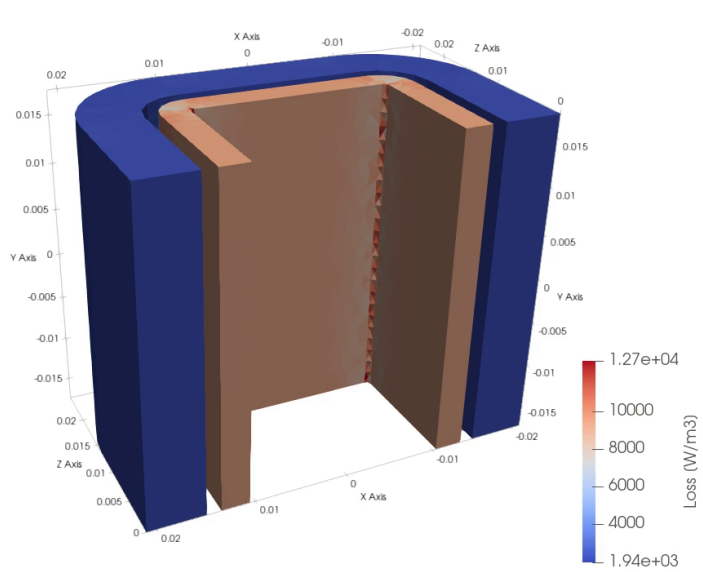
The load draws 1.19 A, but each part of the winding carries only about 0.6 A: the series part carries the input current, the common part the difference between load and input current. The DC resistances are 0.285 Ω for the series part and 0.197 Ω for the common part: its thicker wire more than makes up for its longer outer turns, so it loses less (0.069 W against 0.103 W).
Load voltage and efficiency
The load gets 11.855 V, 0.145 V below the ideal 12 V. The resistive drops explain it: 0.602 A × 0.285 Ω + 0.590 A × 0.197 Ω = 0.29 V, shared equally by the two parts; leakage inductance plays no visible role at this load. The load takes 14.05 W against 0.81 W of losses: 94.5 % efficiency.
Flux density and core loss
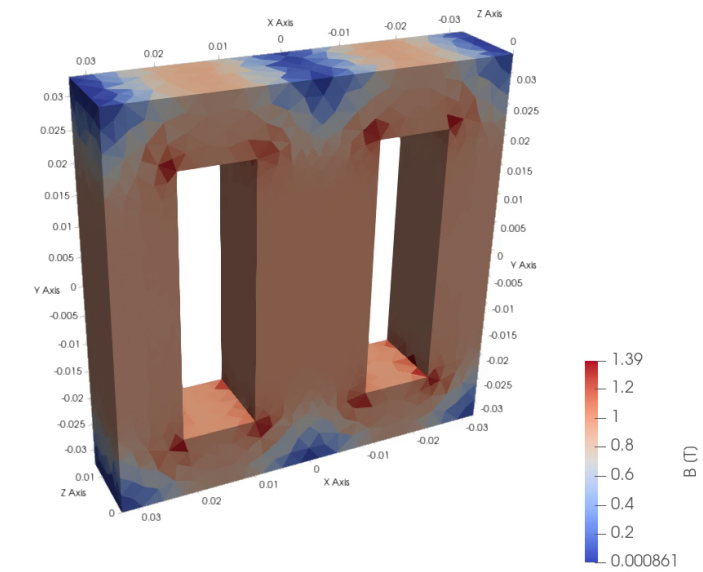
Faraday's law sets the flux from the voltage: Bpeak = V/(4.44·f·N·Ae) = 24 V/(4.44 × 50 Hz × 200 × 535 mm²) = 1.0 T in the limbs, as the field view shows. The flux crowds to 1.4 T at the inner corners of the windows.
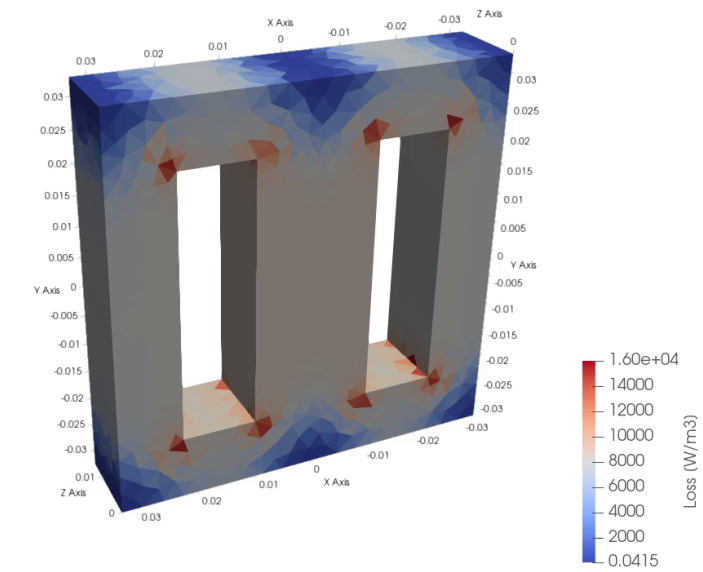
The core causes 79 % of the loss. As a check, the 87.4 cm³ of steel (0.66 kg) at the material's 1.07 W/kg for 1.0 T and 50 Hz would lose 0.71 W; the simulated 0.64 W is lower because parts of the core, such as the outer corners, carry less flux. The shipped example keeps its own copy of the core material, M270-50A, with a different Steinmetz fit of the same loss data: there the core loss is 0.55 W; all other results are the same.
Background
Why an autotransformer needs less copper
Part of the power reaches the load by conduction through the common part, the rest by induction. With the tap at half the turns, each part carries about half the load current, so the winding needs less copper than a two-winding transformer of the same rating, whose secondary would carry the full 1.19 A. The price is that input and output are not isolated.