Setting terminals & Current Direction
Set the current direction of every coil: reverse one coil group with its terminals on the ElMag tab, or a whole winding with its node numbers on the Circuits tab.
Video: setting the current direction of the two coils of a two-limb gapped inductor (recorded in an earlier TRAFOLO version).
The direction matters as soon as two coils or two windings carry current together. A coil that runs against the others cancels their flux instead of adding to it, and inductance and losses come out far off.
When the direction matters
| Model | Wrong direction gives | Fix |
|---|---|---|
| Two or more coil groups on one winding, for example the two coils of a two-limb inductor | The coils cancel each other's flux in the core: inductance far too low | Reverse one coil group with its terminals (ElMag) |
| Two windings with current excitation (Irms [A]), for example a transformer under load | The ampere-turns add instead of cancelling: core flux and core loss far too high | Reverse one winding (Circuits or ElMag), or shift the phase of its current by 180° on the Waveform tab |
| Series-aiding and series-opposing runs for the Coupling Factor | You reverse one coil on purpose for the opposing run | Reverse one coil group with its terminals (ElMag) |
| One winding alone on its source, or a secondary closed only on its own load | Only the signs of its voltage and current change; losses and inductance stay the same | Nothing to do |
Terminals
Terminals are the faces where an open coil ends on the boundary of the model: on the symmetry plane z = 0 in a Symmetric model, on the outer boundary of the air domain in a Full model (see Setup). TRAFOLO finds them when you click Assemble Geometry on the Assembly tab, solid by solid: a Massive (solid) coil has one solid per turn, a Stranded & Litz solid carries Turns per solid turns. Each solid of an open coil needs at least one Positive and one Negative face.
| Type | Colour | Meaning |
|---|---|---|
| Positive | Orange | One end of the solid. Several Positive faces on one solid act as one terminal and share the current. |
| Negative | Black | The other end of the solid. |
| Undefined | Grey | Disconnected: no current crosses the face. |
Swapping Positive and Negative on every solid of a coil group reverses its current.
At assembly, TRAFOLO sets the types by position, solid by solid: along the axis on which the solid's faces lie farthest apart, the faces on the high-coordinate side become Positive and the others Negative. No face starts as Undefined. Identical coils placed side by side therefore all get the same winding sense, whatever the magnetic circuit needs.
Every assembly (Reset Geometry, then Assemble Geometry) sets all terminals back to these automatic types. Check the terminals after every assembly.
Assembly stops with “… doesn't have enough terminals” when a solid of an open coil reaches the boundary with fewer than two faces. Extend the solid to the symmetry plane or to the air box, or, for Stranded & Litz, make it a closed coil. A coil group without a Positive or a Negative face stops the solve with “… has no Positive terminal” (or Negative). The solve does not check single solids: make sure each solid has one face of each type.
A closed coil (Closed coil on the Coil tab, Stranded & Litz only) has no terminals. Its current follows the right-hand rule about Coil Normal, 0.0; 1.0; 0.0 (default). Negate the normal, for example 0.0; −1.0; 0.0, to reverse the current.
Reverse a coil group on the ElMag tab
Use this to reverse one coil group against the other coil groups of its winding. The geometry must be assembled.
- Open the ElMag tab.
-
At the top left of the 3D view, switch Windings to Terminals (1). The model turns transparent and each terminal face shows its type, for example Positive (2) and Negative (3); the legend (4) is below the view.
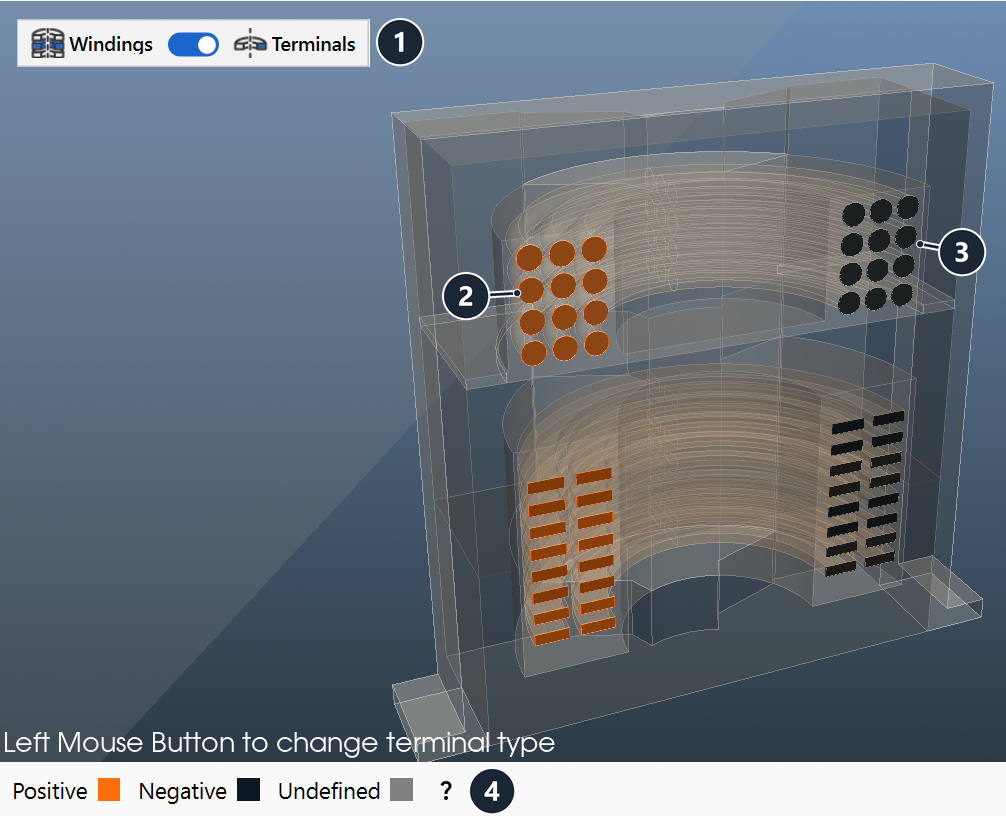
ElMag tab in the Terminals view (Transformer with Inductor template): switch (1), Positive (2) and Negative (3) faces, legend (4). -
Rotate (left-drag) and zoom (wheel) until you see the terminal faces of the coil group (3D View).
- Click a terminal face. Each click moves it one step: Positive → Negative → Undefined → Positive. TRAFOLO saves the change at once.
- Repeat for every solid of the coil group (every turn of a Massive (solid) coil): one click turns a Positive face Negative, two clicks turn a Negative face Positive.
- Solve again. Terminal types are boundary conditions, not geometry: the mesh stays valid.
Reverse a whole winding on the Circuits tab
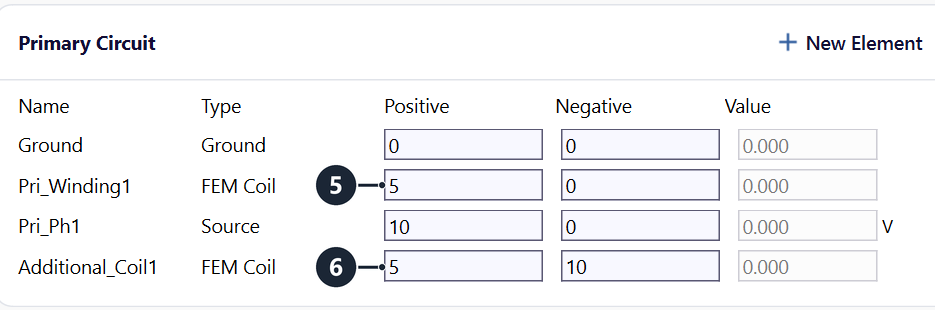
On the Circuits tab each winding is one FEM Coil row per phase: Pri_Winding1 for the primary, Sec_Winding1 and Sec2_Winding1 for the secondaries. The row stands for all coil groups of that winding, connected as set in Coil group connection type on the ElMag tab; its Positive and Negative node numbers (5) are the two ends of the winding. Swapping them reverses all coil groups of the winding together and keeps their directions relative to each other. An additional coil has its own FEM Coil row, for example Additional_Coil1 (6), and reverses alone.
- Open the Circuits tab.
- In the circuit table of the winding, swap the numbers in Positive and Negative of its FEM Coil row (5), for example Pri_Winding1 from 5 and 0 to 0 and 5.
- Click Draw and Save at the bottom right of the tab. TRAFOLO saves the netlist and redraws the circuit.
- Solve again.
With Without Circuits on (Setup tab, see Without circuits), TRAFOLO applies the voltage directly between the Positive and the Negative faces: only the terminals set the direction.
Example: Two Limb Inductor template
The Two Limb Inductor template (Welcome screen, Examples) is a gapped inductor with one coil on each limb:
- Core: Two Limb, M165_35S, limbs 50 mm × 50 mm, three 2 mm gaps of Fiberglass Reinforced Epoxy (FR4) in each limb.
- Coils: Group1coil and Group2coil, Copper, 15 Massive (solid) turns each, both on the Primary winding, Coil group connection type Series (30 turns).
- Excitation: Irms [A] 300 A at 50 Hz, Harmonic, Symmetric (half model, z ≥ 0).
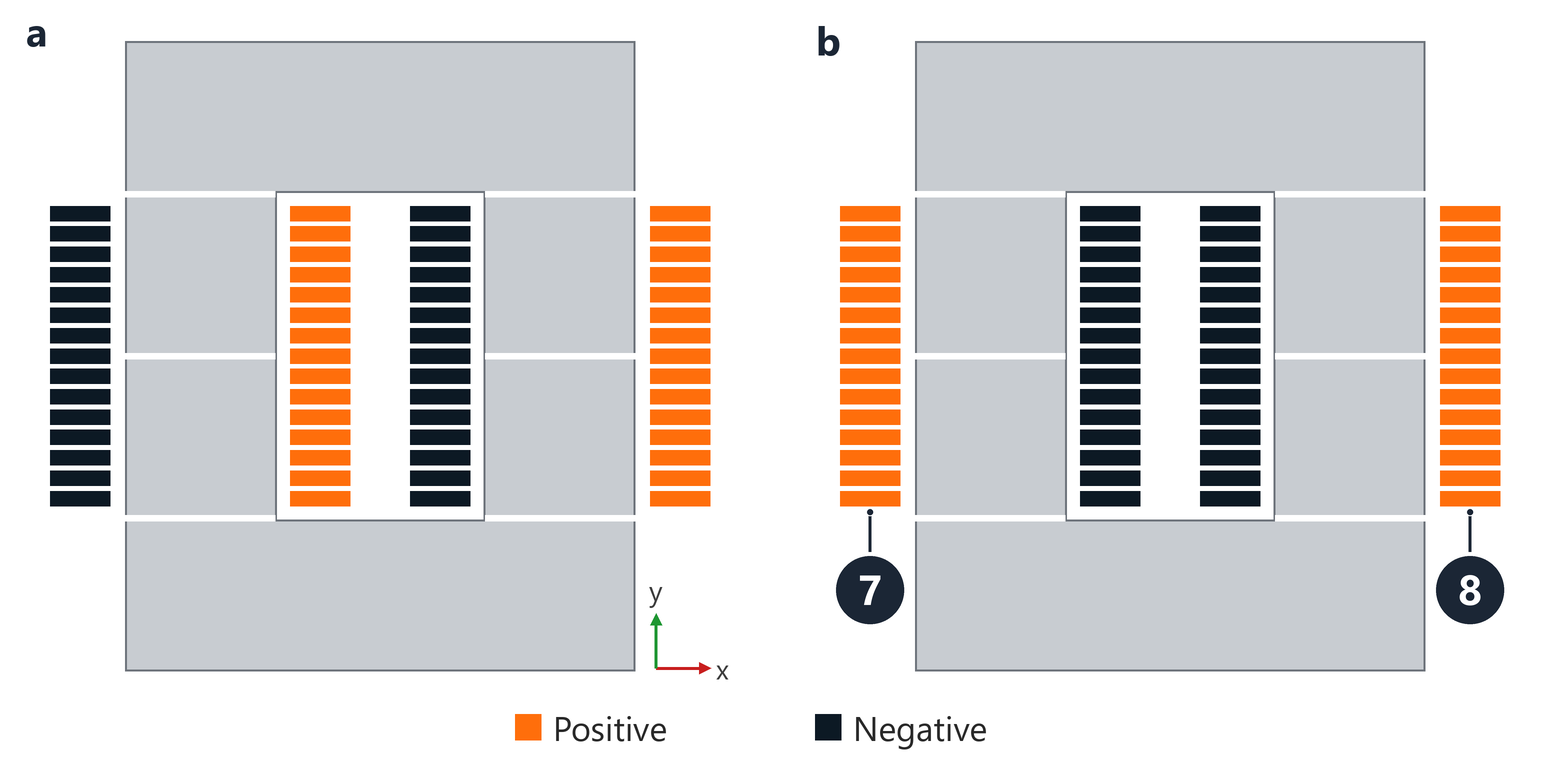
After assembly (a), every turn has its Positive face on the +x side, so both coils have the same winding sense. They drive flux in the same direction through both limbs and oppose each other around the core. The template ships with the terminals of all 15 turns of Group1coil (7) reversed and Group2coil (8) left as assembled (b): the pattern is mirrored and the flux of both coils adds around the core. The Model description on the Setup tab of the template reminds you of this step.
The stored results of the template confirm the direction:
| Quantity | Value | Check |
|---|---|---|
| X of the primary (Component Values) | 0.08876 Ω | L = X/ω = 0.08876 Ω / (2π · 50 Hz) = 282.5 µH |
| Gap estimate | 236 µH | L ≈ μ0·N2·A/lg with N = 30, A = 50 mm × 50 mm, lg = 6 × 2 mm = 12 mm; the FEM value is 20 % higher: the estimate ignores the fringing flux at the gaps |
With one coil reversed by mistake, the ampere-turns of the two coils cancel around the core: the flux of each coil closes through the air instead of through the other limb, X and the inductance fall to a small fraction of these values, and the yokes carry almost no flux. The voltages of the two coils stay equal in both cases, so they do not show the direction.
Check the direction in your model
- After every assembly, look at the Terminals view: identical coils side by side show the same pattern unless you reversed one.
- Compare the inductance with a gap estimate μ0·N2·A/lg. A value far below it points to coils that oppose each other.
- On the Results tab, open Magnetic Flux: with the coils aiding, the flux runs through the limbs and the yokes around the core. Yokes with almost no flux while the limbs carry flux mean the coils cancel.
Related
- ElMag: windings, excitation and the Windings and Terminals views
- Circuits: node numbers and circuit elements
- Coil: Closed coil and Coil Normal
- Coupling Factor: series-aiding and series-opposing runs
- Troubleshooting: inductance or losses far off