Heat Transfer modeling
Use this page to compute the temperature of a transformer, inductor or choke in TRAFOLO and to set the cooling of its outer faces so that the hotspot comes out right. It covers the coupling with the electromagnetic solve, what the heat model includes, convection with an entered or automatic heat transfer coefficient, radiation and heat-sink faces. Each setting is also listed on the Heat and Setup reference pages.
How TRAFOLO computes temperatures
TRAFOLO runs two solves one after the other (weak coupling). The electromagnetic solve gives the loss density in W/m³ in every body. The heat solve takes it as the heat source and computes the temperature by conduction through the solid bodies. Currents change within microseconds to milliseconds and temperatures within minutes to hours, so the heat solve only needs the time-averaged loss.
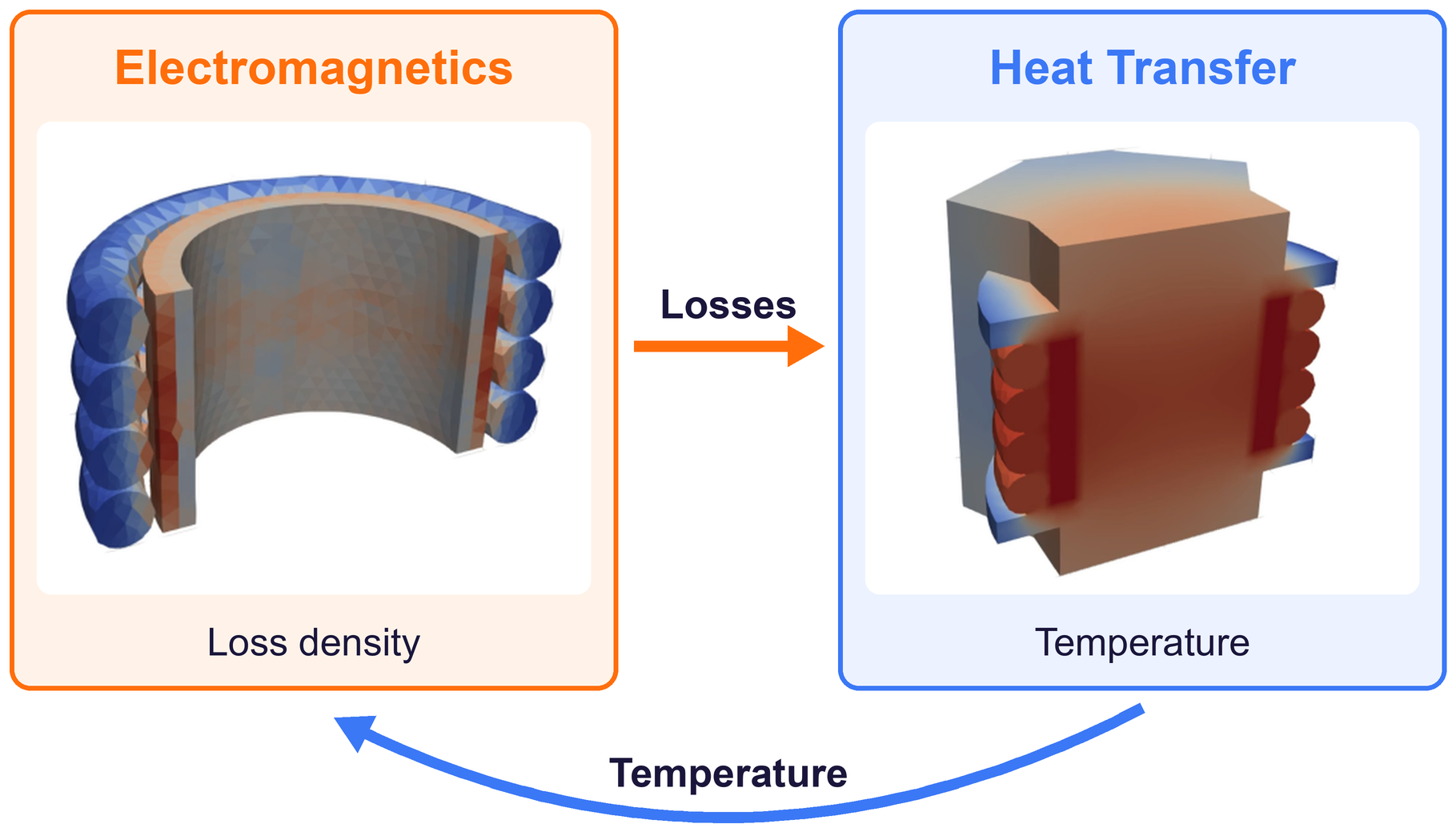
- The electromagnetic solve computes the loss density of the windings, the core and other conductive parts. Harmonic runs add the losses of all frequencies; transient runs average them over full periods.
- The loss density of each body becomes its heat source.
- The heat solve computes conduction in the solid bodies, with the boundary conditions you set on the outer faces. It gives the temperature field and the Hotspot [°C].
- With Temperature Iterations 2 or 3, the temperature field goes back to step 1 (section Temperature of the electromagnetic solve).
The Setup tab decides which runs are combined:
| Electromagnetics | Heat Transfer | Heat source | Temperature Iterations |
|---|---|---|---|
| Harmonic, Transient | Steady-state | Losses of the electromagnetic run | 1 (default), 2 or 3 |
| Harmonic, Transient | Transient | Losses of the electromagnetic run, constant in time | 1 |
| Inductance | Off only | None | 1 |
| Off | Steady-state or Transient (required) | Total Group Power per body group, or Power per body, in W, on the Heat Sources tab of the Heat tab; a group's power is spread over its bodies by volume | 1 |
What the heat model includes
| Physics | In TRAFOLO | Details |
|---|---|---|
| Conduction in the solid bodies | Yes | Heat Conductivity [W/m.K] of each material: one value, or three values (x, y, z) in the global axes for a material that conducts differently by direction. Library values in W/(m·K): copper 401, ferrites 3 to 5.5, epoxy 0.2, laminated steels typically (22, 22, 3) with the low value along z, across the sheets. Check that z is the stacking direction of your core. |
| Turns and insulation inside a winding body | Not resolved | A Stranded & Litz winding is one body and conducts heat with its material's Heat Conductivity in every direction, 401 W/(m·K) for Copper. The enamel, the litz serving and the voids between turns are not included, so the temperature rise inside the winding can come out too low. When the winding hotspot matters, give the winding its own material: the electrical data of copper with a lower Heat Conductivity. |
| Thermal mass | Transient heat transfer | Heat Capacity [J/kg.K] and Density [kg/m³] of each material. |
| Contact between touching bodies | Perfect contact | No contact resistance. Model a thermal pad, gap filler or insulation layer as its own body with its own material; the library has Thermal paste, 4 W/(m·K). |
| Air or oil around the component | Not simulated | No CFD and no conjugate heat transfer. The outer faces get a boundary condition instead: convection, fixed temperature, insulation or heat flux, plus radiation. |
| Air pockets inside the component | Only as a body | An empty pocket belongs to the surrounding air, so its faces are cooled like outer faces. Fill it with a Bobbin body of material Air: heat then crosses it by conduction, 0.024 W/(m·K). |
| Radiation | Per face, to the surroundings | Grey body, from each face straight to the External temperature. No exchange between faces (no view factors). |
Set up a thermal simulation
- On the Setup tab, under HEAT TRANSFER, select Steady-state for the final temperature, however long the part takes to reach it, or Transient for the temperature over time, for example to compare with a measurement that has not settled.
- On the Materials tab, check Heat Conductivity [W/m.K] of every material in the model, also insulation, bobbin and potting. For a transient run, also check Heat Capacity [J/kg.K] and Density [kg/m³]. A material without them carries a marker with the tooltip Missing heat transfer data.
- Fill air pockets between windings and core with an Air body on the Bobbin tab, then click Assemble Geometry on the Assembly tab.
-
On the Heat tab, under GLOBAL SETTINGS, set Predicted Steady-State Temperature (1) near the expected hotspot, Gravity Vector (2) pointing down in the model axes, (0; −9.81; 0) m/s² (default), and Velocity Vector (3), the direction and speed of the cooling air, (0; 0; 0) m/s (default) for still air. In a transient heat run the first box is Initial Temperature, and Timesteps [s] appears below the vectors.
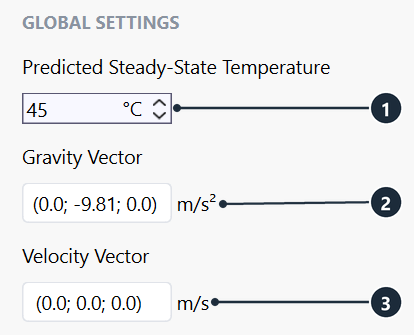
GLOBAL SETTINGS (Busbars template): Predicted Steady-State Temperature (1), Gravity Vector (2), Velocity Vector (3). -
Under FACES on the Boundary Conditions tab, select what to set: Geometry (4) for every outer face, a body group such as Group1core (5) for its faces, or single faces in the list or in the 3D view. Ctrl and Shift select several. Faces where two bodies touch are not in the list: heat crosses them by conduction. Terminal faces at the domain boundary are not in the list either and stay insulated.
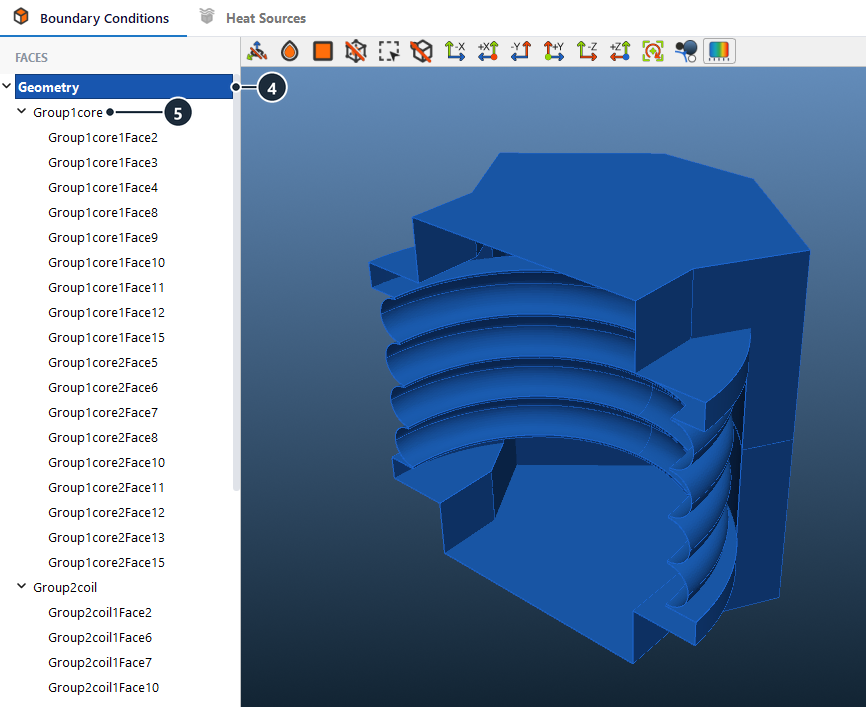
Flyback Transformer template: Geometry (4) selects every outer face; Group1core (5) holds the core faces. -
Under SURFACE SETTINGS, set Type (6) and External temperature (7), the temperature of the air or liquid. For Convection, enter a Heat transfer coefficient (8) or tick Auto (9) for air. For faces that see the surroundings, switch Idealized Radiation (10) on and set Emissivity (11). The sections below explain each choice.
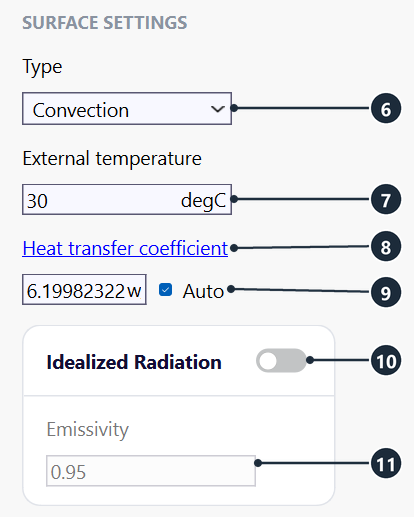
SURFACE SETTINGS of one face (Busbars template): convection to air at 30 °C, α estimated by Auto, radiation off. -
For a face on a heat sink or cold plate, select that face (12) and either untick Auto (13) and enter a higher Heat transfer coefficient, or set Type to Fixed Temperature. To include the heat sink itself, add it as a body on the Other tab (Geometry Builder Type HeatSink, material Aluminum) and set the boundary conditions on its faces.
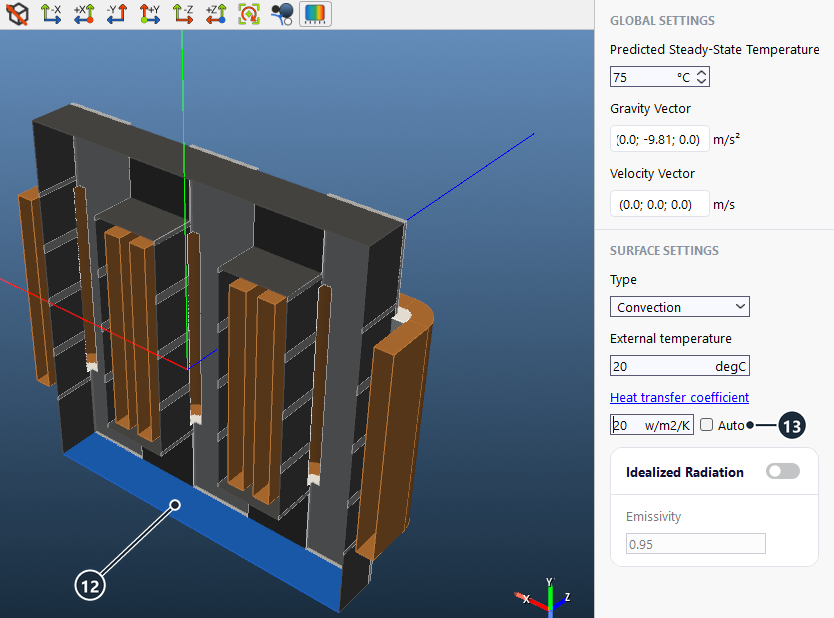
3 Phase Heat Transfer template: the core face on the heat sink (12) gets 20 W/(m²·K) with Auto off (13). -
Check the settings on the model: click Show Color Filter in the 3D toolbar and select Heat Transfer Coefficient. Type and Temperature show the other settings the same way.
-
On the Mesh tab, click Evaluate Mesh and then Compute Mesh.
- On the Solve tab, click Run Simulation. After a change on the Heat tab only, Repeat HT Simulation runs the heat transfer again on the last electromagnetic results.
- Read Hotspot [°C] under Summary on the Results tab and the field under Temperature. If the hotspot is far from the Predicted Steady-State Temperature, see Temperature of the electromagnetic solve below.
Boundary condition types
| Type | Settings | Use it for |
|---|---|---|
| Convection (default) | External temperature, 20 °C (default); Heat transfer coefficient, 5 W/(m²·K) (default), or Auto; Idealized Radiation | Faces cooled by air or a liquid. |
| Fixed Temperature | Temperature, 20 °C (default) | A face held at a known temperature, for example the base on a liquid-cooled cold plate. It assumes perfect contact: model the thermal pad or paste as a body when its resistance matters. |
| Insulation | None | No heat flow (adiabatic), for example a face on a thermally insulating mount. |
| Heat Flux | Heat Flux in W/m², 0 (default) | A known heat flow per area through the face. |
Convection and the heat transfer coefficient
Convection removes heat from a face to the surrounding fluid at the rate set by the heat transfer coefficient α:
−k·∂T/∂n = α·(T − Text)
Here k is the heat conductivity of the solid in W/(m·K), ∂T/∂n the temperature gradient normal to the face in K/m, α the Heat transfer coefficient in W/(m²·K) (0 to 10 000), T the face temperature and Text the External temperature. α stands for the whole fluid side of the face. It depends on the fluid, its speed, the orientation and size of the face and the temperature difference.
| Cooling | Typical α in W/(m²·K) |
|---|---|
| Air, natural (free) convection | 2.5 to 25 |
| Air, forced convection | 10 to 500 |
| Liquids, forced convection | 100 to 15 000 |
The shipped templates use these values. For Auto, the values are the ones the box shows, for a face at the Predicted Steady-State Temperature:
| Template | Cooling | Predicted Steady-State Temperature / External temperature | α in W/(m²·K) |
|---|---|---|---|
| Transformer with Inductor | Still air, Auto; 3 mounting faces at Fixed Temperature 50 °C | 65 °C / 50 °C | 7.1 to 19.8 |
| 3 Phase Heat Transfer | Still air, Auto; heat-sink face entered | 75 °C / 20 °C | 4.6 to 10.4; 20 |
| Dual Active Bridge | Air at 1 m/s, Auto | 80 °C / 20 °C | 8.8 to 27.9 |
| Flyback Transformer | Air at 2 m/s, Auto | 80 °C / 70 °C | 17 to 81 |
| Oil-Immersed Three-Phase Transformer | Oil, entered | 80 °C / 50 °C | 150 |
How Auto estimates α
Auto computes α for every face from textbook correlations for air. TRAFOLO classifies each face by its orientation to the Gravity Vector and the Velocity Vector, takes its size from the whole flat wall the face belongs to, and evaluates the air properties at the film temperature (T + Text)/2.
- Natural convection on every face: vertical faces, faces inclined up to 60° from vertical, faces looking up and faces looking down each have their own correlation. A vertical face with an opposing vertical face closer than 5 mm or 0.1 × the wall height, whichever is larger, is a chimney channel and gets the channel correlation.
- Forced convection when the Velocity Vector is 0.1 m/s or more: faces the air hits (windward), faces it slides along (parallel) and faces in the wake (leeward, 0.33 × windward).
- Both together: α = (αnat3 + αforced3)1/3.
- During the solve, α follows the local face temperature: the solver recomputes it at every nonlinear iteration. The box shows α for a face at the Predicted Steady-State Temperature (Initial Temperature in a transient heat run) in air at the External temperature.
- Assembly turns Auto on for every new face. With a group selected and Auto on, the box stays empty because each face has its own α; select one face to see its value.
Auto models dry air at 1 atm and gives convection only. For oil, water or a liquid-cooled plate, untick Auto and enter α, or use Fixed Temperature. The Velocity Vector is one uniform air speed for the whole model: faces in the shadow of other parts are not slowed down. In still air, also switch radiation on (next section).
Correlations used by Auto
| Face | Nusselt number Nu | Length L |
|---|---|---|
| Vertical, within 5° | Churchill–Chu: Nu = 0.68 + 0.67·Ra1/4 / [1 + (0.492/Pr)9/16]4/9 for Ra ≤ 109; Nu = {0.825 + 0.387·Ra1/6·[1 + (0.492/Pr)9/16]−8/27}2 above | Wall height |
| Inclined, 5° to 60° from vertical | As vertical, with g·cos θ in Ra | Slant length of the wall |
| Looking up | Nu = 0.54·Ra1/4 for Ra ≤ 107; Nu = 0.15·Ra1/3 above (McAdams, Lloyd–Moran) | Area / perimeter |
| Looking down | Nu = 0.27·Ra1/4 | Area / perimeter |
| Vertical channel | Bar-Cohen–Rohsenow: Nu = [576/El2 + 2.873/El1/2]−1/2, El = Ras·s/L | Gap s; channel height L |
| Forced, parallel to the flow | Nu = 0.664·Re1/2·Pr1/3 for Re < 5·105; Nu = 0.037·Re0.8·Pr1/3 above | Wall length along the flow |
| Forced, windward | Churchill–Bernstein | √(d1·d2) of the wall across the flow |
| Forced, leeward | 0.33 × windward | As windward |
α = Nu·kair/L, with Ra = g·β·ΔT·L3/(ν·a) and Re = v·L/ν. Air properties: dry air at 1 atm, film temperature −23 to 527 °C. Nu is at least 1, so a channel gap s narrower than about 4 mm gets α = kair/s, about 14 W/(m²·K) at 2 mm, more than an open wall gets, although the air in such a gap hardly moves. Fill gaps this narrow with an Air body on the Bobbin tab. Coplanar faces form one wall, so a face that is one segment of a gapped core or a stacked winding gets the length of the whole wall. Very small faces, such as chamfers, get at least the length at which buoyancy sets in, so that they do not get a conduction-limited α of hundreds of W/(m²·K). Correlations of this kind typically agree with measurements or CFD within about 25 to 35 % on α.
Radiation
Switch Idealized Radiation (10) on and set Emissivity (11) to add grey-body radiation to the convection of a face:
qrad = ε·σ·(T4 − Text4)
Here ε is the Emissivity, 0 to 1, 0.95 (default); σ = 5.67 × 10⁻⁸ W/(m²·K4) is the Stefan–Boltzmann constant; T and Text are in kelvin, with Text the External temperature of the face. Radiation is available on Convection faces and is off (default).
In still air, radiation removes about as much heat as natural convection. As an equivalent coefficient, αrad = ε·σ·(T2 + Text2)·(T + Text). For ε = 0.9 and air at 25 °C:
| Face temperature | 50 °C | 80 °C | 100 °C | 150 °C |
|---|---|---|---|---|
| αrad in W/(m²·K) | 6.1 | 7.1 | 7.8 | 9.9 |
| Natural convection, vertical face 50 mm high (Auto correlation), in W/(m²·K) | 6.6 | 7.8 | 8.4 | 9.3 |
With radiation off, the temperature rise of a part in still air can come out close to twice too high. With forced air of 20 to 80 W/(m²·K), radiation lowers the rise by roughly 10 to 25 %.
The idealized model lets every face radiate to the External temperature, also a face that looks at another hot part, for example inside a narrow channel between windings. Such faces mostly exchange heat with each other, so radiation there overestimates the cooling. Switch radiation on for Geometry, then off on faces inside narrow channels.
Typical emissivity, from the Engineering ToolBox emissivity table (about 27 °C):
| Surface | ε |
|---|---|
| Plastics, epoxy paint, oil paint | 0.89 to 0.97 |
| Glazed porcelain | 0.92 to 0.93 |
| Steel, oxidized | 0.79 |
| Copper with a thick oxide layer | 0.78 |
| Aluminium, anodized | 0.77 |
| Aluminium, commercial sheet | 0.09 |
| Steel, polished | 0.07 |
| Copper, polished | 0.023 to 0.052 |
Enamelled wire, varnished windings and coated cores behave like paints and plastics; bare bright metal radiates little.
Temperature of the electromagnetic solve
The electromagnetic solve uses temperature-dependent material properties. The conductivity of windings, cores and other conductive parts follows σ(T) = σ20 / (1 + αT·(T − 20 °C)), with αT the material's Temperature coefficient (copper 3.9 × 10⁻³ K−1). The core loss follows temperature only through the core material's Thermal Coefficients; with an empty list it does not change, as for Ferroxcube 3C95 100C and 3C97 100C, whose loss data are for 100 °C.
| Setup | Temperature of the electromagnetic solve |
|---|---|
| Heat transfer Off | Steady-State Temperature on the Heat tab, 20 °C (default), in every body. |
| Steady-state, Temperature Iterations 1 (default) | Predicted Steady-State Temperature, 20 °C (default), in every body. Nothing goes back from the heat solve. |
| Steady-state, Temperature Iterations 2 or 3 | First pass: Predicted Steady-State Temperature. Next passes: the temperature field of the previous heat solve. |
| Transient | Initial Temperature, for the whole run. |
The number of passes is fixed at the value you set; TRAFOLO does not test for convergence. Each extra pass repeats the electromagnetic and the heat solve.
With the default 20 °C, a winding that runs at 80 °C has a DC resistance 23 % higher than the solve uses, so the loss of a current-driven winding comes out up to about 19 % low. Set Predicted Steady-State Temperature to the hotspot of a first run, or set Temperature Iterations to 2. In the 3 Phase Heat Transfer template, 75 °C predicted against an 81.3 °C hotspot changes the winding resistance by 2 %, so one pass is enough.
Check the result
- Hotspot [°C] under Summary on the Results tab is the highest temperature in the model; Temperature shows where it is.
- Hand check: the mean rise of the outer surface above the fluid is about P/(α·A), with P the total loss, A the outer surface and α including αrad. Example: 2 W from 50 cm² at α = 10 W/(m²·K) gives 40 K. The hotspot lies above this by the temperature drop inside the part. A large deviation usually points to a wrong boundary condition; check it with the Color Filter.
- To see the α the solver used on the Auto faces, tick Save full results on the Solve tab: the full results then include the field htc, which you can show in ParaView.
Common problems
The hotspot in still air is far above a measurement. Auto gives convection only and radiation is off. Switch Idealized Radiation on with the emissivity of the surfaces.
The windings stay cool although they carry most of the loss. An empty air pocket next to them is cooled like an outer face. Fill it with an Air body on the Bobbin tab.
The winding loss with heat transfer equals the loss at 20 °C. Temperature Iterations is 1 and Predicted Steady-State Temperature is still 20 °C (default). Set the predicted temperature, or 2 iterations.
The core loss does not change between passes. The core material has no Thermal Coefficients. Use a material with them, or one whose loss data are for the expected temperature.
The Heat transfer coefficient box is empty. A group with Auto is selected. Select one face to see its α.
Auto cannot be ticked. The face comes from a project saved before Auto existed and has no stored geometry. On the Assembly tab, click Reset Geometry, then Assemble Geometry.
Oil or water cooling gives values typical of air. Auto models air. Untick it and enter α.
Related
- Heat: every setting of the Heat tab, including Heat Sources
- Setup: heat transfer type and Temperature Iterations
- Materials: heat conductivity, heat capacity, temperature coefficient and thermal coefficients
- Heat Transfer template: a transient heat run with the losses entered as heat sources
- 3-Phase Choke with Heat Transfer template: a coupled run with Auto and a heat-sink face
- LLC Coupled Transformer (with Inductor) template: Auto in still air, an aluminium heatsink body and mounting faces at Fixed Temperature
- Other: heat sinks and other parts as bodies
- 3D View: the Color Filter