Core Properties and Models
This page helps you choose how TRAFOLO models a magnetic core: the permeability model of the core material (constant, complex or a B-H curve), laminated stacks, the core-loss models, air gaps and permanent magnets. For each model it gives the runs that use it, what TRAFOLO computes and where the model stops being valid. You set the material models on the Materials tab, and the gaps and the magnet direction on the Core tab.
Choosing a permeability model
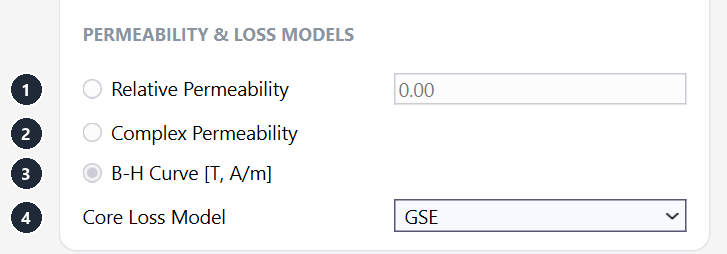
Each core material uses one permeability model, chosen under PERMEABILITY & LOSS MODELS on the General tab of the material form: Relative Permeability (1), Complex Permeability (2) or B-H Curve [T, A/m] (3). Core Loss Model (4) sets the core-loss formula of Transient runs: GSE or iGSE. In a Harmonic or Inductance project it offers only SE (Steinmetz + Eddy).
| Model | Use it for | Harmonic | Inductance | Transient | Core loss from |
|---|---|---|---|---|---|
| Relative Permeability (1) | Gapped cores; ungapped cores well below saturation | Yes | Yes | Yes | Core Loss tab: Steinmetz + Eddy, or GSE / iGSE in Transient |
| Complex Permeability (2) | Ferrites at small signal: EMI chokes, RF and high-frequency inductors | Yes | Yes | No, the run does not start | Imaginary part μ″, inside the field solution |
| B-H Curve [T, A/m] (3) | Saturation; cores running near the knee of the curve | Fundamental frequency only | Yes, at every sweep point | Yes | Core Loss tab, as for Relative Permeability |
Core Material Type sets the kind of core: Ferrite (default), Powder and Composite are modelled the same way; Laminated adds the laminate model and Magnet adds a magnetization (both described further down this page).
Constant relative permeability
With Relative Permeability (1), B = μ0·μr·H in the whole core, in every run type. The model is linear: it does not saturate and has no loss of its own; the core loss comes from the Core Loss tab.
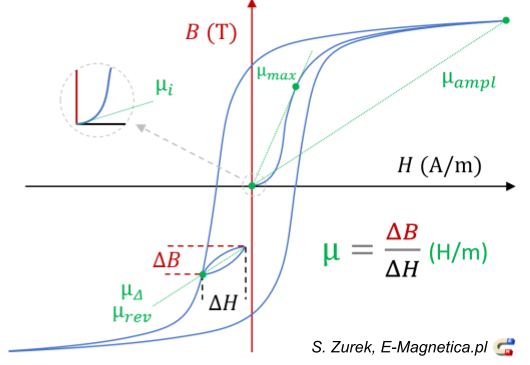
The value to enter depends on the operating point. Datasheets quote several permeabilities, defined on the B-H loop below:
| Permeability | Definition | Enter it for |
|---|---|---|
| Initial, μi | Slope of the initial magnetization curve at H → 0 | Small-signal parts: EMI chokes, current transformers at low flux density |
| Amplitude, μa | B̂ / (μ0·Ĥ) at the peak of the AC loop | Power inductors and transformers: μa at the design peak flux density |
| Incremental, μΔ (reversible, μrev, for a vanishing loop) | ΔB / (μ0·ΔH) of a small loop on a DC bias | AC ripple on a DC current, for example a buck or PFC choke |
| Maximum, μmax | Highest amplitude permeability of the material | An upper bound, not an operating value |
In a gapped core, the gap sets the inductance and the core permeability matters little. The effective permeability is μe = μr / (1 + μr·lg/le), with lg the total gap length and le the magnetic path length. For le = 50 mm and lg = 0.5 mm, μr = 2000 gives μe = 95.2 and μr = 3000 gives 96.8: 50 % more μr, 1.6 % more inductance.
A constant permeability never saturates: the field solution stays linear at any current. Check the peak flux density on the Results tab (Magnetic Flux) against the saturation flux density of the material, and use a B-H curve when the core runs near the knee.
Complex permeability
Complex Permeability (2) describes a linear core with losses: μ = μ′ − j·μ″. The real part μ′ stores magnetic energy; the imaginary part μ″ holds the losses as measured (hysteresis and eddy currents in the grains). Ferrite datasheets give both against frequency.
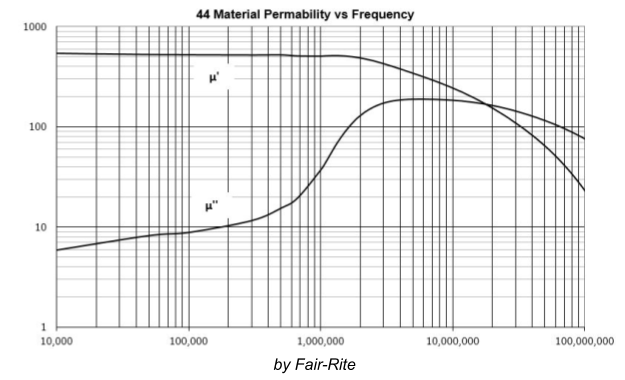
Enter one row per frequency on the Complex μ tab: Frequency in Hz, Real μ′ and Imaginary μ″ as a positive number. For each run frequency, TRAFOLO interpolates linearly between the rows and passes the reluctivity ν = 1/(μ0·μ) = (μ′ + j·μ″) / (μ0·(μ′2 + μ″2)) to the solver.
The core loss is part of the field solution: the loss density is p = π·f·μ0·μ″·Ĥ2 in W/m³, with Ĥ the peak field strength. The lossy core also shields the field, and the loss reaches the circuit: Rac Circuit (R AC source) and Q Factor on the Results tab include it. TRAFOLO does not use the Core Loss tab of a material with complex permeability.
Complex permeability is linear: no saturation, and the loss grows with B², while power ferrites follow Bn with n ≈ 2.5 to 3.5 (Steinmetz). Datasheet μ″ is measured at a small flux density, typically below 1 mT. Use it for small-signal parts such as EMI chokes and RF inductors. For power inductors and transformers at tens or hundreds of mT, use Relative Permeability or a B-H curve with Steinmetz core loss.
Harmonic and Inductance runs only: a Transient run with a complex-permeability material does not start. Outside the frequency range of the table, TRAFOLO extrapolates linearly from the two end rows, so keep every run frequency inside the table.
B-H curve
What the curve describes
With B-H Curve [T, A/m] (3), the permeability follows the flux density, so the model captures saturation. TRAFOLO uses a single-valued (anhysteretic) curve: B averaged over the upper and lower branches of the hysteresis loop, without coercivity and remanence. The table holds its H ≥ 0 half.
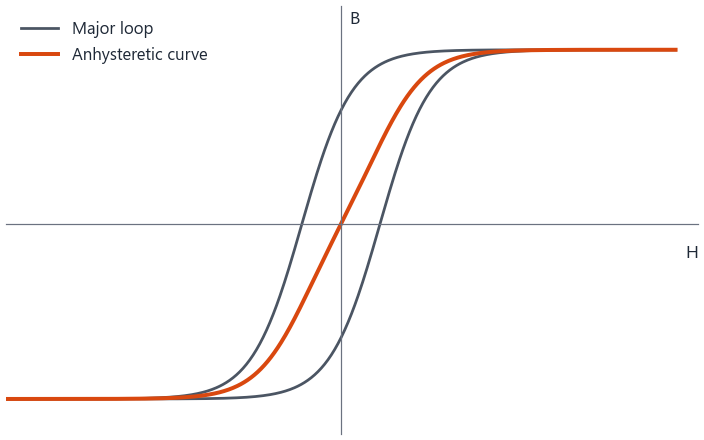
The curve stores no magnetic history, so the hysteresis loss does not follow from the field solution: TRAFOLO computes it after the solve with the core-loss model (see Core loss models). Hysteresis models such as the Jiles-Atherton model need far more complex methods in 3D.
A B-H curve makes the problem nonlinear: the solver iterates until permeability and field agree, so runs take longer. If a run does not converge, set Solver Preset to Slow or lower the Nonlinear Relaxation Factor on the Solve tab.
Importing, fixing and extending the curve
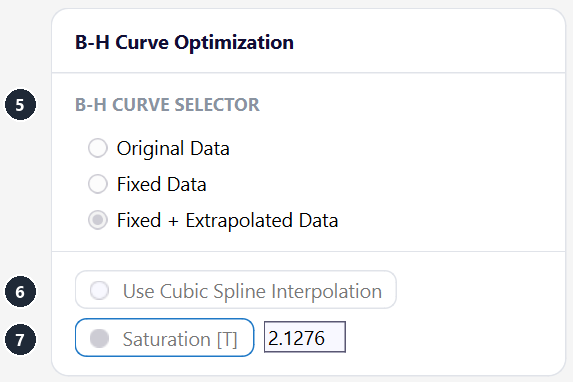
On the B-H tab, Import Table reads a text file with two columns, B in T and H in A/m (file format on Materials). Both columns must rise from row to row. Manufacturers often give no curve or only a few points, and measured points can contain outliers that stop the nonlinear solver from converging. B-H Curve Optimization cleans and extends the curve.
| Setting | What it does |
|---|---|
| B-H CURVE SELECTOR (5) | Original Data (default for a new material): the imported points. Fixed Data: outliers removed (rules below). Fixed + Extrapolated Data: the fixed curve continued to saturation. |
| Use Cubic Spline Interpolation (6) | Off (default): straight lines between the points. On: monotone cubic interpolation, which helps the nonlinear solver with sparse data. |
| Saturation [T] (7) | The saturation polarization Js = B − μ0·H that the extrapolated curve levels at. Unticked (default): TRAFOLO estimates Js from the end of the curve. |
Fixed Data removes:
- points where the curve stops rising (dB/dH ≤ 0);
- spikes: points whose segment is more than 10 times steeper than its two neighbouring segments together;
- the last point, when the last segment is steeper than the one before it.
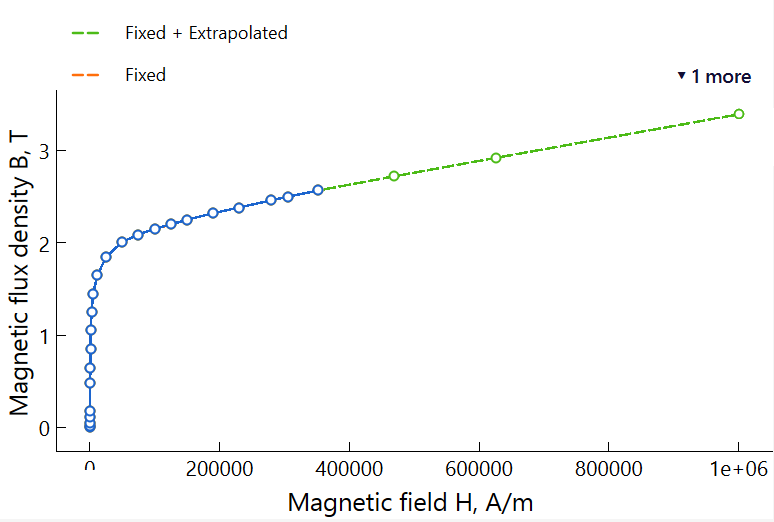
Fixed + Extrapolated Data continues the fixed curve: the polarization J = B − μ0·H approaches Js exponentially, the differential relative permeability falls to 1, and the table ends at H = 10⁶ A/m with the slope of vacuum. Without the extension, a field beyond the last point of the table continues the curve at its last slope and can give too high a flux density.
The B-H curve in each run type
| Run | How TRAFOLO uses the curve |
|---|---|
| Transient | At every time step. The run captures saturation and the flat-topped flux of a saturating core. |
| Harmonic | Only at the fundamental frequency, where the field is a sine whose amplitude follows the curve. Every other frequency of the run uses the permeability of the fundamental solution, element by element, and stays linear. |
| Inductance | At every point of the sweep, so an excitation sweep shows the inductance falling as the core saturates (see Inductance (frequency and excitation sweeps)). |
A harmonic run cannot show the non-sinusoidal flux of a saturating core. In the example (sinusoidal current, core driven into saturation), the transient run with the original curve (blue) clips the flux density at 0.31 T. The harmonic run with the same curve (green) gives a sine with about the same peak, so less flux at the fundamental and too low an inductance. A constant μ (orange) ignores saturation and reaches 1.04 T in both runs.
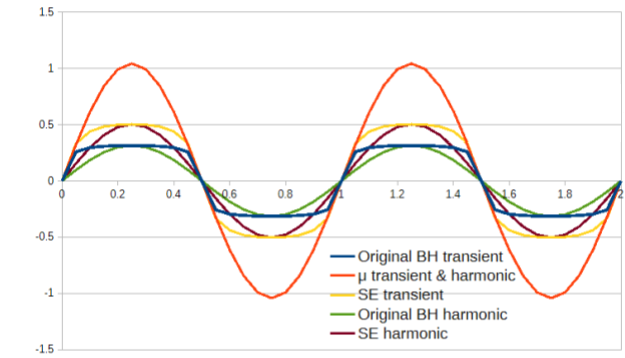
Use Transient when the core saturates or carries a DC bias. Harmonic runs with a B-H curve are good below the knee, where they capture how the permeability changes with the flux density.
Effective B-H curves for harmonic runs
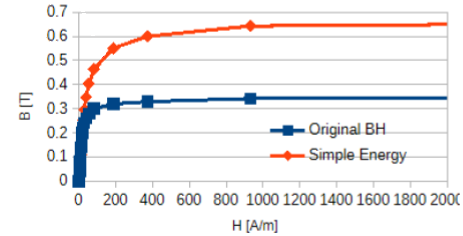
Some FEM tools replace the curve in harmonic runs with an effective curve that keeps the field energy of a transient solution, for example the Simple Energy curve BSE(H) = (2/H)·∫0H B(H′) dH′ (G. Paoli et al., Complex representation in nonlinear time harmonic eddy current problems, IEEE Transactions on Magnetics, 1998; overview in Model Magnetic Materials in the Frequency Domain with an App). TRAFOLO does not compute such curves. You can import one as an ordinary B-H table, with two limits:
- it raises B above the saturation flux density (0.65 T against 0.34 T in the picture), so Steinmetz core losses computed from it come out too high;
- it holds only in harmonic runs: in transient runs it overshoots (SE transient, yellow, in the chart above).
Laminated cores
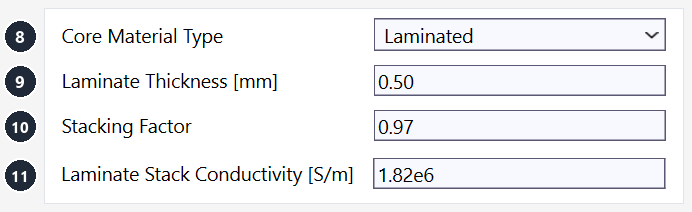
Electrical-steel cores are stacks of thin, insulated sheets. TRAFOLO models the stack as one homogeneous body: set Core Material Type (8) to Laminated and enter the sheet data.
| Setting | Values or unit | What it does |
|---|---|---|
| Core Material Type (8) | Ferrite (default), Laminated, Powder, Composite, Magnet | Laminated shows the three settings below and switches on the laminate model. |
| Laminate Thickness [mm] (9) | mm, above 0 | Sheet thickness d. |
| Stacking Factor (10) | 0 to 1, 1 (default) | Share of the stack cross-section filled with steel. |
| Laminate Stack Conductivity [S/m] (11) | S/m | Conductivity σ of the sheet material. The field takes the place of Electric Conductivity [S/m] @ 20°C (right column of the box), so the bulk core carries no eddy currents. It does not depend on temperature. |
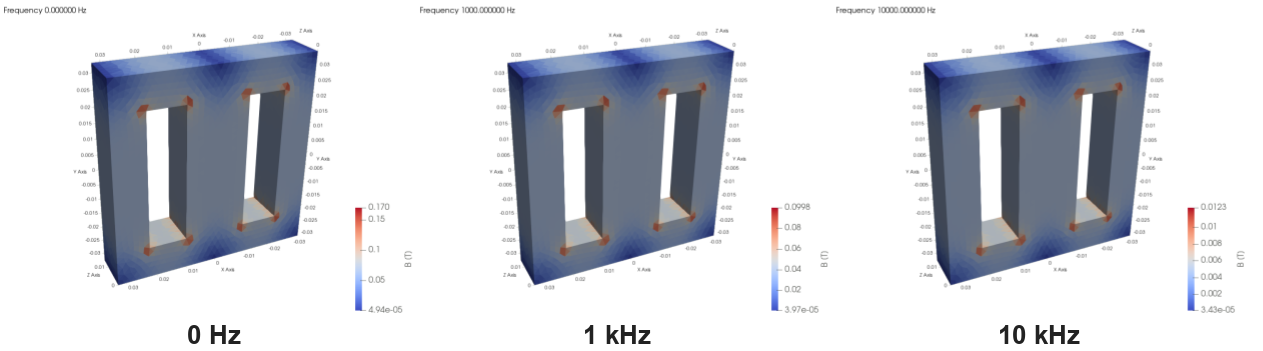
The sheet eddy currents enter through the low-frequency laminate model, in every run type: the field strength gets the term σ·d²/12·dB/dt, which reduces the flux inside the stack as the frequency rises. In the example below (0.48 mm sheets, σ = 2.7 MS/m), the highest flux density in the core falls from 0.170 T at 0 Hz to 0.100 T at 1 kHz (−41 %) and 0.012 T at 10 kHz (−93 %).
The low-frequency model holds while the sheets are thin compared with the skin depth δ = √(2/(ω·μ0·μr·σ)). Up to d = 2δ it stays within about 5 % of the classical lamination solution; for much thicker sheets or higher frequencies it overestimates the shielding (at d = 9δ it gives half the flux). Example: 0.5 mm steel with σ = 1.82 MS/m and μr = 2000 has δ = 1.18 mm at 50 Hz and 0.26 mm at 1 kHz, so d = 2δ at about 1.1 kHz.
With a Stacking Factor k below 1, TRAFOLO homogenizes the stack:
- B-H curve: B = k·Bsteel(H) + (1 − k)·μ0·H; constant and complex permeability: μ = k·μr + (1 − k);
- core loss: Kh × k−n and Ke × k−2, because the datasheet loss holds at the flux density in the steel, B/k;
- density k·ρ for the loss totals and the thermal mass, and laminate conductivity σ/k.
Background on the laminate model: journal article (Electromagnetics, 2016).
Core loss models
TRAFOLO computes the core loss in one of three ways, depending on the permeability model and the run type:
| Model | Runs | Material settings | How |
|---|---|---|---|
| Complex permeability | Harmonic, Inductance | Complex μ tab | From μ″ inside the field solution, at each frequency. |
| Steinmetz + Eddy | Harmonic, Inductance | Core Loss tab | After the solve, from the peak flux density in each element at each frequency; the losses of all frequencies are added. |
| GSE (default) or iGSE | Transient | Core Loss tab and Core Loss Model (4) | At every time step, from dB/dt in each element; averaged over the periods after Skip Periods From Averaged Losses on the Waveform tab. |
Steinmetz + Eddy (Harmonic and Inductance runs)
P = Kh·fm·Bn + Ke·(f·B)2
f is the frequency in Hz, B the peak flux density in T, and P the loss density in the Units of the Core Loss tab: W/kg, mW/cm3 or W/m3 (TRAFOLO converts with the Density of the material). Kh, m (frequency exponent) and n (flux-density exponent) describe the hysteresis loss, Ke·(f·B)² the eddy loss, which counts only when Ke is ticked on the Core Loss tab.
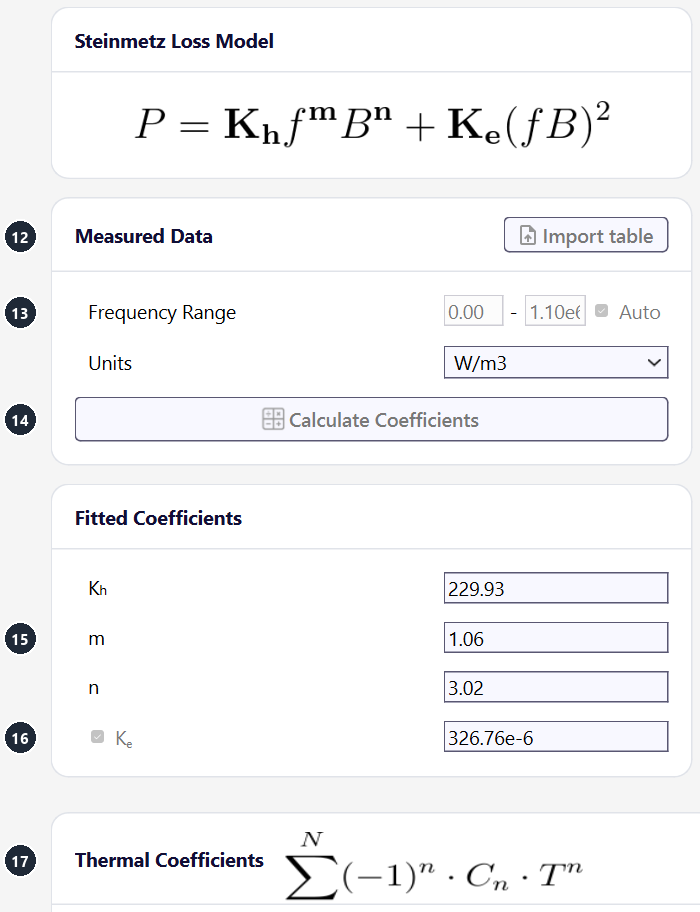
Example with the coefficients of Ferroxcube 3F3 100C in the Core Loss tab picture below (W/m3), at 100 kHz and 0.1 T: 229.93 × (10⁵)1.06 × 0.13.02 = 43.8 kW/m³ hysteresis loss, plus 326.76 × 10⁻⁶ × (10⁴)2 = 32.7 kW/m³ eddy loss: 76.5 kW/m³ in total.
Adding the losses of separate frequencies is an approximation: core loss is nonlinear in B, and a DC bias in the core is not captured. When the core loss matters and the waveform is far from a sine, check it with a Transient run (Transient Waveforms & Simulations).
GSE and iGSE (Transient runs)
Transient runs evaluate the loss at every time step from the flux density waveform B(t) of each element, with the same Kh, m and n. For a sinusoidal flux both reduce to the Steinmetz law above. Choose the formula with Core Loss Model (4) on the General tab:
- GSE (default): P = (1/T)·∫0T ki·|dB/dt|m·|B(t)|n−m dt, with ki = Kh / ((2π)m−1·∫02π |cos θ|m·|sin θ|n−m dθ)
- iGSE: P = (1/T)·∫0T ki·|dB/dt|m·(ΔB)n−m dt, with ki = Kh / ((2π)m−1·2n−m·∫02π |cos θ|m dθ)
T is the period and ΔB the peak-to-peak flux density over it. The iGSE takes the flux swing ΔB instead of the instantaneous |B|, which suits non-sinusoidal flux such as the triangular and trapezoidal waveforms of PWM converters. Neither model captures a DC bias or the relaxation loss after a switching edge.
All core materials that the bodies use must have the same Core Loss Model: with mixed models the run does not start. The GSE integral needs n − m > −1: with Auto on, TRAFOLO keeps m − n ≤ 0.99 for Transient runs.
Core Loss tab
The coefficients come from a measured loss table, P against B at several frequencies, usually from the manufacturer (file format on Materials).
| Setting | What it does |
|---|---|
| Import table (12) | Reads the loss table. Units sets W/kg, mW/cm3 or W/m3. |
| Frequency Range, Auto (13) | Auto on (library materials with a loss table): TRAFOLO refits Kh, m, n (and Ke when ticked) to the whole table for every run; in Harmonic and Inductance runs around each run frequency (nearer frequencies weigh more), in Transient runs over all frequencies. The coefficients shown are then the first fit and are read-only; Frequency Range and Calculate Coefficients are off. Auto off: the coefficients shown are used as they are, and Frequency Range limits the frequencies that Calculate Coefficients fits. |
| Calculate Coefficients (14) | Fits the coefficients to the table, minimizing the relative error. A single fit over a wide frequency range is poor at its ends: fit the range your design runs in, or leave Auto on. |
| Kh, m, n (15) | Hysteresis coefficient, frequency exponent (fitted within 1 to 2.5) and flux-density exponent (fitted within 1 to 4). |
| Ke (16) | Eddy coefficient. Ticked: the eddy term is part of the fit and of the loss. |
| Thermal Coefficients, New Coefficient (17) | A factor on the loss density: C0 − C1·T + C2·T2 − … = Σ(−1)n·Cn·Tn, with T the core temperature in °C. Empty (default): no temperature dependence. Fit the Cn so that the factor is 1 at the temperature of the loss table. |
The core temperature for the thermal factor is the Predicted Steady-State Temperature on the Heat tab in the first pass. With Temperature Iterations 2 or 3 on the Setup tab, it is the temperature field of the previous pass. Some library materials, for example Ferroxcube 3C95 100C and 3C97 100C, have no thermal coefficients: their loss is the 100 °C loss at any temperature.
With an Electric Conductivity above 0, a solid (not laminated) core also gets eddy-current loss in the bulk from the field solution, on top of the Steinmetz loss. Which value to enter for ferrite and powder cores: see the eddy-loss note on Materials.
Air gaps: physical and virtual
A gap a few tens of µm thick between two core halves needs very small elements, which makes the mesh large and the run slow. Gap Type on the Core tab chooses how TRAFOLO models the gaps of a core group:
| Gap Type | Model | Use for |
|---|---|---|
| None (default) | No gap: one continuous core. | One-piece cores without a cut, such as a toroid. |
| Physical | The gap is a body of its own, with the gap material, and is meshed. The mesh resolves the field in the gap and the fringing field around it. | Gaps that set the inductance, and windings close to a gap, where the fringing field drives the winding loss. |
| Virtual | Every face where two core pieces of the group meet becomes a thin-layer boundary with the thickness Virtual Gap (µm) and relative permeability 1. Nothing is meshed inside the gap. | Small and parasitic gaps where core pieces meet; most shipped templates with a virtual gap use 10 to 50 µm. |
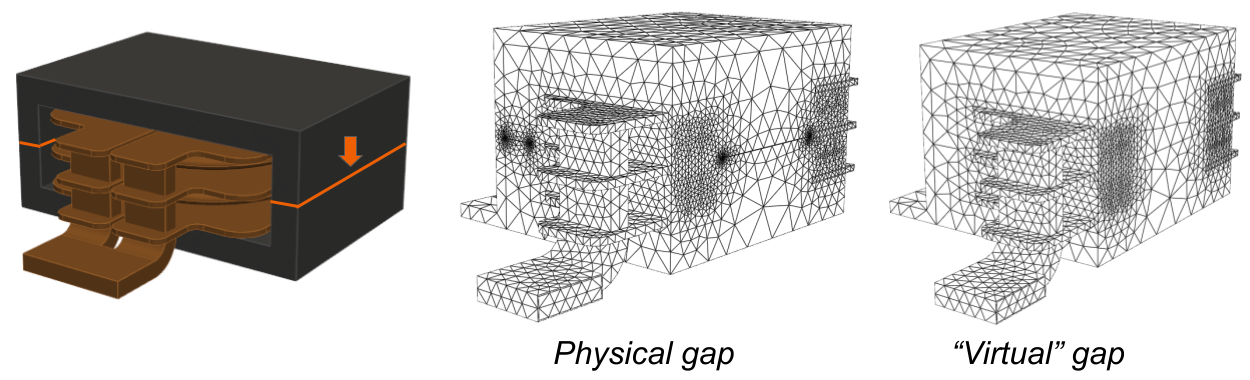
The reluctance of a virtual gap is part of the field solution, so Circuit Inductance includes it. Settings, the gap table of physical gaps and the cut for imported cores: Core.
Permanent magnets
TRAFOLO models a permanent magnet as a linear magnet: a core body with a constant magnetization and its recoil permeability. Demagnetization and other nonlinear effects are not modelled.
-
On the Setup tab, with Harmonic selected, tick Magnets (18). Inductance runs do not offer it.
Magnets option on the Setup tab. -
On the Materials tab, add a core material with Core Material Type Magnet (19).
- Set Relative Permeability to the recoil permeability μrec of the magnet, for example 1.05 for sintered NdFeB.
-
Set Coercivity (Magnetization) [A/m] (20) to the coercivity HcB of the magnet. For a linear magnet, HcB = Br / (μ0·μrec): Br = 1.2 T and μrec = 1.05 give 909 kA/m. The value must be above 0.
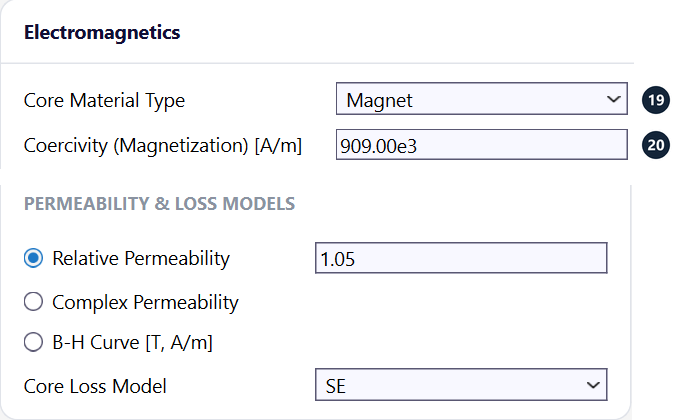
Magnet material on the General tab: Core Material Type Magnet, coercivity 909 kA/m, relative permeability 1.05. -
Make the magnet a body of a core group and give it the magnet material on the Assembly tab. TRAFOLO magnetizes only Magnet bodies of core groups.
- On the Core tab, open the group with Configure and set Direction of Magnetization (21) as a vector x; y; z: 0; 1; 0 (default), the +y direction. TRAFOLO scales it to unit length.
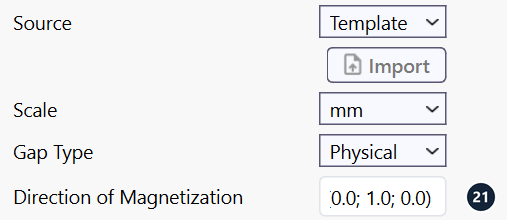
TRAFOLO applies the magnetization M = HcB along that direction to every Magnet body of the group.
A Harmonic run applies the magnetization at every frequency of the run, so the magnet field oscillates at that frequency. The result is right only at 0 Hz; at every other frequency the run adds a magnet field that does not exist. In TRAFOLO 1.64, a Transient run with Magnets ticked stops while TRAFOLO writes the simulation files.
Further reading
- Fixing B-H Curve in FEM Simulations (LinkedIn)
- Materials: every setting of the material form and the file formats
- Material library: the materials that come with TRAFOLO
- Core: gap types and core group settings