Homogenization of Litz and Stranded Windings
Homogenization lets you compute the skin and proximity loss of litz and stranded windings from the local 3D field, without meshing the individual strands.
You switch it on per coil group, in Configure Wire on the Coil tab. The examples come from two shipped templates: Modelling Litz Wire using Homogenization (example Homogenization in TRAFOLO), a PQ65/60 reactor with a 4 mm gap and two litz wires of 10 turns in parallel (7 strands of 0.32 mm each), and the primary of the Flyback Transformer.
How homogenization works
For each coil group, TRAFOLO builds a 2D model of the strand bundle: a central round strand and its neighbours, spaced so that copper fills the Fill Factor share of the area. It solves this model at every simulation frequency and turns the response into an equivalent material: a complex reluctivity across the wire and a complex conductivity along it, six real parameters in all. The 3D solve treats each wire as a solid of this material, so the 3D mesh needs no elements inside the strands or across the skin depth.
The method assumes ideally twisted strands: all strands of one wire carry the same current. Wires that you model as separate coil groups and connect in parallel get their own currents from the circuit, so the current split between them is computed.
When to use it
Configure Wire offers three methods under RAC COMPUTATIONAL METHODS. A new coil group starts with Rac/Rdc coefficient.
| Method | How TRAFOLO computes the winding loss | Use it for |
|---|---|---|
| Rac/Rdc coefficient | DC loss × Proximity Factor, one value for all frequencies; 1 (default) gives the DC loss only. | DC and low-frequency windings, or an Rac/Rdc you know from measurement. |
| Dowell's Equation | Rac/Rdc from Dowell's one-dimensional formula, from Strand Type, Strand Thickness, Number of Layers and Fill Factor: per frequency in Harmonic and Inductance runs, weighted over the waveform harmonics in Transient runs. | Layered windings in a uniform field parallel to the layers. It does not see fringing fields. |
| Homogenization | Skin and proximity loss of the strands from the local 3D field, inside the solve. | Litz and stranded windings near air gaps, in any non-uniform field, and wires in parallel. |
Requirements and limits
| Item | Condition |
|---|---|
| Wire Type | Stranded & Litz only. Foil and Flat wire offer only Rac/Rdc coefficient, without a Proximity Factor: their sheet model computes the eddy-current loss itself. Massive (solid) resolves eddy currents in the 3D mesh and has no methods to choose. |
| Simulation type | Harmonic, Inductance or Transient. With ELECTROMAGNETICS Off, Homogenization cannot be selected. |
| Circuits | Without Circuits, and the High Frequency Mode preset that switches it on, make every coil Massive (solid): homogenization is then not available. |
| Strands | Round. Strand Type in the Fill Factor Calculator changes only the computed Fill Factor; the 2D model always uses round strands. |
| Closed coil | Supported in Harmonic and Inductance runs. Transient runs need open coils. |
| 2D mesh | One per coil group, made with Generate Mesh. Copy on the Coil tab copies it with the group. |
Model the winding geometry
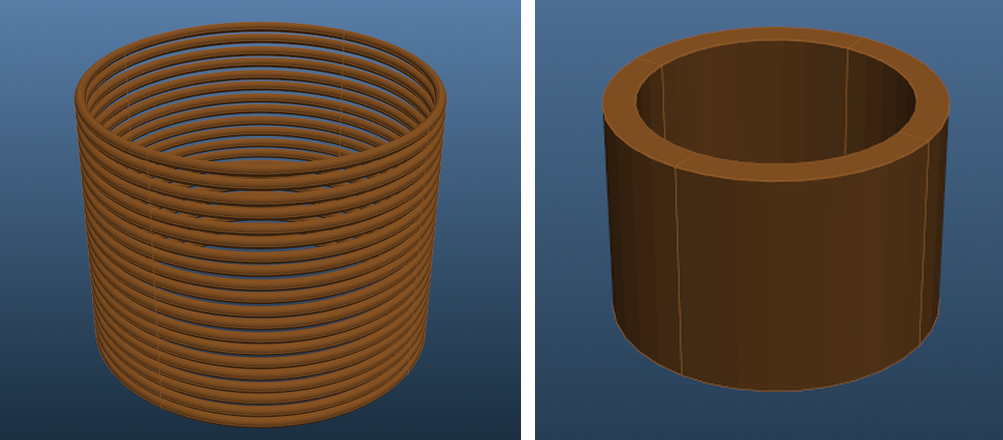
Draw a litz winding either with one body per turn or with several turns in one body, and set Turns per solid to the number of turns in each body.
| One body per turn | Several turns in one body | |
|---|---|---|
| Turns per solid | 1 | The turns in the body, for example 24 |
| Geometry Builder type | Massive: separate turns (not the Massive (solid) wire type) | Filled: one block |
| What you see | The loss of each turn, for example the turns next to a gap | The loss density across the block, with a smaller mesh |
| Template | Modelling Litz Wire using Homogenization: 7 strands of 0.32 mm in a round body of 1 mm diameter (0.785 mm²) | Flyback Transformer primary: 24 turns of 45 strands of 0.05 mm in one body of 8.8 mm² |
| Fill Factor | 0.7168 | 0.241 |
Fill Factor is the copper share of the cross-section A of one body: Fill Factor = Turns per solid × Nstrands × π·d²/4 ÷ A, with d the strand diameter. For the template: 1 × 7 × π·(0.32 mm)²/4 ÷ 0.785 mm² = 0.7168. The Fill Factor Calculator computes it for you.
For wires in parallel, model each wire as its own coil group, assign all of them to the same winding on the ElMag tab and set Coil group connection type to Parallel. The template does this with Group1coil and Group2coil.
Set up homogenization for a coil group
-
On Setup, under ELECTROMAGNETICS, select Harmonic, Transient or Inductance (1).

ELECTROMAGNETICS on Setup: Inductance selected (1), as in the Homogenization template. -
On Coil, click Configure next to the coil group. The group opens in its own tab.
- Check that Wire Type is Stranded & Litz, the default for a new group, and set Turns per solid (2).
-
Click Configure Wire (3). A tab with the group name and _2D opens, for example Group1coil_2D.
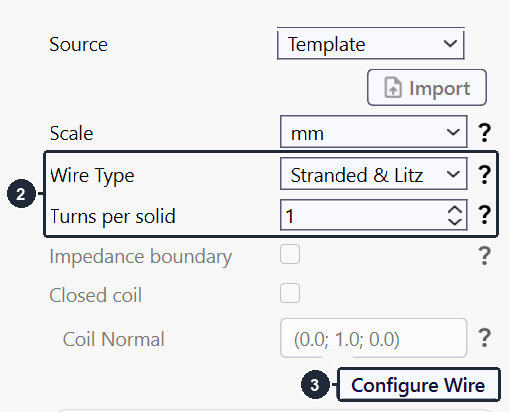
Group1coil of the Homogenization template: Wire Type and Turns per solid (2), Configure Wire (3). -
Under RAC COMPUTATIONAL METHODS, select Homogenization (4).
-
Set Packing, Strand Thickness and Max Frequency (5). See the settings table below.
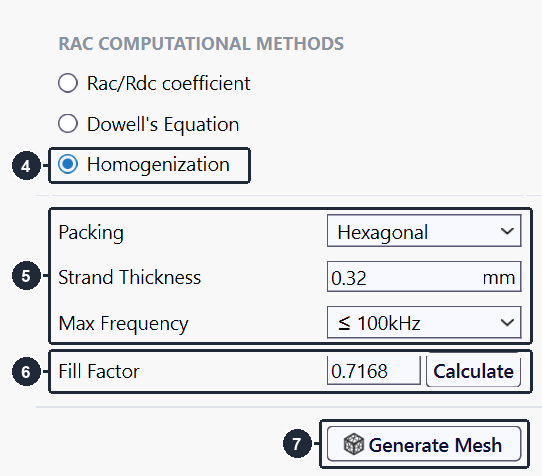
Group1coil_2D: Homogenization (4), Packing, Strand Thickness and Max Frequency (5), Fill Factor (6), Generate Mesh (7). -
Enter Fill Factor, or click Calculate (6). In the Fill Factor Calculator, set Strand Type, Strand thickness and N strands, then click Accept.
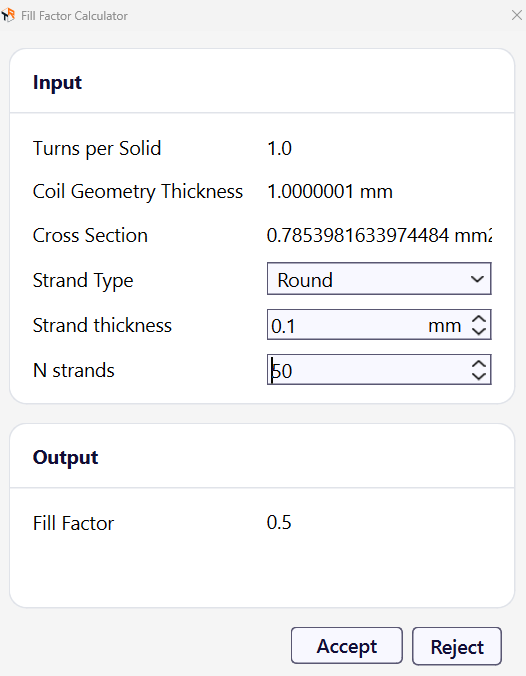
Fill Factor Calculator: 50 strands of 0.1 mm in a 0.785 mm² body give 0.5 (Transformer with Inductor template). -
Click Generate Mesh (7). The 2D model of the strand bundle appears on the right of the tab.
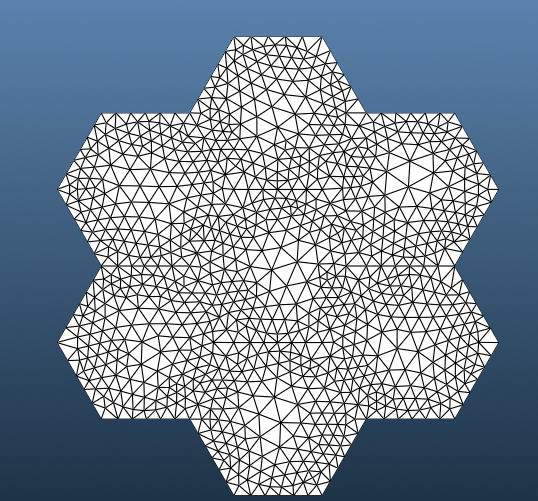
The 2D model after Generate Mesh: a central strand and 6 neighbours, each in a hexagonal cell (Packing Hexagonal). -
Repeat steps 2 to 8 for every coil group that uses homogenization. A group made with Copy takes the settings and the 2D mesh of the original.
TRAFOLO only checks that a 2D mesh exists. After you change Packing, Strand Thickness, Max Frequency or Fill Factor, click Generate Mesh again, or the run uses the old strand model.
Settings
| Setting | Values | What it sets |
|---|---|---|
| Packing | Hexagonal (default), Rectangular | Arrangement of the strands in the 2D model: a central strand with 6 neighbours in hexagonal cells, or with 8 neighbours in a square grid. The highest possible Fill Factor is 0.907 (Hexagonal) or 0.785 (Rectangular). |
| Strand Thickness | mm | Diameter of one strand. A new group starts at the minimum, 0.0001 mm: always enter it. |
| Max Frequency | ≤ 100Hz (default), ≤ 1kHz, ≤ 10kHz, ≤ 100kHz, ≤ 1MHz, ≤ 10MHz | Element size of the 2D mesh: about 1/8 of the skin depth in copper at that frequency. It does not limit the simulation frequencies. |
| Fill Factor | 0 to 1, 1 (default) | Copper share of the body cross-section. It sets the strand spacing in the 2D model and the DC resistance. Calculate opens the Fill Factor Calculator. |
Above the highest Fill Factor of the Packing, for example at the default 1, Generate Mesh fails: the strands cannot fill the whole cell. Enter the real Fill Factor before you click Generate Mesh.
Choose Max Frequency around the highest frequency that carries significant current: the top of a frequency sweep, or the highest significant harmonic of a transient waveform. TRAFOLO still solves the 2D model at every simulation frequency, also above Max Frequency. There the 2D mesh is coarser relative to the skin depth, a small error while the strands are much thinner than the skin depth. The Homogenization template keeps ≤ 100kHz for its sweep to 120 kHz.
Skin depth and 2D element size for each Max Frequency
TRAFOLO sizes the 2D mesh with the conductivity of copper, 6·107 S/m: element size = δ/(6√2) ≈ δ/8.5, with the skin depth δ = 1/√(π·f·µ0·σ).
| Max Frequency | Skin depth δ | 2D element size |
|---|---|---|
| ≤ 100Hz | 6.5 mm | 0.77 mm |
| ≤ 1kHz | 2.1 mm | 0.24 mm |
| ≤ 10kHz | 0.65 mm | 0.077 mm |
| ≤ 100kHz | 0.21 mm | 0.024 mm |
| ≤ 1MHz | 0.065 mm | 0.0077 mm |
| ≤ 10MHz | 0.021 mm | 0.0024 mm |
The 2D model uses the conductivity of the coil material at the temperature on the Heat tab: Steady-State Temperature with HEAT TRANSFER Off, Predicted Steady-State Temperature with Steady-state heat transfer, 20 °C (default). Enter the expected winding temperature there. With Temperature Iterations above 1, only the conductivity along the wire follows the computed temperature; the proximity loss of the strand model stays at the entered temperature.
All Configure Wire fields, also those of the other two methods: Coil (Interface Reference Manual), section Configure Wire.
Transient runs
Homogenization also works in Transient runs, for open coils only. TRAFOLO solves the 2D model at DC, at the odd harmonics 1 to 13 of the fundamental and at the waveform harmonics set by Number of harmonics (Waveform tab, Discrete Fourier Transform). It fits a first-order frequency model to these results and applies it at every time step. When the fit deviates from the 2D results by more than 5 %, TRAFOLO logs a warning that names the coil group.
The Flyback Transformer template uses Max Frequency ≤ 1MHz with a 150 kHz fundamental: the harmonics above 1 MHz, up to the 13th at 1.95 MHz, carry 6 % of the primary current's I². Waveforms, harmonics and time steps: Transient Waveforms & Simulations.
Results
A homogenized winding needs no extra result setting: the skin and proximity loss of its strands is part of the winding loss in every results view.
| View | What to read |
|---|---|
| Summary | Primary Loss and Total Coil Loss per frequency; average losses in Transient runs. |
| Inductance (Inductance runs) | Rdc; Rac Loss = winding loss / Irms², the winding resistance with skin and proximity loss; Rac Circuit = Re(V/I); Q Factor = X / Rac Circuit. One value per frequency. |
| Component Values | Rdc, Rac Circuit, X, Urms and Irms of each winding, coil group and turn; Value picks the frequency. With wires in parallel, Irms shows the current split. |
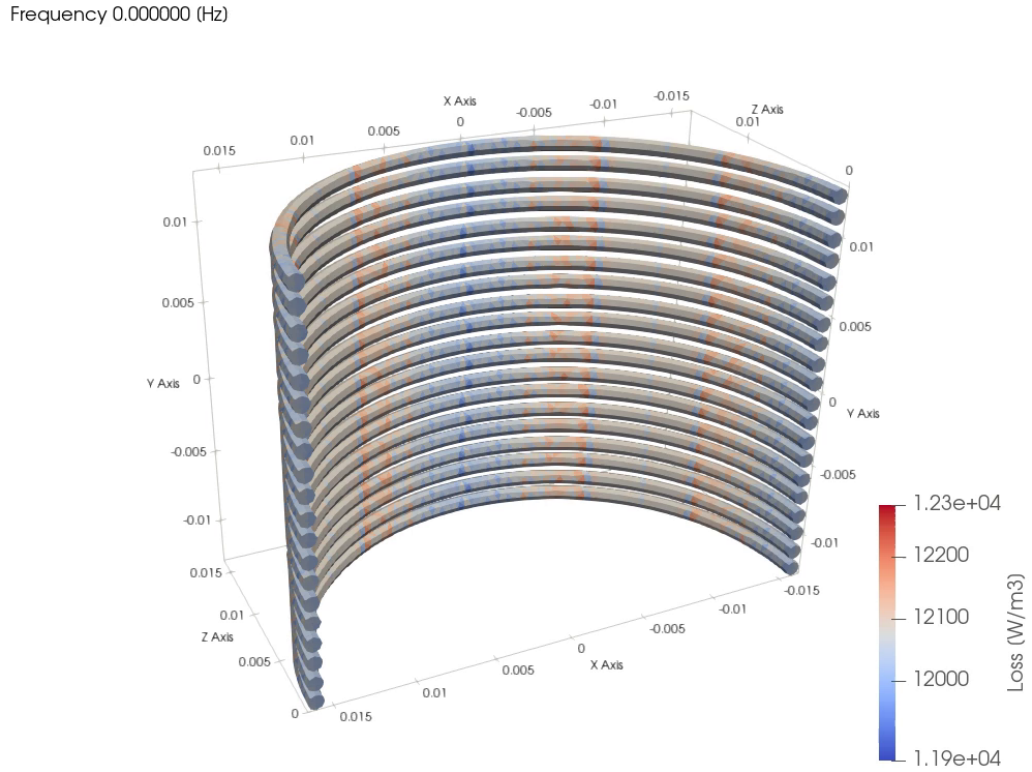
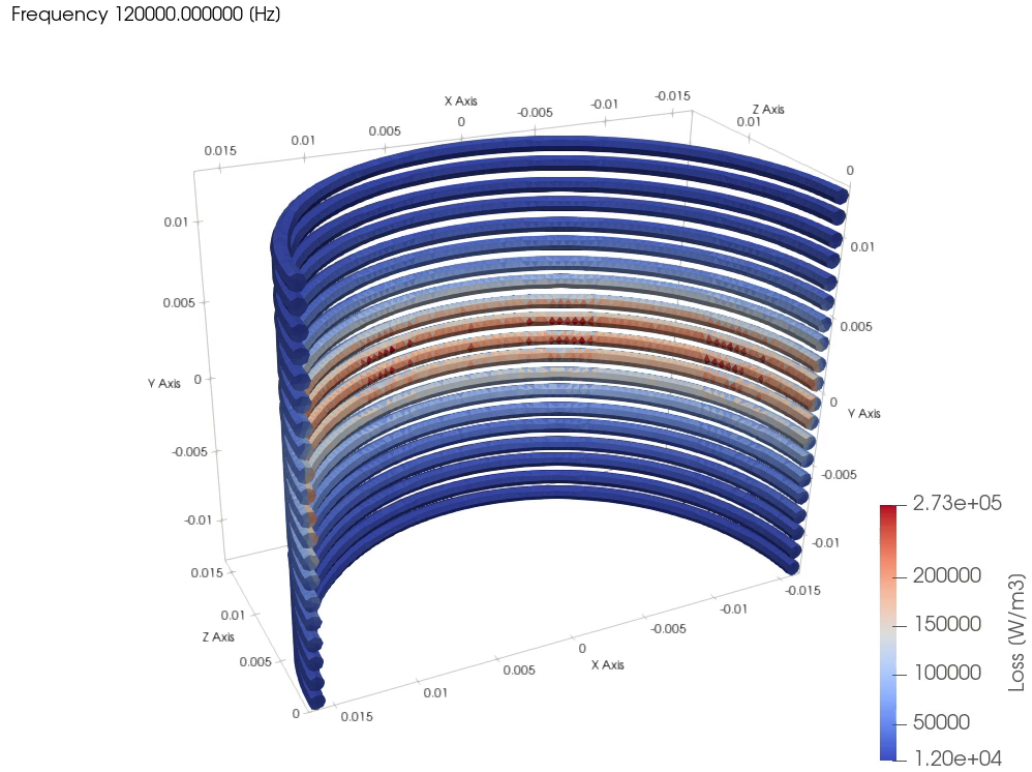
| Coil Losses | Loss density in the winding: where the proximity loss sits. |
Definitions of all values: Results. In the Homogenization template at 1 A RMS, Total Coil Loss rises from 17.3 mW at DC to 24.1 mW at 40 kHz. The winding resistance rises from Rdc = 17.3 mΩ to an Rac Loss of 58.3 mΩ at 100 kHz (3.4 times) and 75.4 mΩ at 120 kHz (4.4 times).
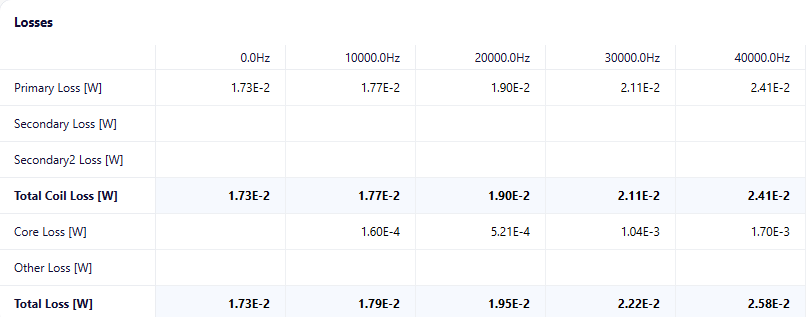
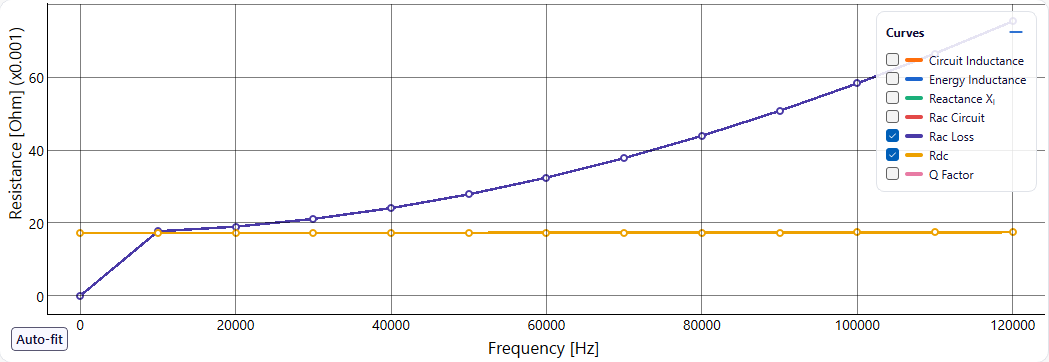
At DC the current spreads evenly over all strands, so every turn has the same loss density. At 120 kHz the fringing field of the 4 mm gap adds proximity loss, highest in the turns next to the gap.
Check the result
- Measurement: in the Homogenization template, Rac Loss stays within 12 % of the measured AC resistance from DC to 100 kHz. Table and plot: Modelling Litz Wire using Homogenization, section Validation.
- 2D mesh: set Max Frequency one step higher, click Generate Mesh and run again. Rac Loss should barely change.
- 3D mesh: it need not resolve the strands or the skin depth. The Homogenization template runs with Mesh Refinement Coarse.
Troubleshooting
| Symptom | Cause and fix |
|---|---|
| Solve shows: Litz coil Group1coil uses Homogenization, but its wire mesh hasn't been generated. In the Coil tab, open Group1coil > Configure Wire and click Generate Mesh. | The group has no 2D model: Generate Mesh was not clicked for it, or it failed. Open the group, click Configure Wire, then Generate Mesh. |
| Solve shows: A homogenized Litz coil is closed, and transient homogenization doesn't support closed coils. Use an open coil, or pick another RAC method for it in Configure Wire. | Transient runs need open coils. Clear Closed coil and give the coil terminals, or choose another method. |
| Generate Mesh fails. | Fill Factor is above 0.907 (Hexagonal) or 0.785 (Rectangular), for example the default 1. Enter the real value or use Calculate. |
| Homogenization cannot be selected. | ELECTROMAGNETICS is Off, Wire Type is not Stranded & Litz, or Without Circuits (High Frequency Mode) is on. |
| Results do not change after a new strand setting. | The run used the old 2D model. Click Generate Mesh again. |
Further reading
- Modelling Litz Wire using Homogenization: the full set-up of the example, its results and the comparison with measurement.
- Coil: every field of the coil group and of Configure Wire.
- HOMOGENIZATION. Hands-on modeling of litz in 3D FEM #9 (TRAFOLO on LinkedIn)
- Dowell equation, homogenization, and the role of academia in solving our engineering problems #5 (TRAFOLO on LinkedIn)